MULTI-EVENT PLANNER
Plan every ceremony, not just the wedding
Mehndi, sangeet, haldi, then the ceremony and reception — each with its own guest list, RSVPs, seating, vendors, and tasks. One workspace that knows a desi wedding is six events, not one.
Free during early access. No credit card.
- Per event
- Guests, RSVP, seating, vendors
- One guest
- An independent answer for each ceremony
- Built for desi
- Mehndi to reception, out of the box
WHY ONE-EVENT TOOLS FAIL
Six ceremonies. One wedding. One workspace.
The guest matrix is real
Aunty is mehndi-only. Your cousins come to everything. Your in-laws fly in for the ceremony and reception but skip the haldi. The Knot, Zola, and Joy assume one guest list with one yes-or-no. A desi wedding has overlapping guest lists per ceremony, and a tool that flattens them into a single row gets your meal counts wrong.
Vendors split across events
Your photographer covers all six ceremonies. The mehndi artist works the henna night only. Panditji handles the haldi and the pheras. The DJ runs the sangeet and the reception. A flat vendor list with no idea which event a vendor serves leaves your day-of coordinator guessing who is meant to be where.
Tasks belong to a ceremony
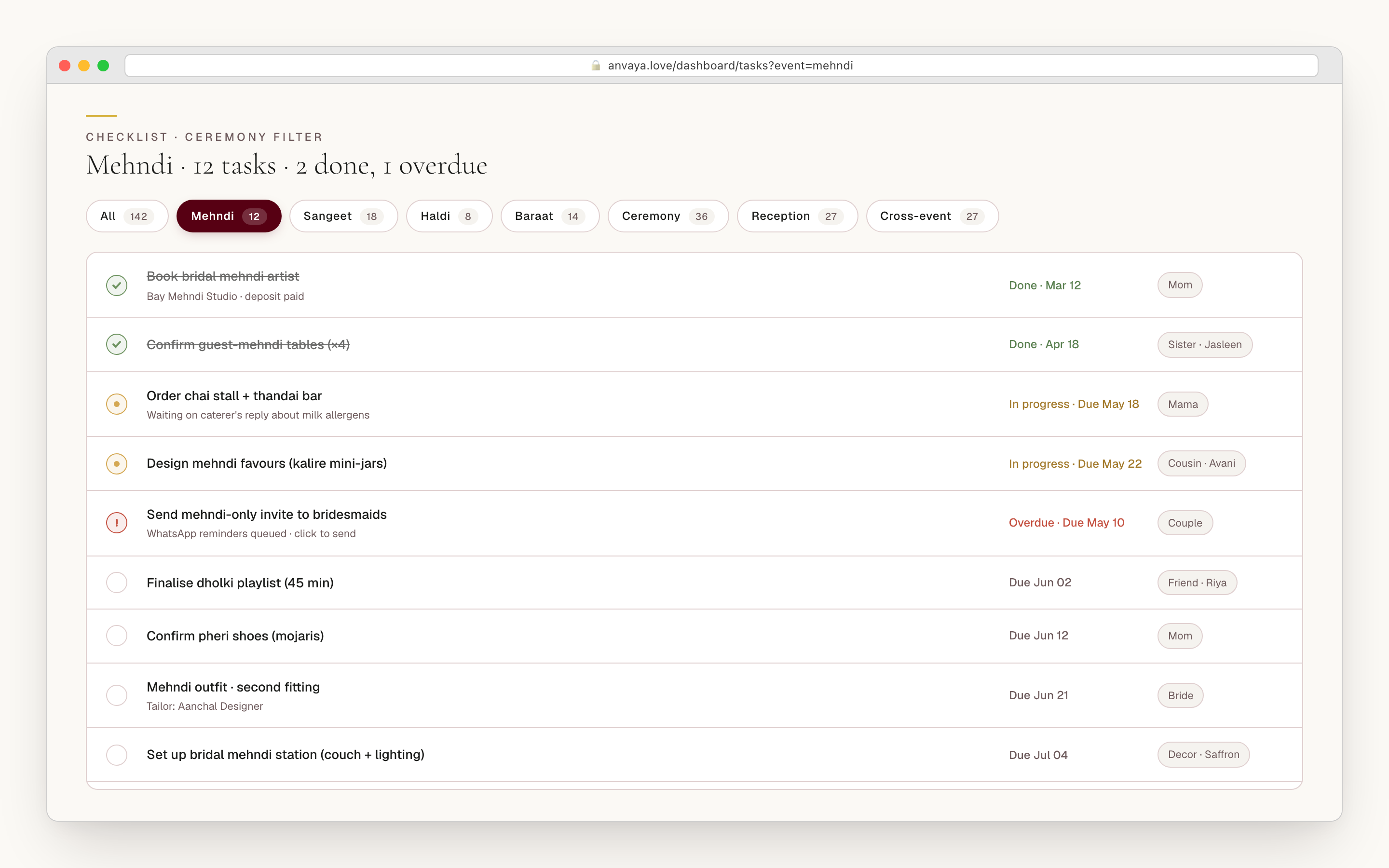
"Book the mehndi artist" belongs to the mehndi. "Confirm the baraat horse" belongs to the baraat. "Print reception menu cards" belongs to the reception. Generic tools dump every task into one bucket and make you invent prefixes (M-book, R-print) to cope. Anvaya lets you assign a task to the ceremony it serves.
Timing follows the sun
The haldi is at sunrise. The pheras start at the muhurat panditji issued. The sangeet kicks off after sunset so the diaspora can land from work. A calendar app with no idea when the sun rises at your venue is guessing. Anvaya computes sunrise and sunset at each venue so morning rituals and evening events are anchored to real daylight.
Every ceremony is its own plan.
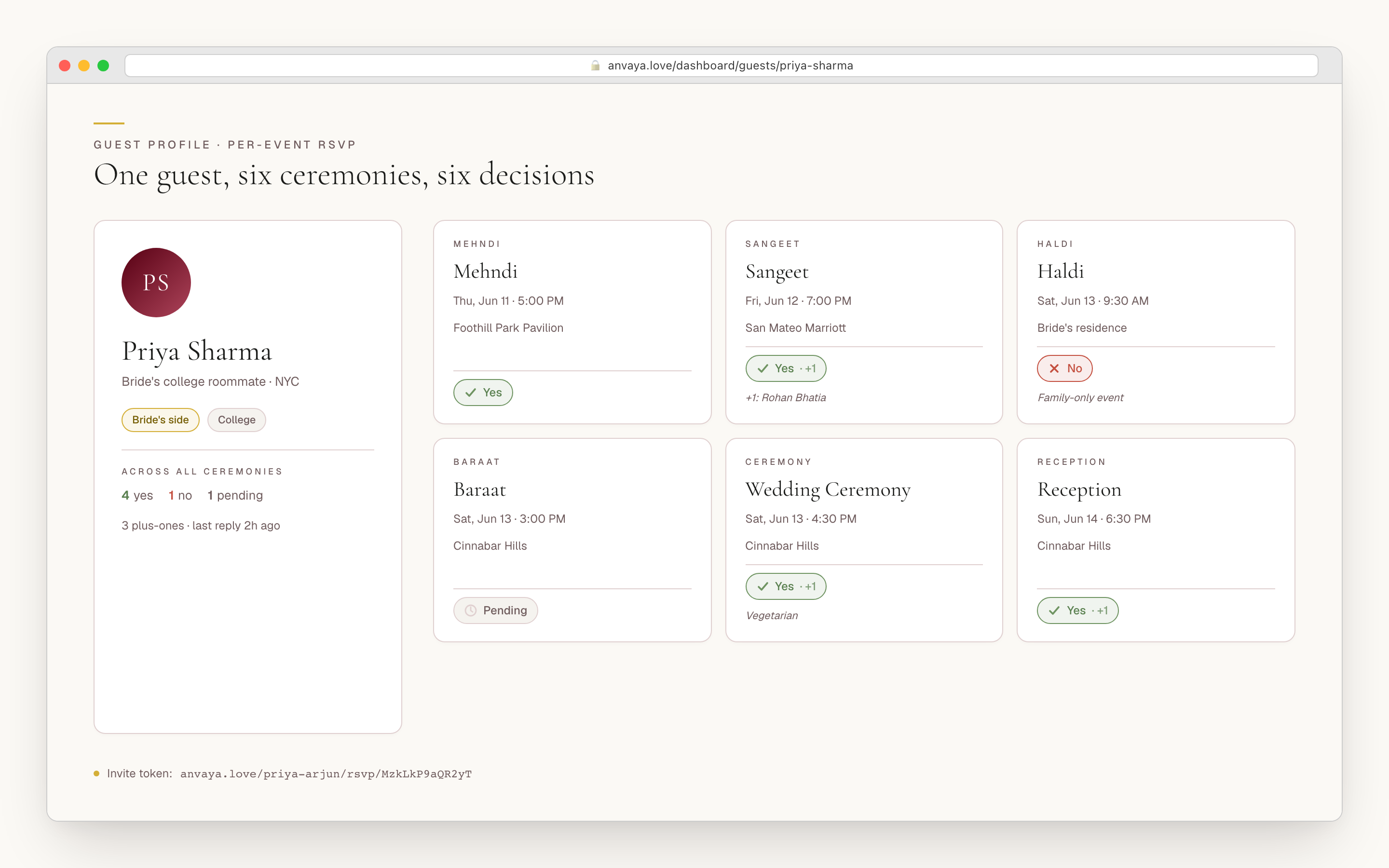
Anvaya treats each ceremony as a first-class event with its own date, start time, duration, venue, dress code, and colour palette — not a row buried under a single wedding date. Drop in the mehndi at the courtyard pavilion on Thursday night, the sangeet at the ballroom on Friday, the haldi at the bride's family home Saturday morning, the ceremony under the mandap, and the reception on Sunday evening. Each event carries its own guest set, its own tasks, its own vendor roster, and its own seating canvas.
The events hub shows the whole wedding week in one editorial agenda — dates, venues, dress codes, and the sunrise and sunset computed for each venue. Open any ceremony and the workspace narrows to that one event: its guests, its tasks, its vendors. No more mentally filtering one giant spreadsheet to find what the haldi still needs.
Anvaya ships twelve ceremony templates a diaspora wedding actually runs — mehndi, sangeet, haldi, the baraat, a welcome party, the wedding ceremony, the reception, plus the nikah, the walima, the Anand Karaj, a church ceremony, and the chuppah & ketubah — and lets you add or rename events for anything they don't cover: the pheras, a garba, a Tamil muhurtham. Pick the events your family runs and name them in your own vocabulary.
- Each ceremony is its own event — date, time, venue, dress code, and dress-code colours
- Twelve built-in events: mehndi, sangeet, haldi, baraat, welcome party, wedding, reception, nikah, walima, Anand Karaj, church, chuppah
- Add and rename events for the pheras, a garba, a muhurtham, or any regional ritual
- Sunrise and sunset computed per venue, shown right on the week grid
- Open one ceremony and the whole workspace filters to it
PER-EVENT GUEST LISTS
One guest. Six events. Six different answers.
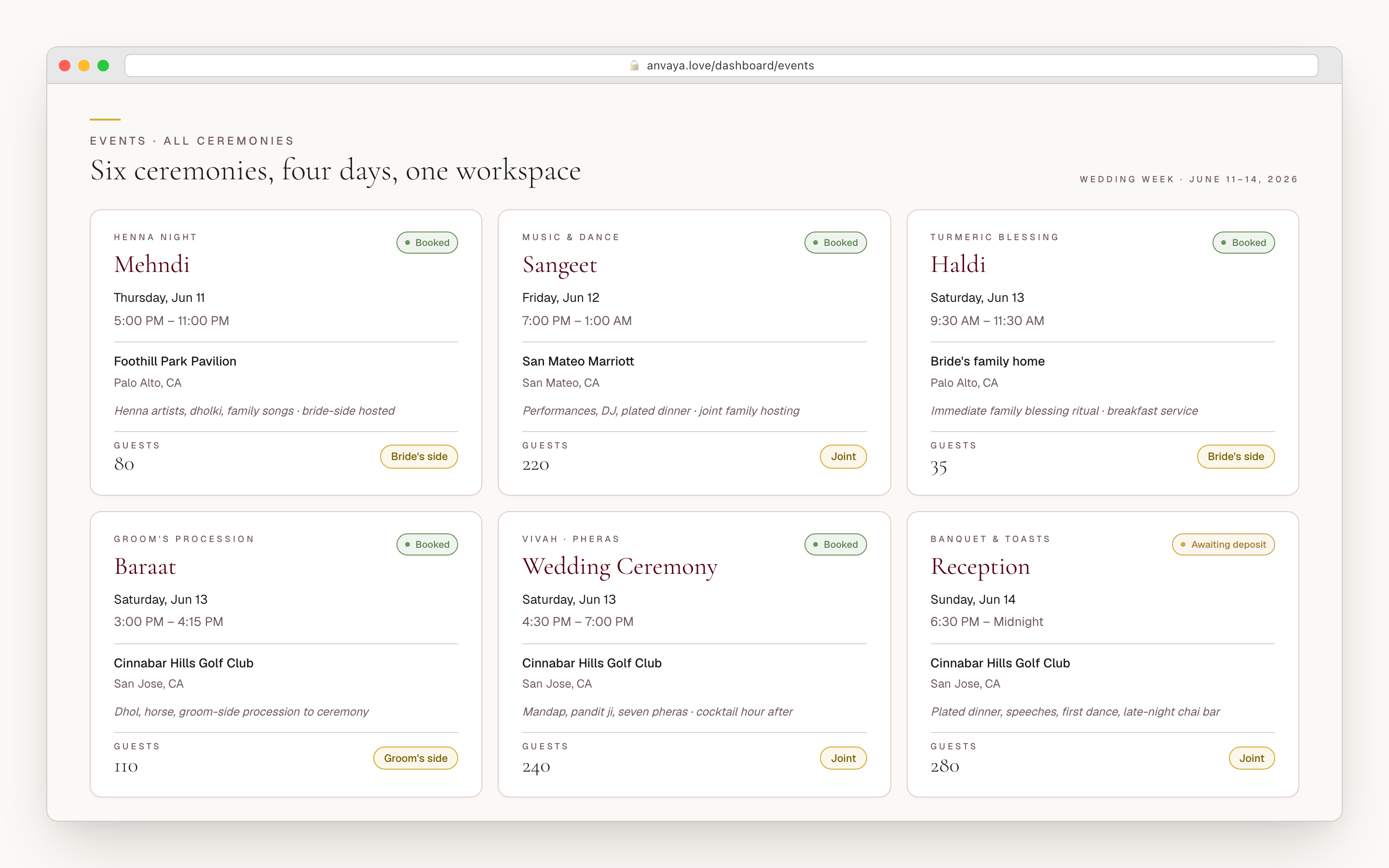
This is the data model the whole product is built around: one guest record with an independent RSVP for every ceremony. Divya Menon — the bride's Villanova roommate flying in from New York — says no to the gaye holud (close-family only), yes plus-one to the sangeet, yes to the church ceremony, pending the biye while she sorts her flight, and yes plus-one to the reception with a vegetarian note. Six answers, one guest, surfaced across six dashboards. The tool that asked her once whether she was "coming to the wedding" got it wrong six different ways.
Every guest sees only the ceremonies on their invitation. The close-family gaye holud shows up for the bride's sister but not the work crowd. The sangeet shows for close friends but not the ceremony-and-reception relatives flying in from overseas. Each invite link opens a clean page with the right events and nothing else. Plus-ones are declared per event — a cousin brings her partner to the sangeet, the whole family to the reception, and skips the gaye holud entirely.
The aggregated counts answer the questions vendors actually ask. The caterer wants the gaye holud lunch count, the reception dinner count, and a dietary note for each. Every number comes from the same guest matrix, sliced to one ceremony at a time — and when a guest changes their RSVP two weeks out, every relevant count moves with it.
- One guest record carries an independent RSVP for every ceremony
- Per-guest invite visibility — family-only events stay hidden from work invites
- Plus-ones declared per event, each with their own RSVP and dietary note
- Live counts per ceremony for the caterer, the venue, and the transport lead
- Import your existing spreadsheet — Anvaya maps the columns for you
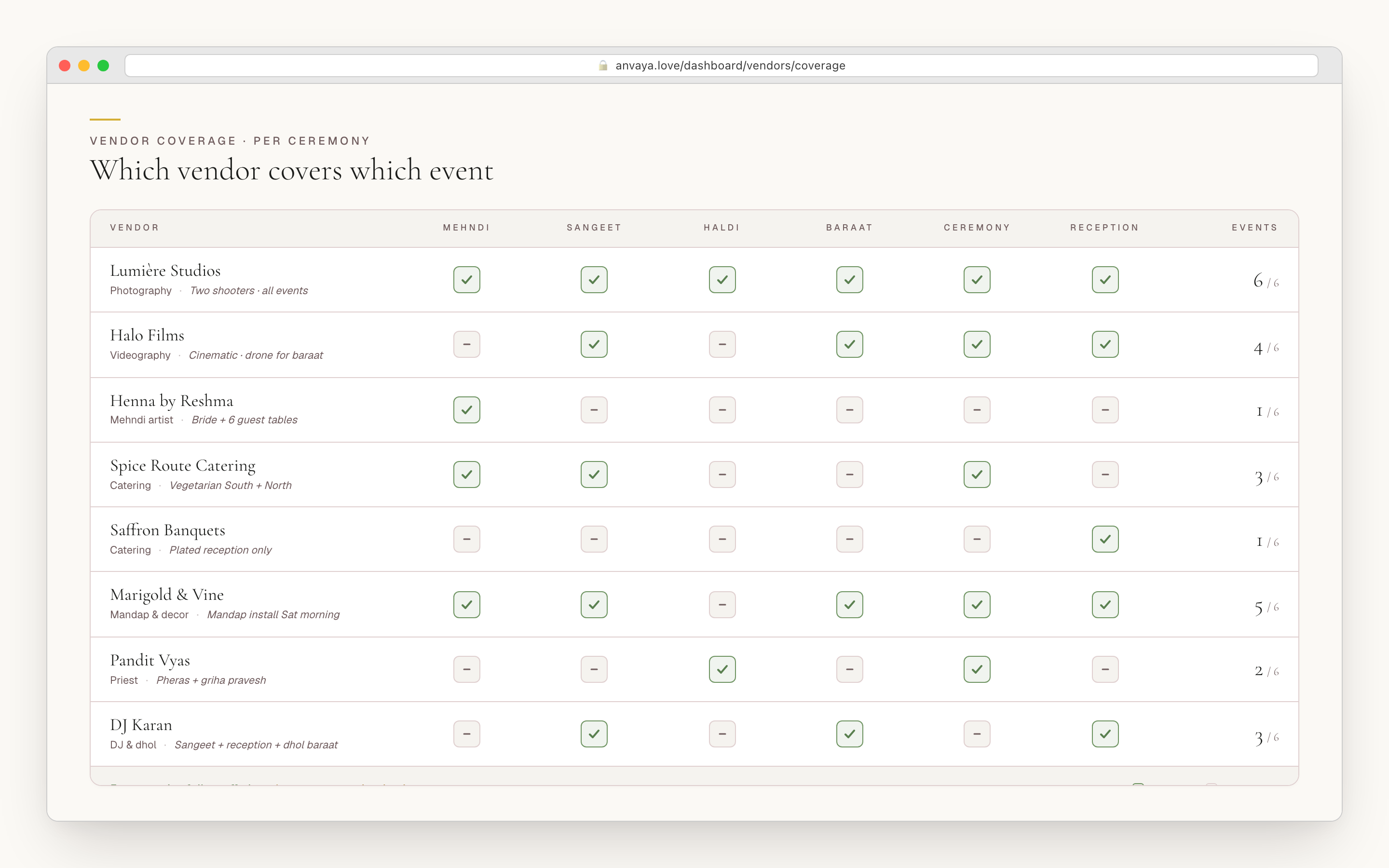
Photographer all six. Mehndi artist one. Panditji two.
Most desi weddings hire ten to fifteen vendors, and each one covers a different slice of the weekend. Your photographer is at every ceremony. Your mehndi artist works the mehndi only. Panditji handles the haldi and the pheras. The DJ runs the sangeet and the reception. The mehndi caterer is a different outfit from the reception caterer. In Anvaya every vendor carries the events they cover, so the flat list finally has an answer for who is on what.
Each vendor card holds the ceremonies they serve, their quote, a payment schedule with deposits and final balances and due dates, and the contact who runs them on the day. Open one ceremony and you see only the vendors on it — the mehndi page shows the mehndi artist, the photographer, the dholki, and the caterer that covers the courtyard, not the reception caterer or the pheras pandit.
Forward a vendor's quote to your wedding's private email address and Anvaya reads the PDF or photo and pre-fills the name, category, contact, location, and price — you assign it to the right ceremony and accept. Comparing two photographers? Put them side by side and weigh quote, event, and contact in one view before you sign.
- Every vendor carries the ceremonies they cover — photographer all six, mehndi artist one
- Open one ceremony and see only its vendors, with the day-of contact for each
- Per-vendor payment schedule — deposits, balances, and due dates
- Forward a quote and Anvaya extracts the name, category, contact, and price
- Compare two vendors side by side before you sign
A seating canvas for every event.
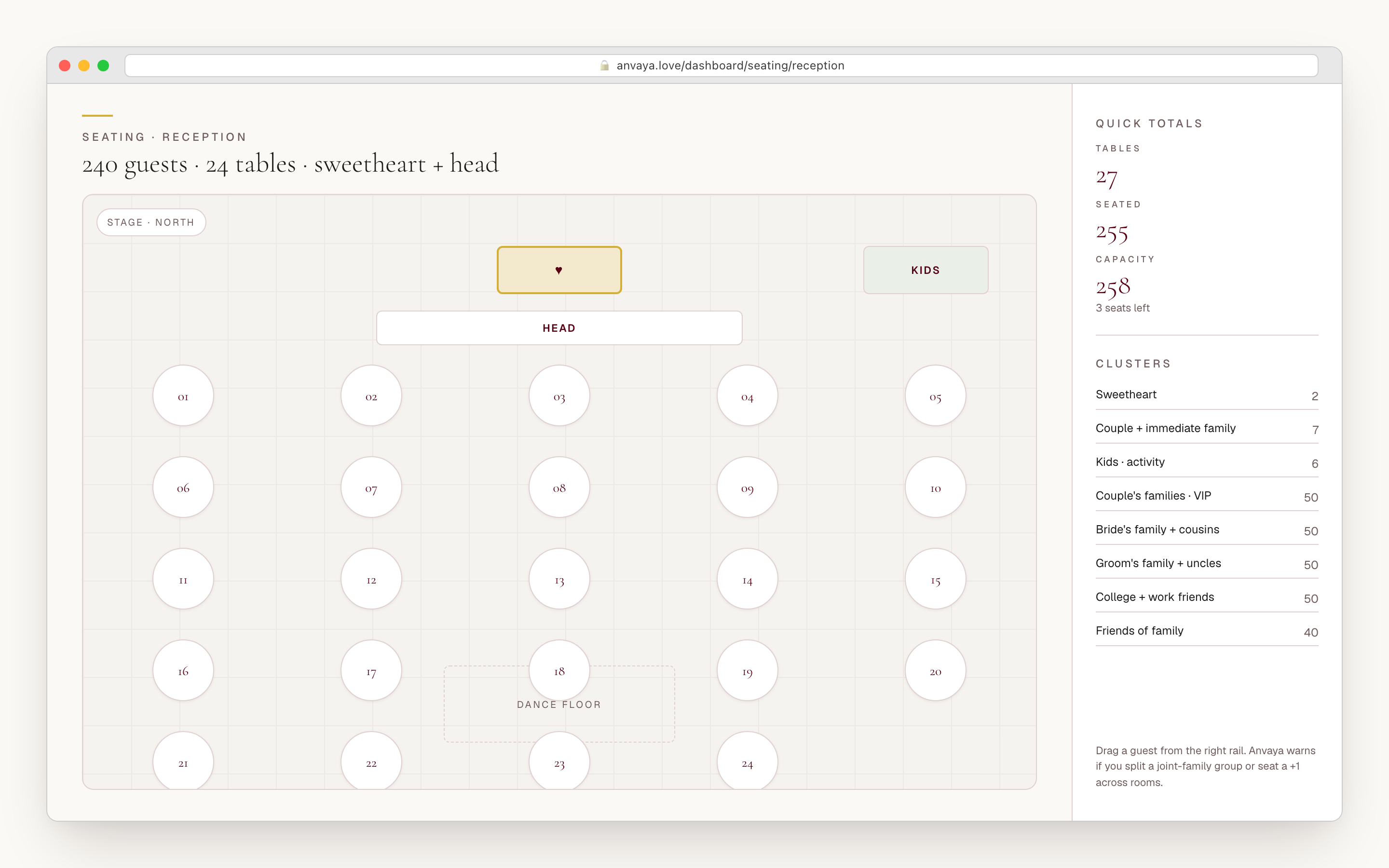
The sangeet is a stage with a dance floor and parents seated on either side. The reception is round tables of ten with a head table at the centre. These are different rooms for different events, and one chart can't hold both. Anvaya gives every ceremony its own seating canvas — drag in round, rectangular, square, sweetheart, and head tables, then drop a stage, a dance floor, a bar, or a buffet where the room needs one.
The same guest list flows into every canvas, filtered to the people who said yes to that ceremony — the unseated panel never offers you someone who already declined. Seat your dad at a sangeet parent table and at the reception head table: one guest, two events, two independent saves. When a guest cancels two days out, that seat clears at that event without touching the others, because the chart reads live RSVP status.
Each table has a capacity, so the canvas tells you the moment a table is over. Drag-and-drop placement auto-saves as you go, and a CSV export — table, seat, guest, side, RSVP — hands the caterer and the venue a clean seating list per event.
- A separate seating canvas per ceremony
- Round, rectangular, square, sweetheart, and head tables, plus stage / dance-floor / bar fixtures
- The same guest, filtered to who confirmed for that event — no double-offering declined guests
- Per-table capacity warnings and auto-saving drag-and-drop
- CSV export per event — table, seat, guest, side, and RSVP — for the caterer and venue
Tasks that know which ceremony they belong to.
Every desi wedding runs the same long checklist, and every couple rebuilds it from scratch on a fresh Notion page at midnight. Anvaya seeds six starter tasks the moment you create your wedding, and a seed dialog lets you pull from twenty-three templates in all — staged by how far out they fall, so you book the venue and photographer early, finalise attire and catering in the middle, and confirm the officiant and transport in the final stretch. From there you assign each task to the ceremony it serves, give it a due date, and hand it to a co-planner.
Open a ceremony and its tasks come with it. Assign "book the mehndi artist" to the mehndi and "confirm the baraat horse" to the baraat, and each one lives with its event instead of in one undifferentiated pile. Set a due date six weeks before the sangeet rather than against a single wedding day, and the work paces itself across the whole week.
The task board flags what's overdue against every due date, so a glance tells you which work has slipped. Filter to one ceremony or one owner, select a run of tasks with the gutter checkboxes, and reassign or close them in a single action — the week-of triage stops being a scroll and starts being a sweep.
- Six starter tasks on day one; twenty-three templates in all to seed by stage
- Assign any task to the ceremony it serves and to a co-planner
- Due dates you set per task — pace the work across the whole week, not one day
- Add, edit, or duplicate tasks; nothing is locked to the template
- Overdue flags on the task board; multi-select to reassign or close a run of tasks at once
Jain mehndi. Halal reception. Two families, one budget.
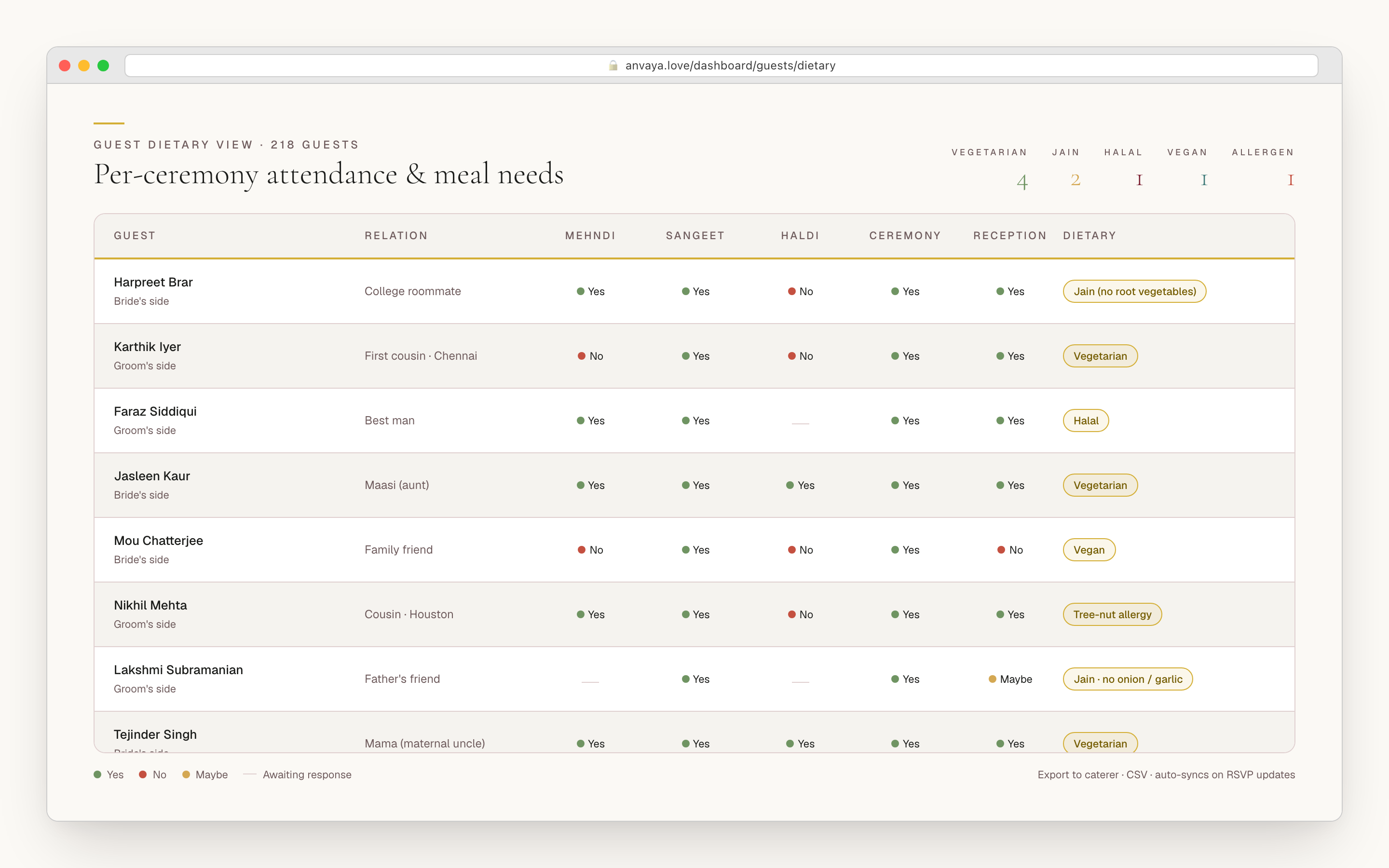
A 400-guest desi wedding is not one group. Half the family is vegetarian, a cousin keeps halal, your future mother-in-law is Jain, and the mehndi caterer needs a different breakdown from the reception caterer. Anvaya stores a dietary note on every guest for every ceremony, and on each plus-one too — so the same guest can read Jain at the mehndi and vegetarian at the reception, and the caterer gets the right list for the right event.
The budget knows a desi wedding is funded by more than one household. Set up funding sources for the bride's family, the groom's family, and the couple, then attribute spend to each — so when both mothers ask "what has my side committed?" the answer is one number, not a guess. Costs roll up by ceremony, so you can see what the sangeet is running before it runs away from you.
Parents and siblings help without taking over. Anvaya has four roles — you hold full control, family admins add and edit guests, send messages, and manage vendors, family contributors get narrower edit rights, and guests stay read-only. Reminders go out by text or email to just the guests who need them (only the reception crowd, or only the guests still pending), so the aunties who never check email still hear from you.
- A dietary note per guest per ceremony — and on every plus-one
- Family-side budget — bride-side, groom-side, and couple funding sources, tracked separately
- Costs roll up by ceremony so you can see what each event is running
- Four collaborator roles — full control, family admin, contributor, and read-only guest
- Text and email reminders to just the guests who need them
COMPARED
Anvaya vs the wedding tools you have already tried.
Joy, Zola, The Knot, and WedMeGood are good products. Anvaya’s difference is that the per-ceremony matrix is the default workflow, not an extra event list bolted onto a single wedding day.
| Feature | Anvaya | Joy | Zola | The Knot | WedMeGood |
|---|---|---|---|---|---|
Per-event guest invites (different lists per ceremony) A guest can be invited to the sangeet and reception but not the haldi — and only sees the events on their invite. | |||||
Per-event RSVP states (one guest, six answers) A guest RSVPs yes, no, pending, or plus-one independently for each ceremony. | |||||
Per-event seating chart Each ceremony gets its own drag-and-drop canvas, filtered to who confirmed for that event. | |||||
Per-event vendor assignment Each vendor carries the ceremonies they cover — photographer all six, mehndi artist one. | Directory | ||||
Tasks assigned to a ceremony Assign "book the mehndi artist" to the mehndi instead of one generic to-do bucket. | Generic | Generic | Generic | Generic | |
Sunrise / sunset computed per venue Anvaya computes daylight at each venue so the haldi at sunrise and the sangeet after sunset land right. | |||||
Mehndi / sangeet / haldi built into the data model Canonical desi ceremonies as first-class events, not custom labels you invent. | Custom labels | Custom labels | Custom labels | ||
Multi-event wedding website One page that lists every ceremony — date, venue, dress code — with a per-event RSVP toggle. | |||||
Family-side budget (bride-side, groom-side, couple) Track who funds what across both families and the couple, and roll spend up by ceremony. | |||||
Messaging reminders by cohort Message only the reception crowd, or only the guests still pending, by text or email. |
Per-event guest invites (different lists per ceremony)
A guest can be invited to the sangeet and reception but not the haldi — and only sees the events on their invite.
Anvaya
Joy
Zola
The Knot
WedMeGood
Per-event RSVP states (one guest, six answers)
A guest RSVPs yes, no, pending, or plus-one independently for each ceremony.
Anvaya
Joy
Zola
The Knot
WedMeGood
Per-event seating chart
Each ceremony gets its own drag-and-drop canvas, filtered to who confirmed for that event.
Anvaya
Joy
Zola
The Knot
WedMeGood
Per-event vendor assignment
Each vendor carries the ceremonies they cover — photographer all six, mehndi artist one.
Anvaya
Joy
Zola
The Knot
WedMeGood
Tasks assigned to a ceremony
Assign "book the mehndi artist" to the mehndi instead of one generic to-do bucket.
Anvaya
Joy
Zola
The Knot
WedMeGood
Sunrise / sunset computed per venue
Anvaya computes daylight at each venue so the haldi at sunrise and the sangeet after sunset land right.
Anvaya
Joy
Zola
The Knot
WedMeGood
Mehndi / sangeet / haldi built into the data model
Canonical desi ceremonies as first-class events, not custom labels you invent.
Anvaya
Joy
Zola
The Knot
WedMeGood
Multi-event wedding website
One page that lists every ceremony — date, venue, dress code — with a per-event RSVP toggle.
Anvaya
Joy
Zola
The Knot
WedMeGood
Family-side budget (bride-side, groom-side, couple)
Track who funds what across both families and the couple, and roll spend up by ceremony.
Anvaya
Joy
Zola
The Knot
WedMeGood
Messaging reminders by cohort
Message only the reception crowd, or only the guests still pending, by text or email.
Anvaya
Joy
Zola
The Knot
WedMeGood
Comparison as of June 2026. Competitor features change — verify on each provider’s site before deciding.
FAQ
Multi-event questions we hear a lot
RSVP & Guests
Free, per-event online RSVP with text and email reminders.
Plan the RSVPSeating
Drag-and-drop seating chart with per-event layouts, table shapes, and CSV export.
Build the seating chartBudget
For existing accounts: track spending across ceremonies with scenarios and joint-family contributions.
Track the budgetEvery ceremony.
One workspace.
Built for the desi wedding week — mehndi to reception. Free during early access, no credit card.