ONLINE RSVP
One guest. Five events. Three different answers.
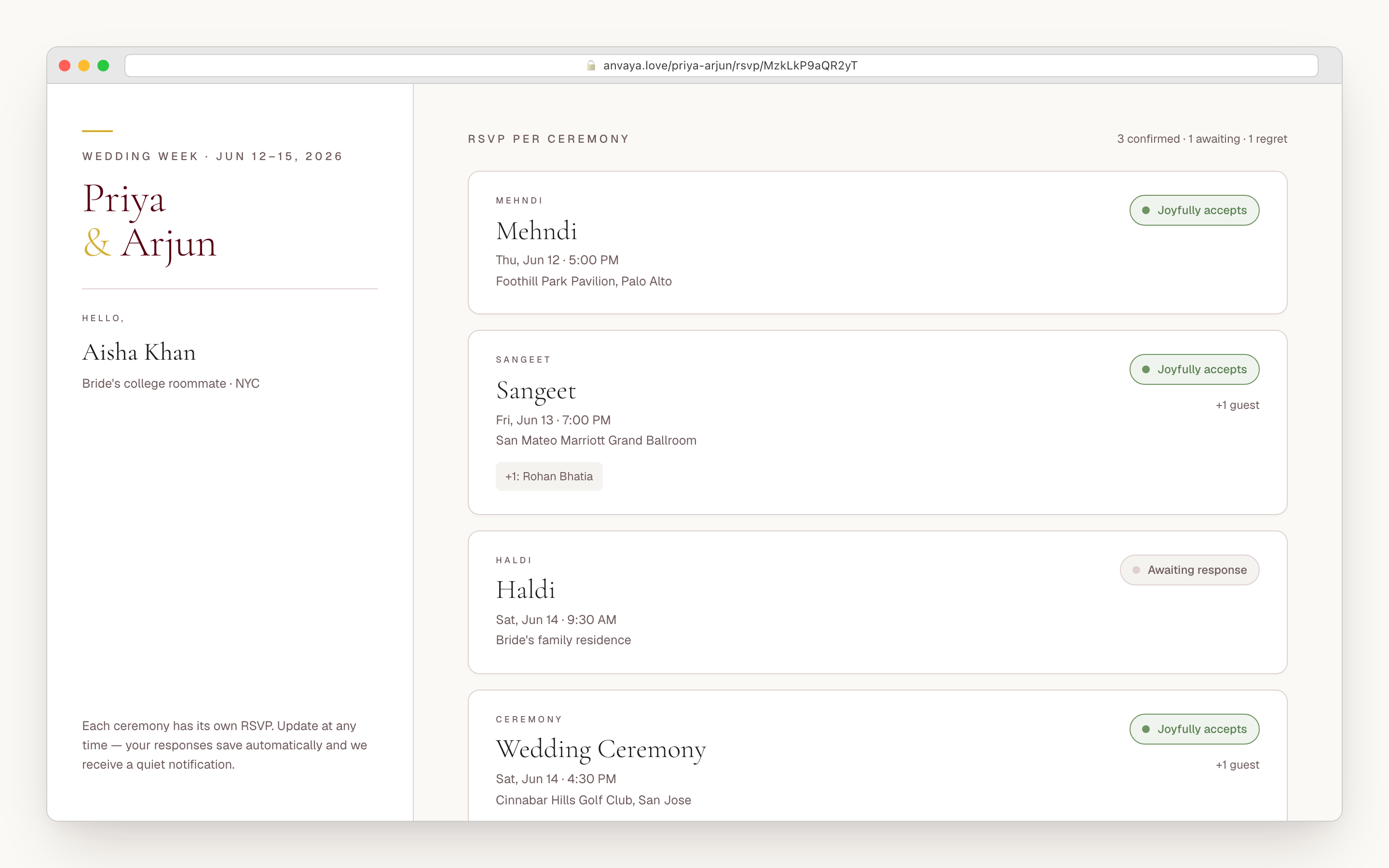
Anvaya is online wedding RSVP built per ceremony. One private link per guest collects a separate answer for the mehndi, sangeet, haldi, ceremony, and reception — with plus-ones and dietary needs attached to the event they affect.
Free during early access. No credit card.
- Per ceremony
- A yes, no, or maybe for each event
- Reminders
- By text or email
- Free to start
- No credit card during early access
12+
Ceremony presets, plus any custom event you name
2
Ways to remind guests: text and email
4
Collaborator roles for both families
1
Private link per guest, no account
A South Asian guest list does not fit on one line.
Aunty comes to the mehndi only
The phupha who flies in from Hyderabad makes the ceremony and the reception. Your dad's coworker is reception only. Your college roommate is at every event. Anvaya tracks an RSVP per ceremony, so each guest sees only the invitations meant for them — and your caterer gets the right count for each meal.
Plus-ones aren't binary
A cousin brings her partner to the sangeet, the whole family to the reception, and skips the haldi. In Anvaya each plus-one gets their own per-event yes, no, and dietary note — so 'are the kids coming or not' stops being a WhatsApp thread the week of, and becomes a number.
Dietary needs are per event
Jain at the mehndi, halal at the reception, nut allergy at the welcome dinner — the same guest can need three different meals across one weekend. Anvaya keeps a dietary note per guest per ceremony, then rolls it into a clean count for each vendor when they ask.
One submission. Every ceremony. Real numbers.
A generic RSVP asks once: are you coming? A South Asian wedding asks five questions across one weekend. Anvaya ships twelve presets for the ceremonies you actually run — mehndi, sangeet, haldi, baraat, welcome party, wedding, reception, nikah, walima, Anand Karaj, church, chuppah — and lets you name any other event yourself, from a garba to a farewell brunch. Each one is its own object with its own date, venue, and guest set. Your guest opens one page and toggles the events on their invitation; you see confirmed, declined, maybe, and pending counts per ceremony, live, the moment they tap.
The answers go deeper than yes or no. A guest can mark maybe while a flight is unbooked, or decline with a one-line note that lands on your dashboard instead of in the email pile. Every plus-one carries their own per-event answer and their own dietary note, so a party of four at the reception and two at the sangeet is two real headcounts, not a guess. And Anvaya watches the matrix for you — it flags the guests who confirmed one ceremony but never answered another, so the Saturday reconciliation becomes a glance instead of a spreadsheet audit.
- Per-ceremony confirmed / declined / maybe / pending states, not one overall RSVP
- Each plus-one has their own per-event answer and dietary note
- Ask your own questions on the RSVP — shuttle, song requests, kids
- Anvaya flags guests confirmed for one event but pending for another
- Live dashboard with confirmed counts broken out by ceremony
Your guests tap a link. They never make an account.
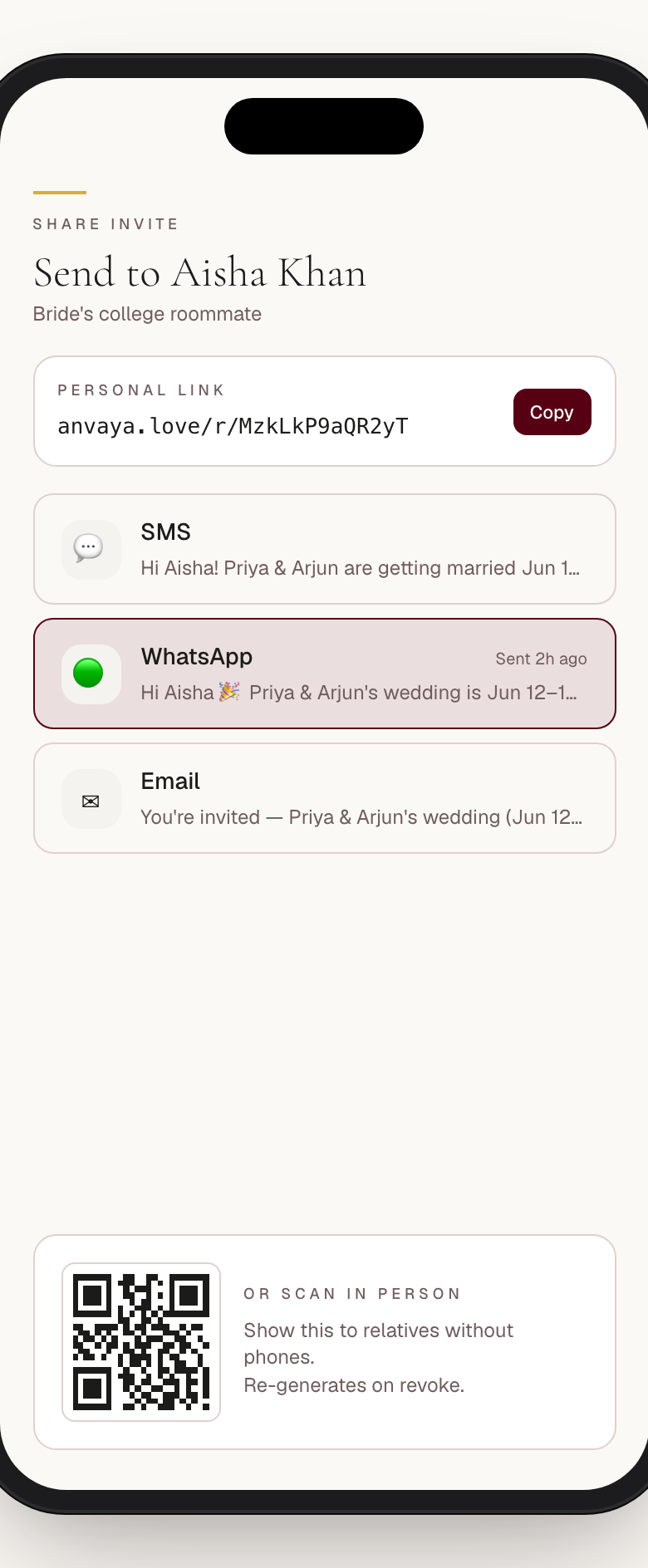
Every guest gets their own private invite link. No login, no app, no password to forget the night before they fly in. The link opens a mobile-first page with their name, the events they are invited to, and a toggle for each. They answer, the page saves, you get the count. Older relatives who would abandon any wedding-tech signup get through it in under a minute. From the Guests page, copy their private RSVP link and paste it into a one-to-one message on the channel your family already uses. Anvaya keeps the sharing step explicit, so you see the named guest before their private link leaves your clipboard.
When the whole household replies as one, a single group link lets the Sharma family answer per event in one visit — each member tracked by name underneath, each with their own per-ceremony yes, no, and dietary note. That is the right shape for an address that sends three people to the wedding, one to the sangeet, and none to the haldi. Past the RSVP itself, you can add your own questions to the page — shuttle from the hotel, song requests for the sangeet, kids' ages for the caterer — and every answer exports alongside the headcount.
- One private link per guest — no shared codes, no account signup
- One group link RSVPs a whole household per event, tracked name by name
- Add custom intake questions — yes/no, single-select, or multi-select
- Mobile-first page that works on any phone, in any country
- Copy the private RSVP link beside a guest, then paste it into your message
Drop the spreadsheet your mom has been editing for a year.
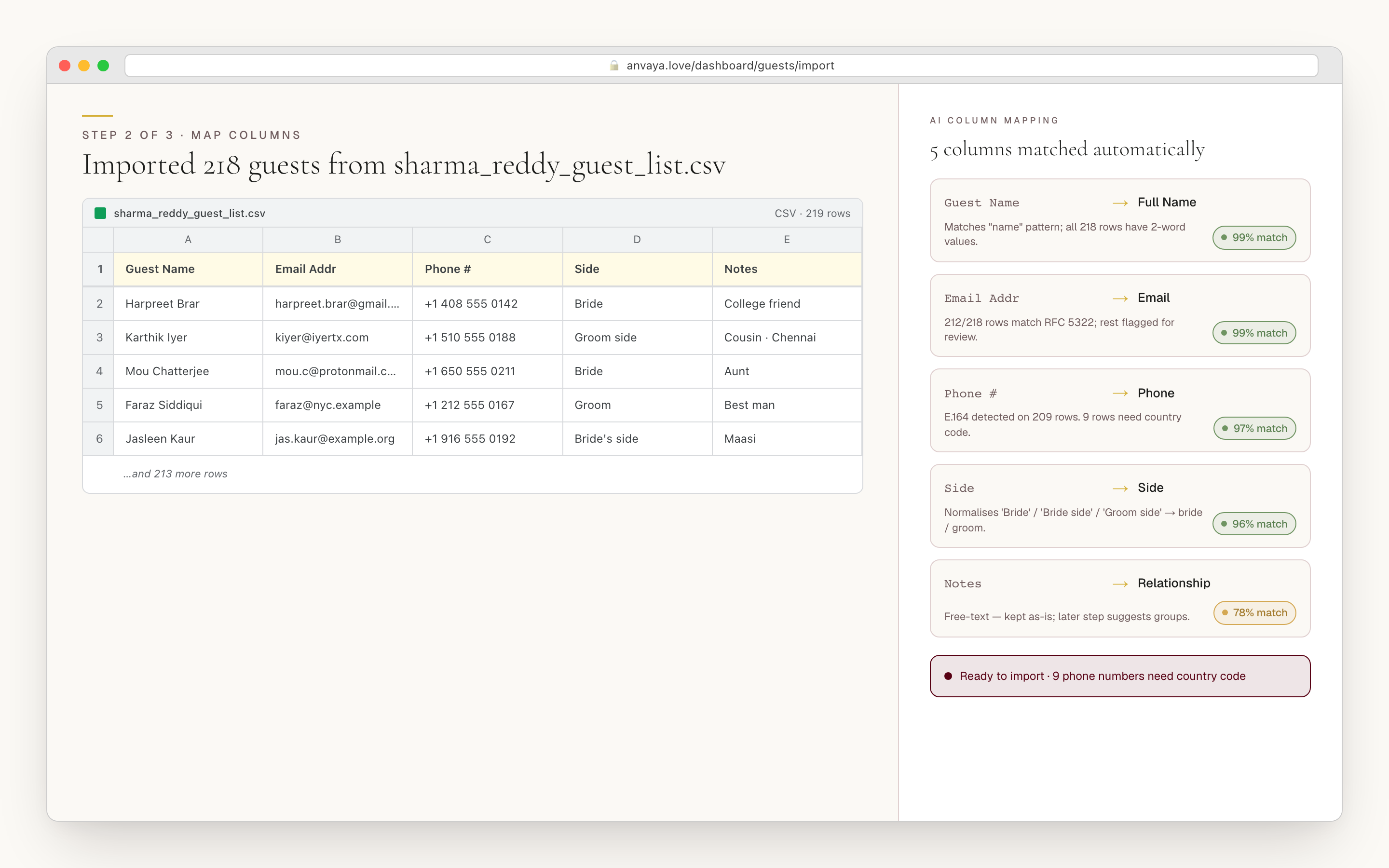
Most guest lists already exist — in the Google Sheet your mom started in 2024, the Notion table your sister keeps editing, the list your future mother-in-law exported from The Knot last week. Anvaya reads them. Export any of those to a CSV, drop it in, and the AI maps the columns on its own: name, phone, email, side of family, group, plus-ones, tags, and notes. It even infers which side a guest belongs to and how many plus-ones they get from how a row is written — no rigid template to match.
You preview every parsed guest before anything is saved, and the import flags the rows it could not place cleanly so you can fix them with a dropdown. Phone numbers are tidied into one format so texts reach the right person, likely duplicates are caught against your existing list, and re-importing an updated sheet merges onto the guests you already have. When you'd rather have people add themselves, share a signup link that collects each guest's details — and revoke it the moment you're done.
- Import a CSV — the export from Google Sheets, Excel, Numbers, or The Knot
- AI maps messy columns (Guest Name, Phone #, Aunty's side) — no template
- Preview and correct before committing; ambiguous rows are flagged
- Tidies every phone number into one format, ready for texts
- Duplicate detection on re-import; revocable self-signup link
Collect your first
per-ceremony RSVP.
Import your list, send one link, and watch the counts come in by event. Free during early access. No credit card.
Nudge the guests who still owe you an answer.
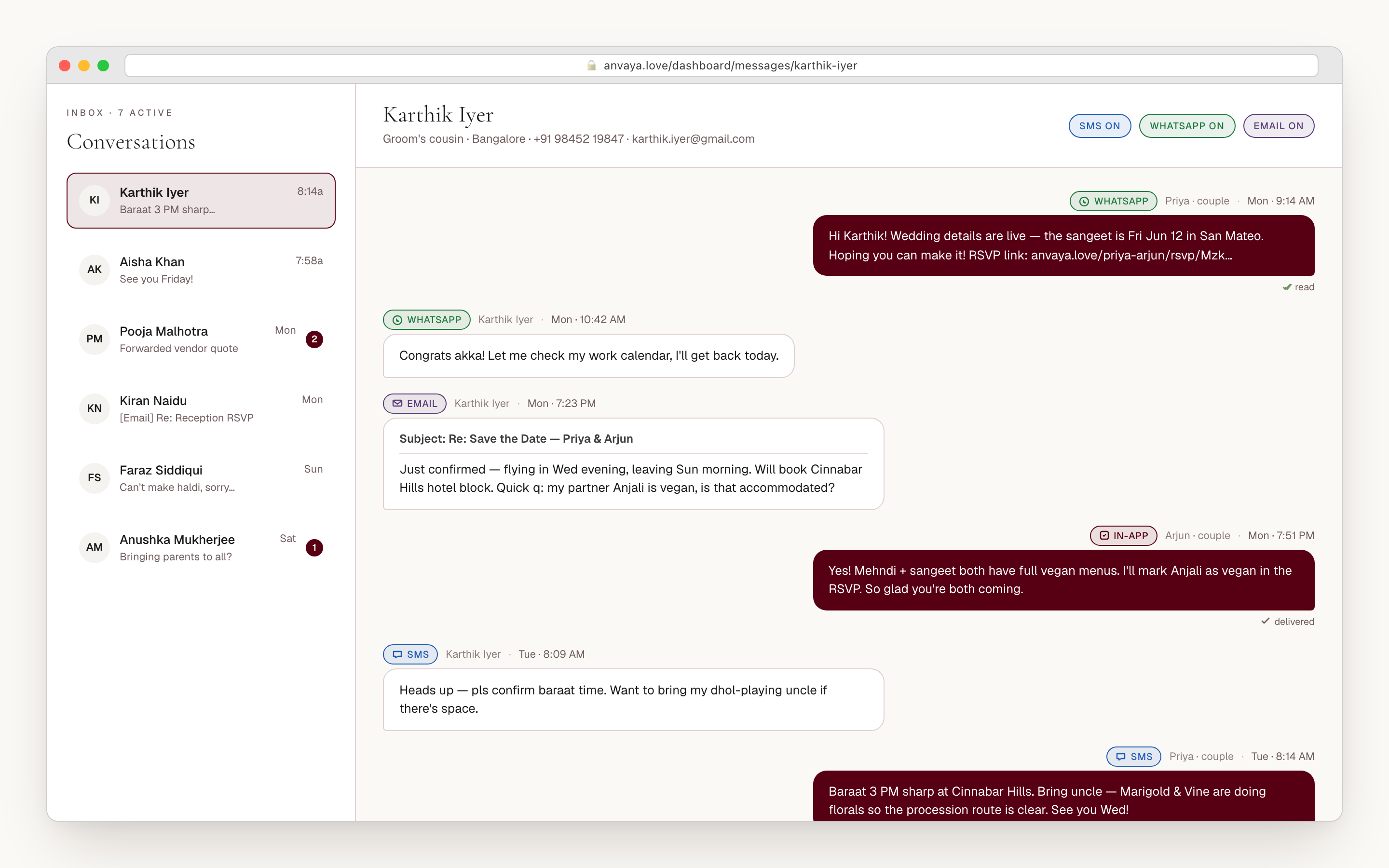
Your masi reads a text before anything else; your college friends live in their inbox. Anvaya sends RSVP reminders both ways: texts to guests with US and Canadian numbers, and email to anyone, anywhere. Pick who it's for, everyone who hasn't answered for the haldi, everyone coming to the reception, a group, or names you choose, and each guest gets their own RSVP link. Relatives abroad are flagged before you send, so you can reach them by email.
When a guest replies, the message lands in their thread on your dashboard, and every reminder shows whether it was delivered, so you catch a wrong number before the deadline. And because your plan is reachable from Claude and ChatGPT, you can ask the assistant who hasn't answered the sangeet. It pulls the names and the count from your real data, so you start the nudge already knowing who needs it.
- Text and email replies land in one thread per guest
- Texts to US and Canadian numbers; email to everyone, anywhere
- Send only to the guests who haven't answered for an event
- Each guest gets their own RSVP link
- Delivery shown on every reminder, with failed numbers flagged
The dietary count your caterer actually asks for.
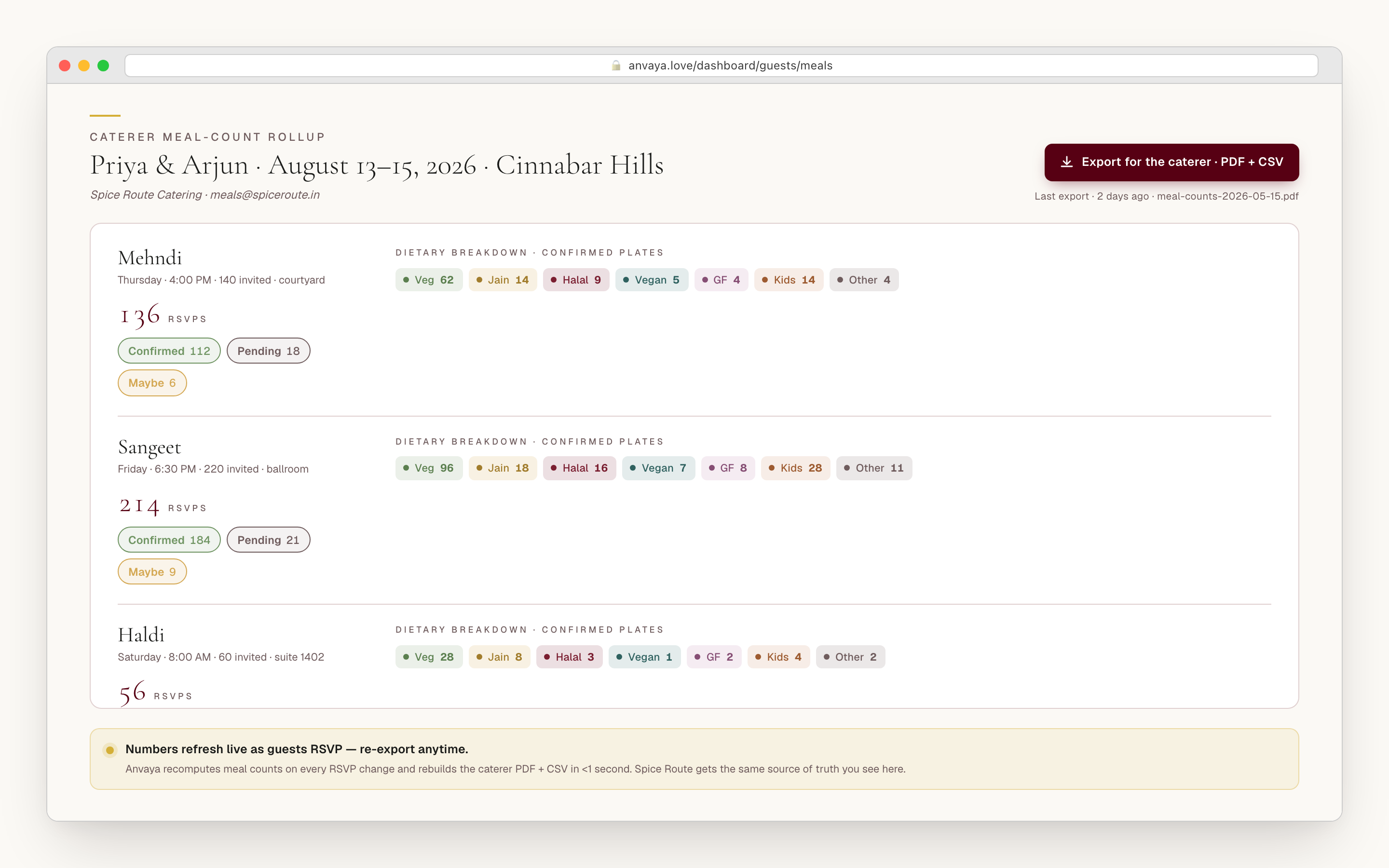
Every desi caterer wants the same sheet two weeks out: per-ceremony confirmed counts with the meals spelled out. Guests write their needs in plain words on the RSVP — "Jain, no onion-garlic," "nut allergy," "halal" — and Anvaya keeps that note per guest per ceremony, so the same person can be Jain at the mehndi and halal at the reception without a second spreadsheet. Anvaya groups the free-text notes into a clean count across the diets that drive a catering order — vegetarian, vegan, halal, kosher, gluten-free, nut allergy, dairy-free — and when several of them cluster, Anvaya AI turns the counts into a caterer-ready recommendation instead of leaving you to tally "no carbs" against "I eat everything."
The dashboard rolls every per-event RSVP into a ceremony-by-ceremony view — confirmed, pending, and maybe per event — and the CSV export carries one RSVP column per ceremony plus each guest's dietary notes, so the caterer reads the mehndi count and the reception count off the same sheet. Re-export when a cousin RSVPs late or changes their meal, and the numbers are current without you opening a single spreadsheet.
- Dietary note kept per guest per ceremony — Jain mehndi, halal reception
- Free-text notes grouped into a countable diet tally for the caterer
- Anvaya AI writes a catering recommendation when several diets cluster
- Confirmed · pending · maybe rolled up per ceremony
- CSV export with one RSVP column per ceremony, re-export anytime
COMPARED
How Anvaya compares to general wedding RSVP tools.
General tools increasingly support multiple events; Anvaya makes the per-ceremony matrix the default — different answers, plus-ones, and meals per event, with text and email reminders and vendor-ready exports built in.
| Feature | Anvaya | Joy | Zola | The Knot | RSVPify |
|---|---|---|---|---|---|
Per-event RSVPs (different yes/no per ceremony) A guest can RSVP yes to the sangeet, no to the haldi, plus-one to the reception in one form. | |||||
Plus-one variation per event Different plus-one counts — and a separate answer per plus-one — for the sangeet vs the reception. | |||||
Dietary tracking per event Different meals per guest per ceremony — Jain mehndi, halal reception. | One per guest | One per guest | One per guest | ||
Two-way texts in one guest thread A guest's texts and emails in one thread. Texts reach US and Canadian numbers. | Varies | Varies | Varies | Add-on | |
CSV import with AI column mapping Drop your existing spreadsheet; AI maps the columns to the canonical fields. | Manual | Manual | Manual | Manual | |
Family co-planner roles with audit trail Four permission-tiered roles so both families can co-plan; the dashboard logs who changed what. | |||||
Guest CSV with a column per ceremony One export, one RSVP column per event plus dietary notes — the caterer reads each ceremony off the same sheet. |
Per-event RSVPs (different yes/no per ceremony)
A guest can RSVP yes to the sangeet, no to the haldi, plus-one to the reception in one form.
Anvaya
Joy
Zola
The Knot
RSVPify
Plus-one variation per event
Different plus-one counts — and a separate answer per plus-one — for the sangeet vs the reception.
Anvaya
Joy
Zola
The Knot
RSVPify
Dietary tracking per event
Different meals per guest per ceremony — Jain mehndi, halal reception.
Anvaya
Joy
Zola
The Knot
RSVPify
Two-way texts in one guest thread
A guest's texts and emails in one thread. Texts reach US and Canadian numbers.
Anvaya
Joy
Zola
The Knot
RSVPify
CSV import with AI column mapping
Drop your existing spreadsheet; AI maps the columns to the canonical fields.
Anvaya
Joy
Zola
The Knot
RSVPify
Family co-planner roles with audit trail
Four permission-tiered roles so both families can co-plan; the dashboard logs who changed what.
Anvaya
Joy
Zola
The Knot
RSVPify
Guest CSV with a column per ceremony
One export, one RSVP column per event plus dietary notes — the caterer reads each ceremony off the same sheet.
Anvaya
Joy
Zola
The Knot
RSVPify
Competitor capabilities as of June 2026; they change — verify on each provider’s site.
FAQ
Questions we hear a lot
Keep planning with Anvaya
Messaging
Two-way texts and email, with every reply in one thread per guest.
Message guestsMulti-Event
Per-event guest lists, RSVP, seating, and vendors across every ceremony in your wedding.
Plan every eventWedding Website
Build a wedding website that handles every ceremony, from mehndi to reception.
Build the websiteEarly access
One link.
Every ceremony.
Free during early access. No credit card. Built for South Asian weddings, ceremony by ceremony.