ANVAYA AI
The wedding AI that actually does the work
Ask who still hasn't RSVP'd to the sangeet. Tell it to draft a haldi reminder, add five tasks for your mama, or line up your three photographers side by side. Anvaya AI lives in your dashboard and takes the action with your tap — and the same assistant plugs into Claude and ChatGPT so the wedding comes with you wherever you work.
Free during early access. No credit card. Every change asks before it saves.
- Takes action
- Adds, drafts, updates — with your approval
- Knows your wedding
- Guests, budget, vendors, events
- Or use Claude
- Connect once, plan from anywhere
A chat that talks about your wedding is not the same as one that plans it.
Generic AI can't see your wedding
ChatGPT will write you a baraat playlist and Claude will draft a Hindi welcome speech — but neither can see your real guest list, your real budget, or your real vendor quotes. You get a thoughtful generic, not your plan. Until the assistant can read what you've actually entered, you're back to pasting your spreadsheet into a chat window.
An AI that only answers is half a tool
Most wedding apps bolt a chat into the corner: you ask, it answers, you go back to clicking. Anvaya AI is different. Tell it to add five guests, draft a reminder, or snapshot the budget before you move money around, and it does it — staged behind a tap-to-confirm card so nothing happens behind your back.
You already live in ChatGPT and Claude
Half the planning happens outside the wedding app — vows in ChatGPT, vendor notes in Claude, research in another tab. Anvaya brings the planner into those tools, so the assistant you already pay for can pull up your guest list, compare quotes, or queue a message without you ever pasting in a spreadsheet.
Open Anvaya. Ask. Done.
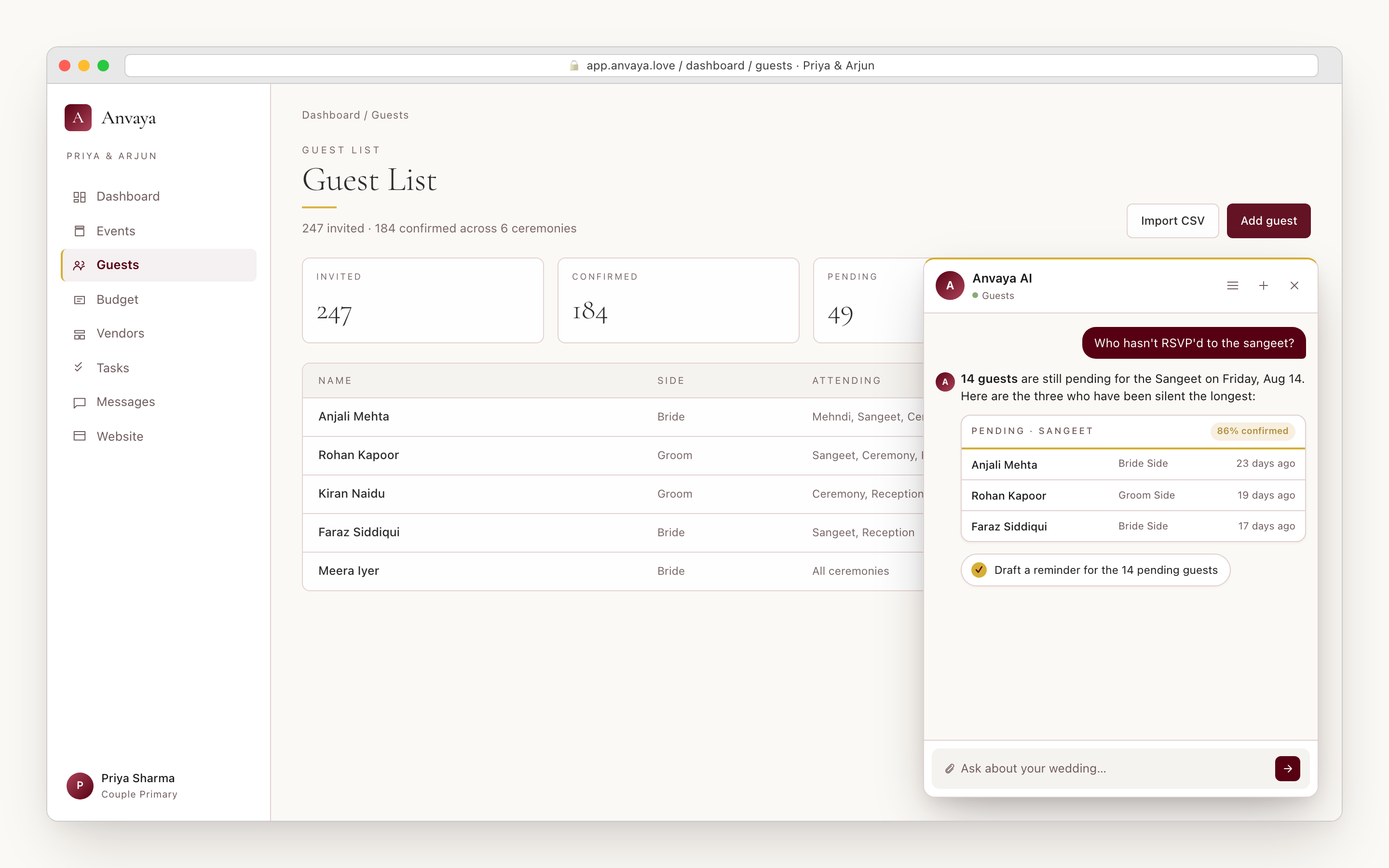
A gold-ringed chat button sits in the corner of your dashboard. Tap it and the assistant slides open already tuned to the page you came from. Open the guest list and ask “who hasn't RSVP'd to the sangeet?” — the answer comes back with names, last-contact dates, and a button to draft a reminder. Open the budget and ask “where am I over plan?” — the categories that overshot come back highlighted, with the variance against your envelope.
It is not a separate app. The chat reads from the same wedding the rest of Anvaya does, so the numbers always match the dashboard. And it knows where you are: the guest page leads with pending RSVPs and headcount, the budget page with over- and under-spend, the vendor page with who's researched, contacted, and booked. You don't have to learn what to ask — the page already shapes the answer.
Your threads stick around across devices and reloads, so you can scroll back through last week's decisions and pick up where you left off. Long answers come back as tidy tables and cards, not paragraphs of prose — confirmed/regrets/pending donuts, budget breakdowns, vendor side-by-sides. Nothing scrolls off into a chat-shaped wall.
- Built into the dashboard — guests, budget, vendors, tasks, events, seating, schedule
- Page-aware: the page you opened shapes what the answer leads with
- Returns tables, cards, and charts — not walls of text
- Conversation threads save automatically so you can scroll back
- Reads the same wedding the rest of Anvaya does — numbers always match
Not just answers. Things actually get done.
What separates Anvaya AI from a search bar is that it can pick up the work. Tell it “add five tasks for mama” and the tasks are drafted, assigned, and waiting for your tap. Tell it “mark Sohini as confirmed for the gaye holud” and the RSVP updates. Tell it to snapshot the budget before you move money around and a what-if scenario is captured. Each one is a real change to your wedding — not a screen of suggestions to copy out by hand.
Every action that writes to your wedding — adding guests, updating RSVPs, snapshotting the budget — pops a small approval card first. You see exactly what is about to happen — the guest names, the budget line, the task assignment — and you tap approve or cancel. A single click never books a vendor or changes a number behind your back. The AI proposes; you decide.
Drafting a message works differently: ask for a sangeet reminder and the assistant writes the copy, with a suggested recipient you confirm, and hands it back for you to send from your own tools — it never sends on your behalf. Every action that does write lands in the same activity log as your manual edits, with the actor and the time. If your partner asks “who added this budget line at 11pm last Tuesday?” the answer is right there. Nothing happens invisibly.
- Adds guests, tasks, vendors, budget lines, and events
- Updates RSVPs, marks tasks done, snapshots the budget into a what-if scenario
- Drafts guest reminders, vendor follow-ups, and family announcements — copy you send yourself
- Every write shows an approval card before it commits — no surprises
- Approved writes land in the activity log beside your manual edits
Or plan from inside Claude or ChatGPT.
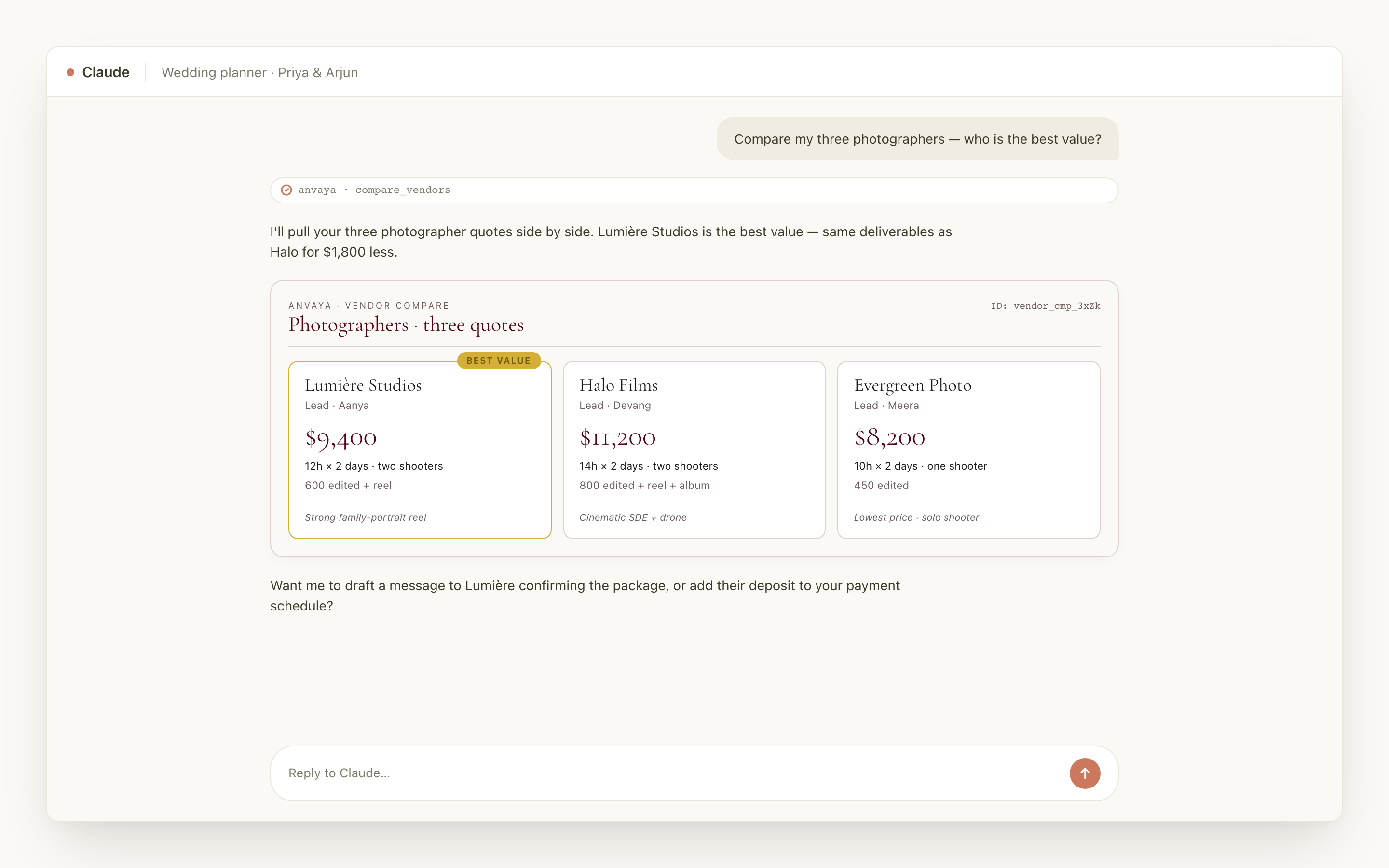
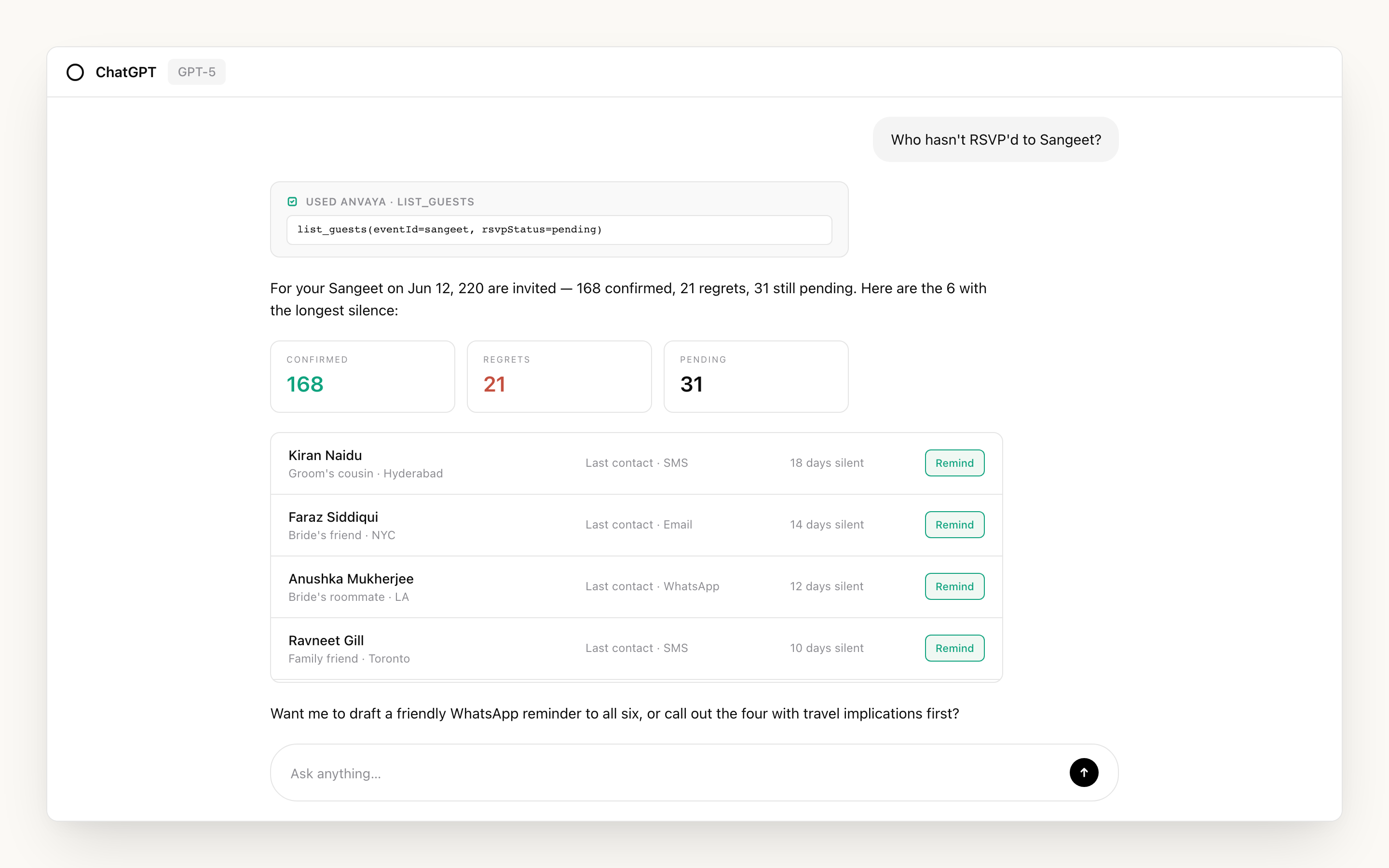
If you already pay for Claude or ChatGPT — or you live in Cursor for work and don't want to switch tabs — Anvaya plugs right in. Open the connector menu, search for Anvaya, sign in once, and the same wedding tools show up inside that chat. Now you can ask Claude “compare my three photographers” or tell ChatGPT “draft a haldi reminder for the bride's side” and the answer comes straight from your real wedding — not a generic template.
You don't pick favourites. Couples on Claude get Claude. Couples on ChatGPT get ChatGPT. Couples in Cursor or Claude Code get those. It's the same wedding, the same tools, and the same fifty-odd planning actions either way — the assistant is just whichever one you already trust. Answers come back as the same visual cards the in-app chat uses: best-value vendor ribbons in gold, RSVP donuts split by event, over-budget lines flagged.
Connecting takes about a minute. You stay signed in as you, the assistant reaches your wedding only, and nothing about you is shared with anything you don't connect.
- Connect to Claude Desktop, claude.ai, ChatGPT, Cursor, and Claude Code
- One-minute setup — sign in once per assistant, never share a password
- Same wedding, same tools, same visual cards as the in-app chat
- No extra subscription — use the assistant plan you already pay for
Real cards in the chat. Not just paragraphs.
A wedding has too many numbers to read as prose, so Anvaya AI answers most questions with proper visual cards. Ask about your budget and you get a category-by-category breakdown with variance bars — over-budget lines flagged, on-track lines calm. Ask about RSVPs and you get a donut split into confirmed, regrets, and pending per event. Ask to compare vendors and you get side-by-side quote cards with a gold “Best Value” ribbon on the pick.
The cards work the same in the Anvaya chat and inside Claude or ChatGPT. The wedding palette comes along — cream background, burgundy and gold, Cormorant Garamond display type — so the answer feels like your wedding, not a chatbot reply pasted into a window.
And they're built for action, not decoration: the vendor compare leads to a pick, the RSVP tracker to a reminder, the task board to marking things done. The chat isn't a one-way conversation. It's a place you actually do work.
- Dashboard card — wedding overview with headline numbers and what needs attention
- Budget card — categories with variance bars, over-budget lines flagged
- Vendor compare — side-by-side quotes with a gold Best Value ribbon
- RSVP tracker — confirmed, regrets, and pending per event
- Task board — todo, due, overdue, done
- Same look in the Anvaya chat and inside Claude or ChatGPT
BUILT FOR SOUTH ASIAN WEDDINGS
Knows mehndi from sangeet from haldi.
A generic AI will happily plan your “Indian wedding ceremony” as one event on a Saturday. Anvaya AI starts from the truth: a desi wedding is three to five days and a handful of distinct ceremonies, with overlapping guest cohorts who go to different events. Mehndi, sangeet, haldi, welcome party, the ceremony, the reception — each is a first-class event in your workspace, with its own date, venue, dress code, guest list, and RSVP — twelve templates in all, the baraat, the nikah, the walima, the Anand Karaj, a church ceremony, and a chuppah among them. Name anything else yourself and it slots in beside them.
The cultural fluency runs through the data, not just the chat prompt. Vendors carry South-Asian categories — officiant, mehndi artists, live performers, procession, decor — so “book the dhol players” lands in the right place. The assistant recognises the vocabulary too: ask for the mama's tasks, the bride's-side reminders, or a starter checklist and it knows a mehndi is a henna night and a haldi is a morning turmeric rite, not interchangeable words.
It draws on a deep reference for Hindu, Sikh, Muslim, Jain, and Christian South Asian traditions across North and South India, Bengali, Gujarati, Punjabi, Tamil, and diaspora communities — and it's honest about its limits. When a ritual varies by region, sect, or family, it says so and points you to your priest, imam, granthi, or minister rather than inventing a ruling.
- Twelve ceremony templates as first-class events — mehndi, sangeet, haldi, baraat, welcome party, wedding, reception, nikah, walima, Anand Karaj, church, chuppah
- South-Asian vendor categories — officiant, mehndi artists, live performers, procession, decor
- Per-event guest lists, RSVP state, dietary notes, dress code, and tasks
- Deep reference for Hindu, Sikh, Muslim, Jain, and Christian South Asian traditions
- Honest about regional variation — points you to your officiant, never fakes a ruling
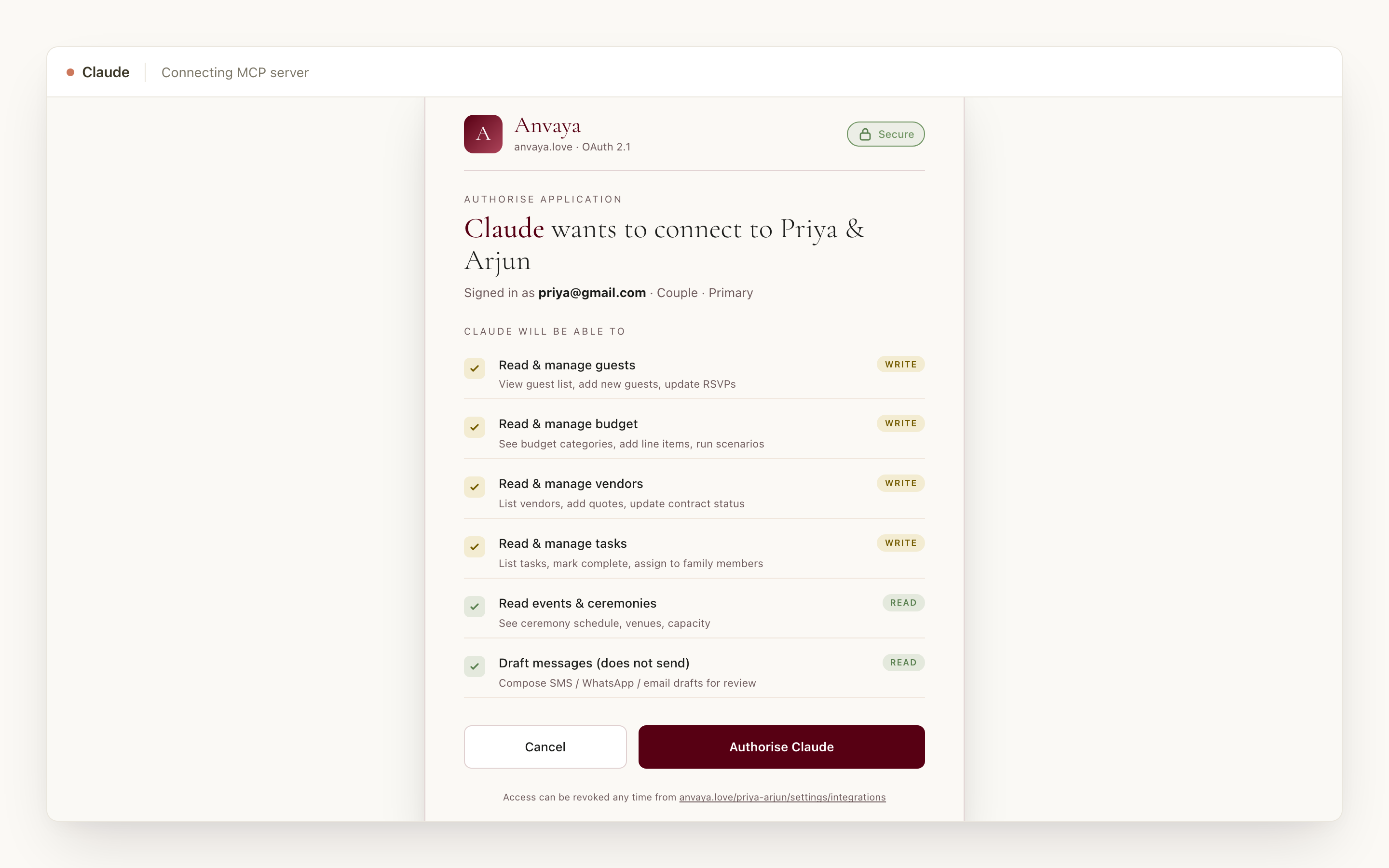
Nothing happens without your tap.
Anvaya AI never changes your wedding without your approval. Every action that adds, edits, or removes anything shows a confirmation card first — the exact guest names, the message text, the budget line — with a one-tap approve or cancel. A single click never sends a reminder, never books a vendor, never deletes a task. The AI proposes; you decide.
When you connect Claude or ChatGPT, you sign in with your regular Anvaya email — your password is never shared with the assistant. And the roles you already set in Anvaya stick: Couple Primary, Family Admin, Family Contributor, and Guest each get exactly the access they have in the dashboard, whether they're clicking through it or asking from inside Claude. A Family Contributor can't delete what they can't delete by hand.
Every approved action shows in the activity log beside your manual edits, marked as an assistant action, with who did it and when. And Anvaya does not sell your wedding data or use it to train an AI model — your guest list stays yours.
- Every change pops a tap-to-confirm card — no silent edits
- Sign in with your Anvaya email — never share a password with the assistant
- The four family roles you set carry over to every connected assistant
- Activity log marks assistant actions beside manual edits, with actor and time
- Your wedding data is never sold and never used to train a model
TEN THINGS TO ACTUALLY ASK IT
Ten prompts that get real work done.
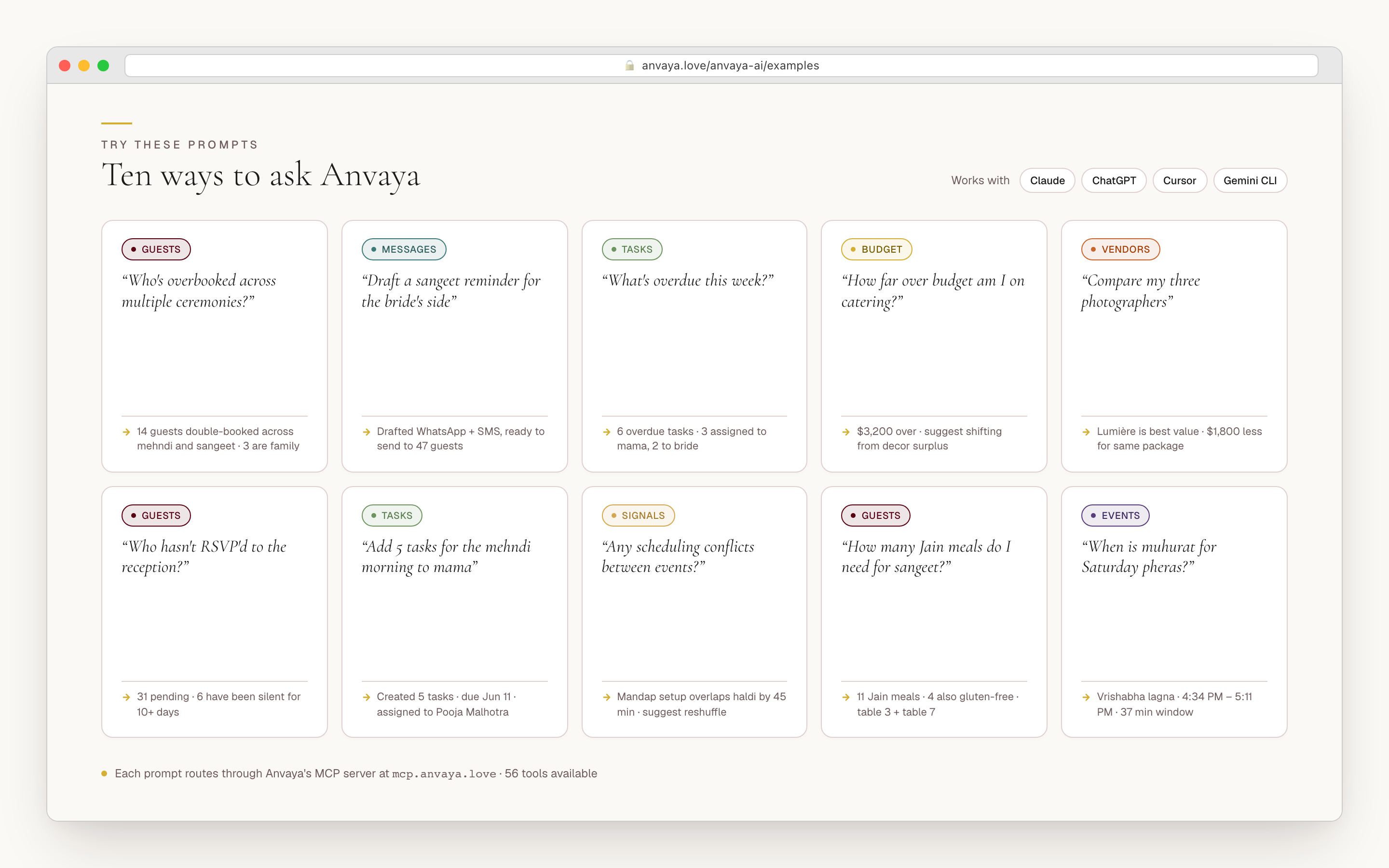
The hardest part of any AI tool is knowing what to ask. Anvaya AI is built around concrete, planning-shaped questions you would already put to a planner — each one producing a specific answer or a draft action you approve in a tap. Every prompt below works today, and works the same in the Anvaya dashboard, in Claude, or in ChatGPT without changing a word.
- “Who hasn't RSVP'd to the reception?” → pending guests with last-contact age
- “Draft a sangeet reminder for the bride's side” → ready-to-send copy you review and send yourself
- “What's overdue this week?” → overdue tasks grouped by assignee
- “How far over budget am I on catering?” → category variance with a suggested re-allocation
- “Compare my three photographers” → side-by-side vendor card with a best-value pick
- “Add 5 tasks for the mehndi morning to mama” → tasks drafted, assigned, awaiting approval
- “How many Jain meals do I need for the sangeet?” → dietary count for that event
- “Is there enough time between the haldi and the baraat?” → gap warning with the minutes
- “Snapshot my budget before I move money around” → a what-if scenario you can compare
- “Draft a follow-up to the photographer about the deposit” → reply staged for your review
COMPARED
Anvaya AI vs the other AI wedding planners.
Most AI wedding products are a chat bolted onto their own dashboard. Anvaya gives you a chat that actually does things — and the same assistant works from inside Claude and ChatGPT too.
| Feature | Anvaya | Weddy | ItsaYes | nupt.ai | TheWeddingPlanner.ai |
|---|---|---|---|---|---|
Built-in chat, page-aware The assistant knows which dashboard page you're on and leads the answer with what matters there. | |||||
AI takes action, not just answers Adds guests, drafts messages, updates the budget, snapshots scenarios — with a tap-to-confirm card on every write. | |||||
Works inside ChatGPT Connect Anvaya as a tool in ChatGPT and ask about your real wedding from any conversation. | Not documented | Not documented | Not documented | Not documented | |
Works inside Claude and Cursor Connect Anvaya as a tool in Claude Desktop, claude.ai, Claude Code, and Cursor. | Not documented | Not documented | Not documented | Not documented | |
Visual cards in chat (not walls of text) Vendor compare, budget summary, RSVP tracker, and task board show up as real cards inside the chat. | Not documented | Not documented | Not documented | Not documented | |
Tap-to-confirm on every change The AI never silently edits your wedding — every write shows a preview card with approve or cancel. | Not documented | Not documented | Not documented | Not documented | |
Family roles carry into the AI The role each collaborator holds in the dashboard scopes what they can do through the assistant too. | Not documented | Not documented | Not documented | Not documented | |
Built for the multi-event desi wedding Mehndi, sangeet, haldi, and the rest as first-class events, with South-Asian vendor categories and a deep tradition reference. | Not documented | Not documented | Not documented | Not documented | |
Free during early access AI features included in the free plan with no credit card required during early access. | Trial | Trial | Trial |
Built-in chat, page-aware
The assistant knows which dashboard page you're on and leads the answer with what matters there.
Anvaya
Weddy
ItsaYes
nupt.ai
TheWeddingPlanner.ai
AI takes action, not just answers
Adds guests, drafts messages, updates the budget, snapshots scenarios — with a tap-to-confirm card on every write.
Anvaya
Weddy
ItsaYes
nupt.ai
TheWeddingPlanner.ai
Works inside ChatGPT
Connect Anvaya as a tool in ChatGPT and ask about your real wedding from any conversation.
Anvaya
Weddy
ItsaYes
nupt.ai
TheWeddingPlanner.ai
Works inside Claude and Cursor
Connect Anvaya as a tool in Claude Desktop, claude.ai, Claude Code, and Cursor.
Anvaya
Weddy
ItsaYes
nupt.ai
TheWeddingPlanner.ai
Visual cards in chat (not walls of text)
Vendor compare, budget summary, RSVP tracker, and task board show up as real cards inside the chat.
Anvaya
Weddy
ItsaYes
nupt.ai
TheWeddingPlanner.ai
Tap-to-confirm on every change
The AI never silently edits your wedding — every write shows a preview card with approve or cancel.
Anvaya
Weddy
ItsaYes
nupt.ai
TheWeddingPlanner.ai
Family roles carry into the AI
The role each collaborator holds in the dashboard scopes what they can do through the assistant too.
Anvaya
Weddy
ItsaYes
nupt.ai
TheWeddingPlanner.ai
Built for the multi-event desi wedding
Mehndi, sangeet, haldi, and the rest as first-class events, with South-Asian vendor categories and a deep tradition reference.
Anvaya
Weddy
ItsaYes
nupt.ai
TheWeddingPlanner.ai
Free during early access
AI features included in the free plan with no credit card required during early access.
Anvaya
Weddy
ItsaYes
nupt.ai
TheWeddingPlanner.ai
Competitor columns reflect public marketing as of June 2026 and exclude features we could not verify. AI products ship fast — check each site for the latest.
FAQ
AI wedding planning questions we hear a lot
Wedding Website
Build a wedding website that handles every ceremony, from mehndi to reception.
Build the websiteRSVP & Guests
Free, per-event online RSVP with text and email reminders.
Plan the RSVPBudget
For existing accounts: track spending across ceremonies with scenarios and joint-family contributions.
Track the budgetEarly access
Sign in.
Ask the AI to plan with you.
A built-in chat that takes action — or plug it into the AI you already use. Free during early access.