Forward the quote. Anvaya writes the record.
Your vendors already emailed the price. Forward a photographer or decorator quote to your wedding inbox and Anvaya reads it — vendor, price, contact, and notes, into a real record you can compare and pay against.
Existing accounts keep access. Vendors is unavailable to new signups.
- Capture
- Forward email, drop a PDF, import a CSV
- Compare
- Quotes side by side, down to each line item
- Pay
- Deposits and balances linked to your budget
The vendor work starts after you pick the vendor.
Your vendors live in your inbox and a spreadsheet
The photographer emailed a PDF. The decorator put pricing in the email body. The caterer attached a quote. Then you opened a spreadsheet and retyped all of it. Anvaya reads the email you forward to your wedding inbox, parses the quote and the attachments, and writes the vendor record — name, contact, location, quote, and the package notes.
A marketplace is not a tracker
You already shortlisted the photographer. Discovery is the easy part. The real work moves into inboxes, PDFs, deposits, and due dates — exactly where The Knot, Zola, and Joy hand you a contact list and a generic checklist. Anvaya is the workspace that takes over once you know who you are talking to, moving each vendor from researching to contacted to booked to paid.
One vendor, six ceremonies
The Knot tracks one wedding day. You are running a mehndi, a sangeet, a haldi, a baraat, the ceremony, and a reception — and a single photographer covers most of them on four payment milestones. Anvaya ties each vendor to every event it serves, so the deposits, the quotes, and the dates line up across the whole celebration.
18
South Asian vendor categories
4 ways
Capture: email, PDF, image, CSV
6
Quotes compared side by side
< 1 min
Per vendor, no retyping
AI EMAIL CAPTURE
Forward the quote. Anvaya writes the record.
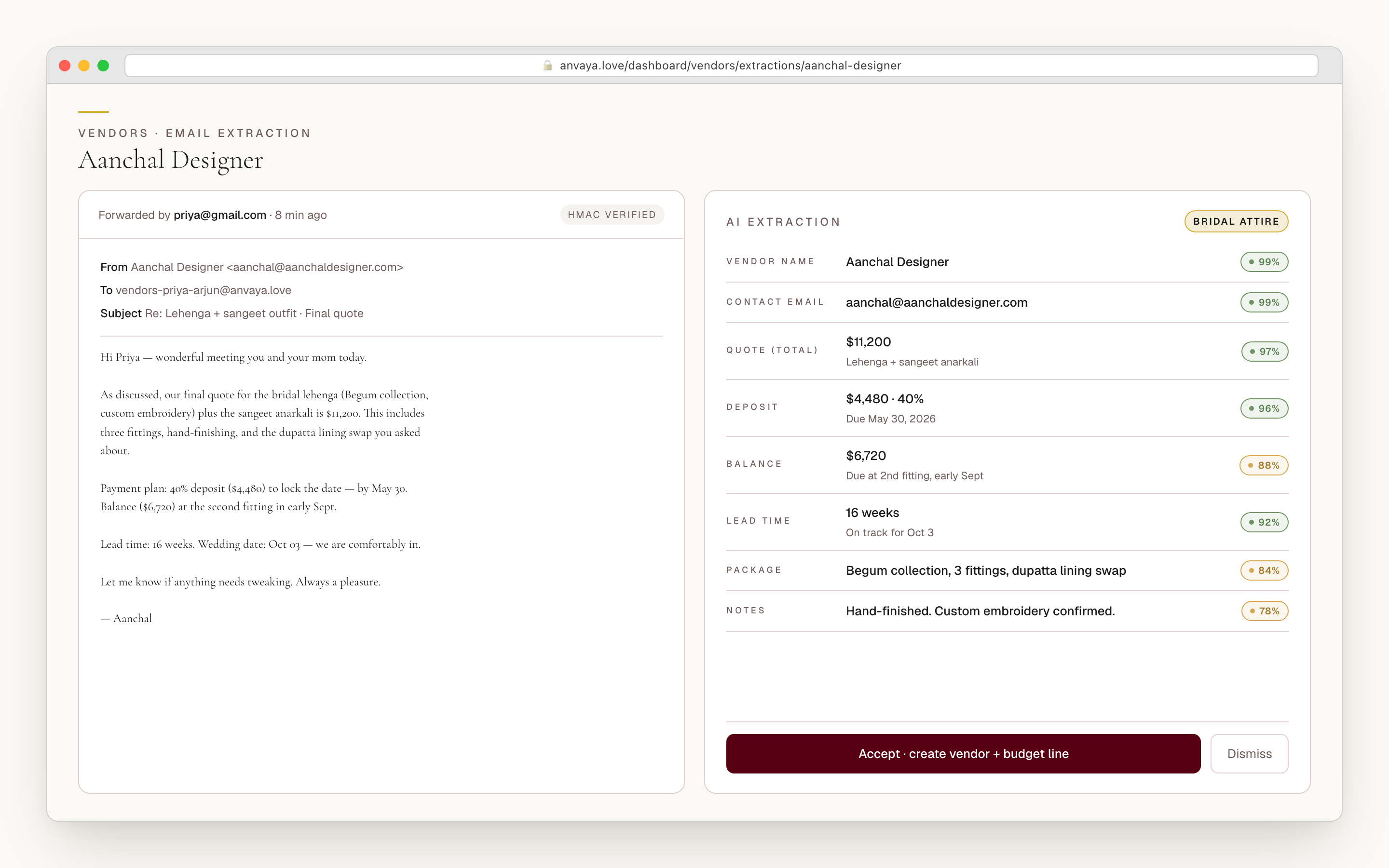
Every wedding workspace gets its own forwarding address — something like vendors-aritra-meghan@anvaya.love, one tap to copy. Forward a photographer or decorator quote there and Anvaya reads the email body and the attachments, pulls out the vendor name, contact, phone, website, location, category, and total, and condenses the package, inclusions, and payment terms into a tidy set of notes.
The extraction lands as a pending record beside the original email, so you fix anything the model misread and accept — the whole loop runs in under a minute per vendor, with nothing created behind your back.
- Per-wedding forwarding inbox: vendors-{subdomain}@anvaya.love
- Extracts vendor, contact, phone, website, location, category, and total
- Condenses package, inclusions, and payment terms into review-ready notes
- Accept creates the vendor record — and a draft budget line when the quote has a number and the category matches
- Original email kept on file, HMAC-verified, so the source is auditable
Not an email? Drop the PDF or the photo.
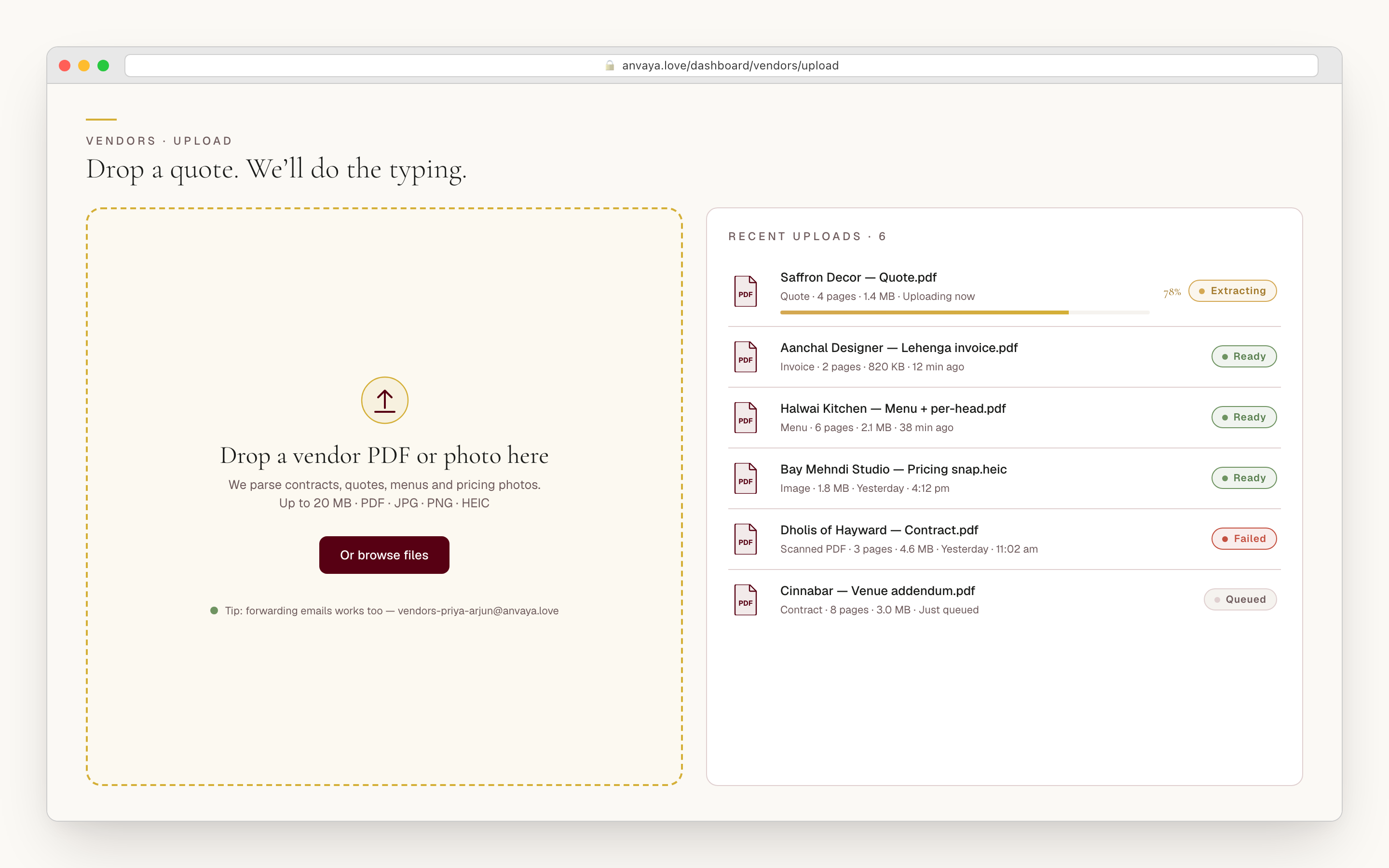
Not every vendor sends something you can forward. The decorator handed you a printed quote at the showroom. The caterer texted a photo of their menu. Drop the file in — PDF, JPEG, PNG, WebP, or GIF, up to 10MB — and it runs the same extraction as the forwarded-email path, into the same review-and-accept flow.
Already keep your vendors in a sheet? Paste or upload the CSV and Anvaya reads every row into review at once, each mapped to a category, and flags likely duplicates so the same caterer never lands in your list twice.
- Accepts PDF, JPEG, PNG, WebP, and GIF, up to 10MB per upload
- Bulk CSV import — every row read into review, auto-mapped to a category
- AI duplicate detection across email, file, and CSV — review and merge before they double up
- Rate-limited to five uploads a minute; a failed parse retries with a clear error
- Whatever the source, you always review the fields before anything is saved
COMPARE QUOTES
Three photographers, side by side, down to the line item.
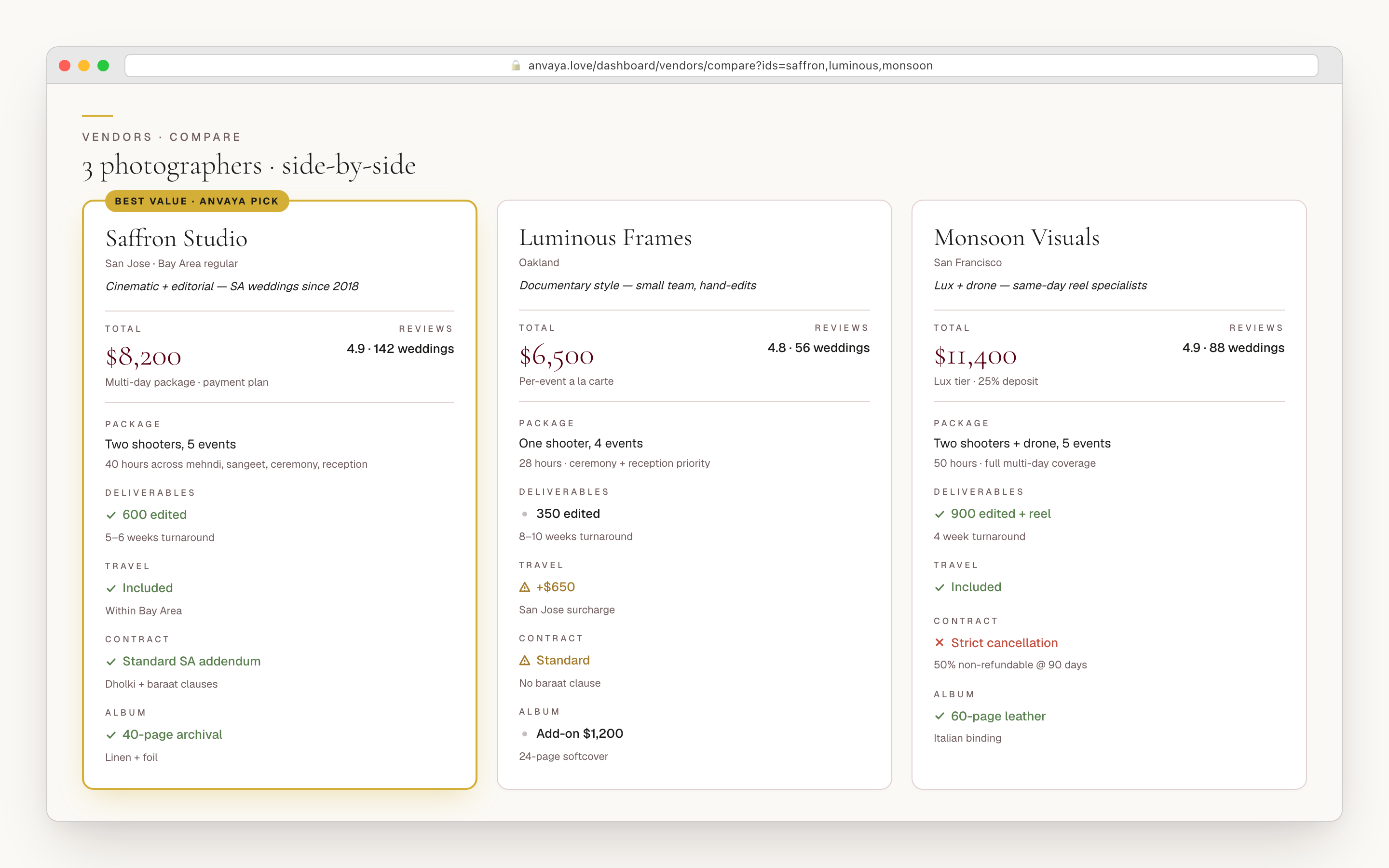
Pick two to six vendors in the same category and open the compare drawer. Anvaya lays them out as side-by-side columns — status, event, location, quote, contact, files, and more — so you read like for like instead of toggling between four screenshots in the family chat, with the lowest quote marked automatically.
Price alone misleads, so the compare goes a level deeper. Expand any quote and Anvaya shows the breakdown it captured — base cost (flat or per-head), line items, fixed fees, and the percentage charges that quietly move the real number — so the photographer who looks cheap until you read the service charge stops looking cheap.
- Compare two to six vendors in a category, side by side
- Columns: status, event, location, quote, contact, files — read at a glance
- Expand a quote into base cost, line items, fixed fees, and percentage charges
- Lowest total — and the lowest figure on each line — highlighted automatically
- Sales tax, service charge, and gratuity surfaced so the real number is honest
COMPARED
Built for the wedding US tools were not built for.
The Knot, Zola, and Joy organize around one day and one household. Anvaya makes multi-event coordination, AI quote capture, and per-line comparison first-class.
| Feature | Anvaya | The Knot | Zola | Joy |
|---|---|---|---|---|
Forward a vendor email to auto-extract the quote AI reads the email and attachments and drafts a vendor record. | ||||
Line-item quote comparison (fees, tax, gratuity) Compare base cost, line items, and percentage charges, not just a total. | Basic | Basic | Basic | |
One vendor tied to multiple ceremonies A photographer across mehndi, sangeet, and reception — not one wedding day. | ||||
South Asian vendor categories built in Officiant, procession, live performers, ceremony decor, and 14 more. | Generic | Generic | Generic | |
Per-vendor payment schedule on the budget timeline Deposit, installments, and final balance, with overdue and due-soon alerts. | Basic | Basic | Basic | |
Bulk CSV import of an existing vendor list Paste a sheet; every row is read into review and mapped to a category. | Basic |
Forward a vendor email to auto-extract the quote
AI reads the email and attachments and drafts a vendor record.
Anvaya
The Knot
Zola
Joy
Line-item quote comparison (fees, tax, gratuity)
Compare base cost, line items, and percentage charges, not just a total.
Anvaya
The Knot
Zola
Joy
One vendor tied to multiple ceremonies
A photographer across mehndi, sangeet, and reception — not one wedding day.
Anvaya
The Knot
Zola
Joy
South Asian vendor categories built in
Officiant, procession, live performers, ceremony decor, and 14 more.
Anvaya
The Knot
Zola
Joy
Per-vendor payment schedule on the budget timeline
Deposit, installments, and final balance, with overdue and due-soon alerts.
Anvaya
The Knot
Zola
Joy
Bulk CSV import of an existing vendor list
Paste a sheet; every row is read into review and mapped to a category.
Anvaya
The Knot
Zola
Joy
Competitor capabilities as of June 2026; they change — verify on each site.
Existing accounts
Stop retyping vendor quotes
into a spreadsheet.
Existing accounts keep access to vendor imports and quote tracking. This feature is unavailable to new signups.
Track every deposit before it slips.
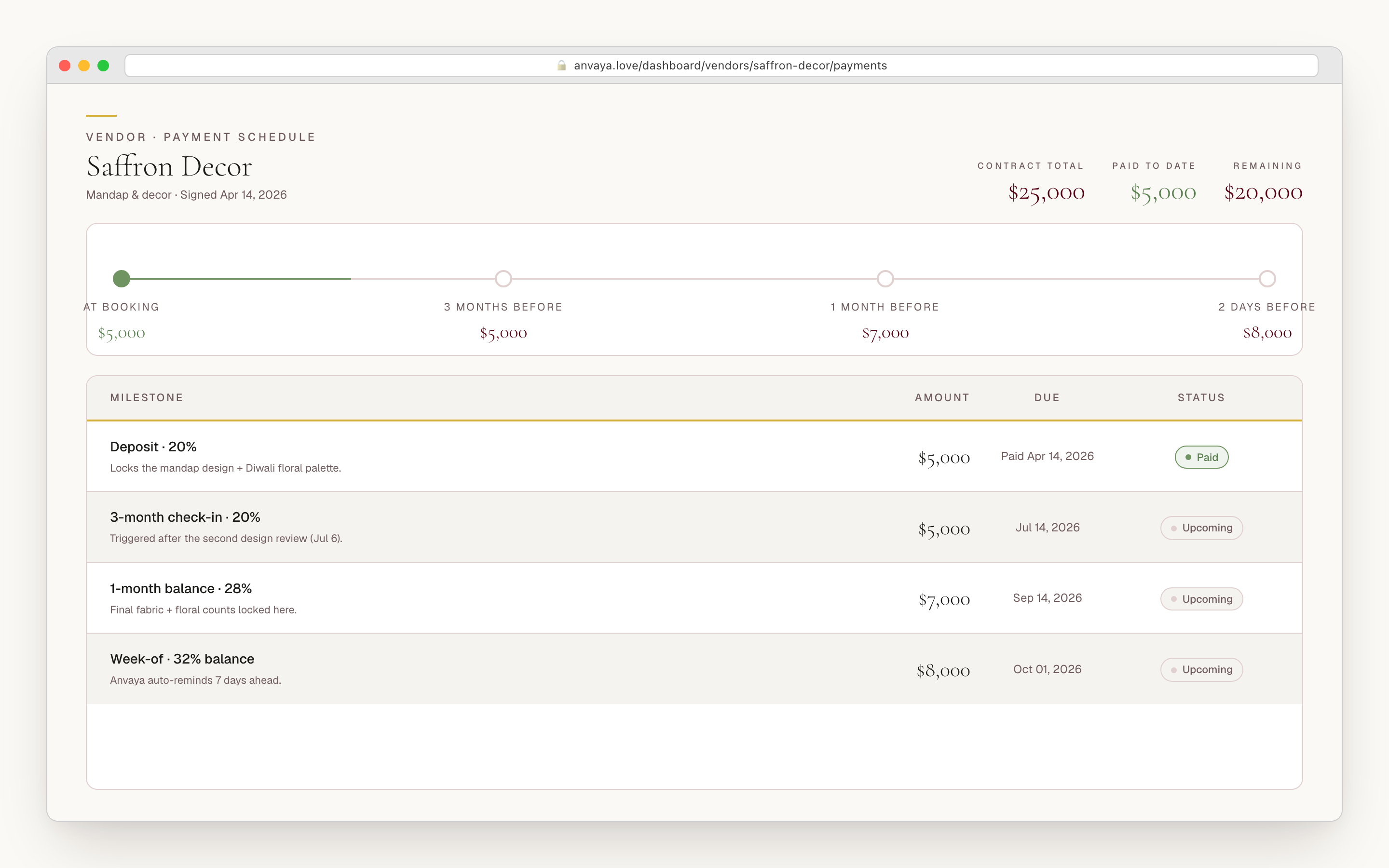
Each vendor carries a payment schedule — a deposit, any installments, and the final balance, every milestone with its amount and due date. Sign the contract and attach the PDF to the record; mark a payment paid and Anvaya stamps the date. Anvaya never moves money — you pay through your bank, wire, or Zelle, and it keeps the record where the rest of the vendor lives.
Because each vendor links to a line in your wedding budget, the quote becomes the allocation and the payment schedule IS the spend record — each milestone you mark paid adds to that line's actual, and your budget flags a deposit going overdue or coming due within thirty days, so a milestone never slips quietly.
- Payment schedule per vendor: deposit, installments, final balance
- Each milestone carries its amount, due date, and paid date
- Overdue and due-soon alerts surface on the budget so a deposit never slips
- Attach the signed contract PDF to the vendor record
- The quote becomes the budget allocation; marking a milestone paid moves the line’s actual spend by exactly that amount
- Amounts show in your chosen currency — six supported, including USD, GBP, CAD, EUR, INR, and AUD — format only, no FX conversion
BUILT FOR DESI WEDDINGS
A real pipeline, the categories desi weddings use, the events to match.
Every vendor moves through a status you set — researching, contacted, booked, paid, cancelled — or your own labels, so the list is a pipeline, not a directory. And it runs on eighteen categories built for a South Asian wedding: officiant, procession, live performers, ceremony decor, catering, photography and video, hair and makeup, beauty services, bridal attire, groom attire, jewelry, florist, invitations, cake and sweets, venue, transportation, DJ and music, and a catch-all.
Then Anvaya pins each vendor to the ceremonies it serves. The decorator dressing both the mehndi mandap and the reception ballroom shows up against both. You can scope a comparison to one category or one ceremony — everyone bidding on the sangeet — and the structure flows straight into the budget, the way a multi-event wedding is actually run.
- A real pipeline: researching → contacted → booked → paid, or your own custom statuses
- Eighteen built-in categories — officiant, procession, live performers, decor, and more
- The email extractor auto-routes each new vendor into the right category
- Pin one vendor to every ceremony it serves — mehndi through reception
- Roles for the whole family — Couple, Family Admin, Family Contributor, Guest
FAQ
Questions we hear a lot
Budget
For existing accounts: track spending across ceremonies with scenarios and joint-family contributions.
Track the budgetAnvaya AI
A built-in AI chat that adds guests, snapshots the budget, and drafts messages with you — plus the same assistant inside Claude and ChatGPT.
Plan with Anvaya AIChecklist
Starter tasks you can assign to family with due dates and ceremony filters.
See the checklistExisting accounts
Forward a quote.
Skip the typing.
Existing accounts keep access to Vendors. This feature is unavailable to new signups.