SEATING CHART
A separate seating canvas for every ceremony.
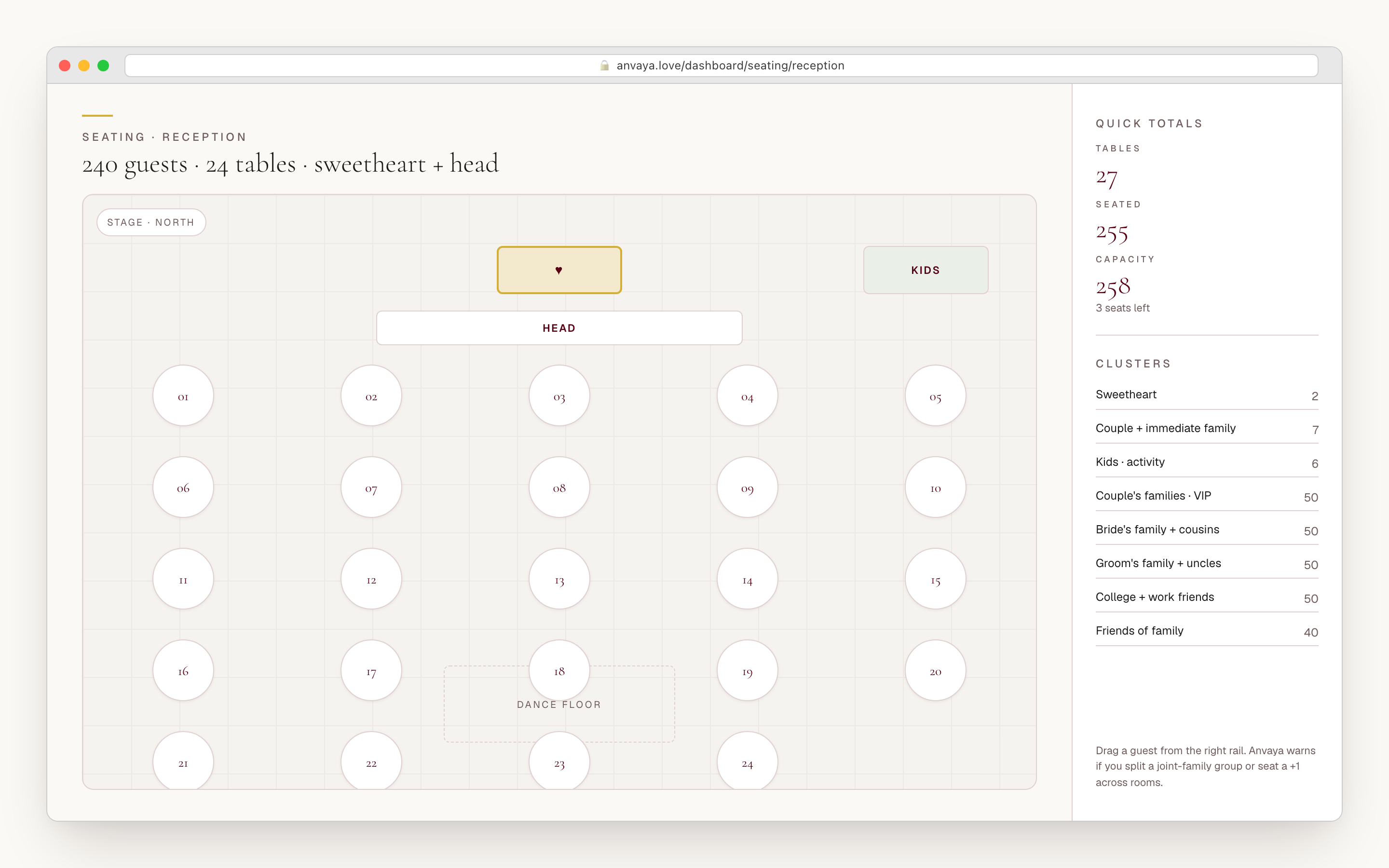
Seat the mehndi, the sangeet, and the reception from one guest list — each event its own drag-and-drop canvas. Round, rectangular, sweetheart, head, and square tables. Every confirmed plus-one gets their own chair, and the caterer leaves with a clean CSV.
Free during early access. No credit card.
- Layouts
- One canvas per ceremony
- Guests
- Plus-ones seated as people
- Handoff
- CSV + printable seat board
WHAT SINGLE-EVENT TOOLS MISS
A South Asian wedding is not one room of round tables.
A different room for every ceremony
Generic seating tools assume one reception with one floor plan. A desi weekend is a mehndi, a sangeet with a stage, a haldi, a ceremony, and a reception ballroom — each a different room with a different crowd. Anvaya gives every ceremony its own canvas, its own tables, and its own guest set, all drawing from the same list.
The same guest, seated five times
The guest invited to all five functions has to be placed in all five rooms — and each placement is its own decision. Most tools make you rebuild the chart from scratch per event or maintain parallel spreadsheets. Anvaya pulls one guest list into every ceremony, so you arrange each room independently without re-importing six hundred names.
Family politics, made visible
Whose chacha sits near the head table, whether the bride's side fills the left of the room, which uncles can't share a table — these are the decisions a desi seating chart is actually for. Anvaya tags each guest with side of family, so you can filter the unseated list to the bride's side or the groom's side and place a coherent group in one motion.
ONE GUEST LIST, EVERY EVENT
Seat every ceremony from the same guest list.
Anvaya pulls the same guest list into every ceremony you run — mehndi, sangeet, haldi, the wedding, the reception, the welcome party — and gives each one its own canvas. The guest invited to all five events appears in five seating charts. The guest who is reception-only appears in one. You never maintain parallel spreadsheets per event, and you never re-import names to start arranging the next function.
The unseated panel beside every canvas reads your live guest list for that ceremony, with one-click filter chips for Confirmed, Pending, and Declined, and for the bride's side or the groom's side. Filter to the groom's confirmed guests, drop them onto their tables, and they leave the unseated list for that event — while their reception seat stays exactly where you put it.
When a seated guest declines the week of the wedding, the chart flags it for review so you can free the seat — it surfaces the RSVP change rather than silently rearranging your room. And Anvaya won't let you delete the arrangement you're working from: the active chart and the last chart for an event are protected, so your live plan can't vanish out from under you.
- One guest list, one canvas per ceremony — never re-import names
- Unseated panel filters by RSVP state (Confirmed / Pending / Declined) and by side of family
- Each placement is independent — the mehndi seat and the reception seat are separate decisions
- A seated guest who declines is flagged for review so you can free the seat
- Delete guardrails: you can't remove the active chart or an event's last arrangement by accident
Five table shapes, the real room around them.
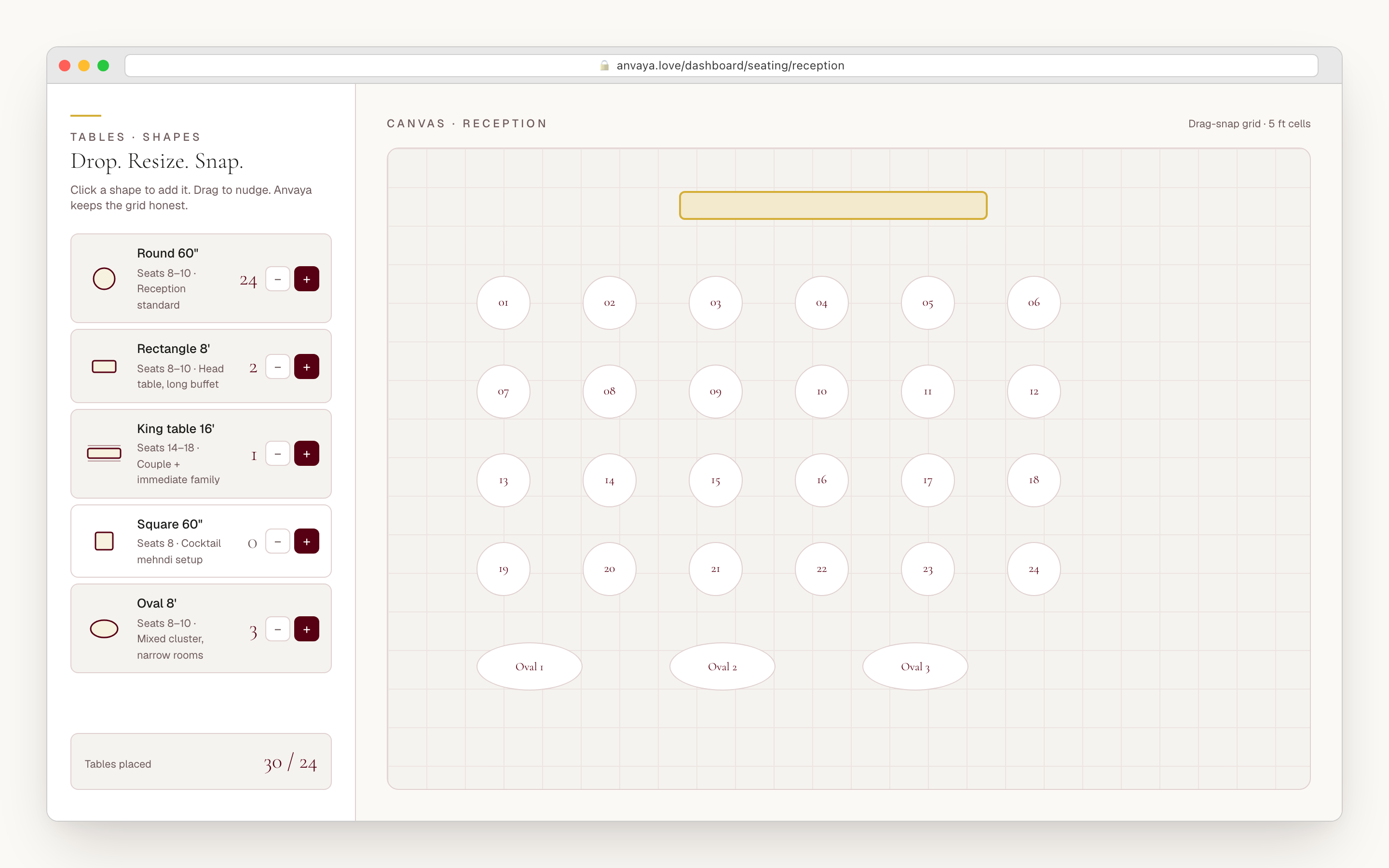
Pick the shape you actually rented. Anvaya ships five built-in tables — round, rectangular, sweetheart, head table, and square — each with a sensible default seat count you can edit per table. Drop a head table down the centre for the wedding party, ring rounds of eight or ten around it for extended family, and set a sweetheart for two where the couple sits.
Then build the rest of the room. Drop a stage, a dance floor, a DJ booth, a bar, a buffet, and entrances and exits onto the canvas so the floor reads the way it will on the night — not just a field of disconnected tables. Drag a guest from the unseated panel onto a seat and the placement saves on its own. Move a guest from one seat to another, or drag a whole table and its seats travel with it. Rotate any table to any angle and label it by host family or by the number the caterer expects.
Everything auto-saves about every two seconds, and undo and redo reach back up to fifty steps — so you can pull the room apart, try a bolder arrangement, and walk it back without losing the version you liked. If a table goes over capacity, the seated count flags inline so you never quietly overpack a round the venue can't fit.
- Five built-in shapes: round, rectangular, sweetheart, head table, square — editable seat counts
- Room fixtures: stage, dance floor, DJ booth, bar, buffet, entrances and exits
- Drag a guest, a seat, or a whole table on desktop; tap a guest then tap a seat on mobile — auto-saves about every two seconds
- Undo and redo up to fifty steps; rotate any table to any angle
- Over-capacity tables flag inline so you never overpack a round
Each ceremony is its own layout, edited on its own.
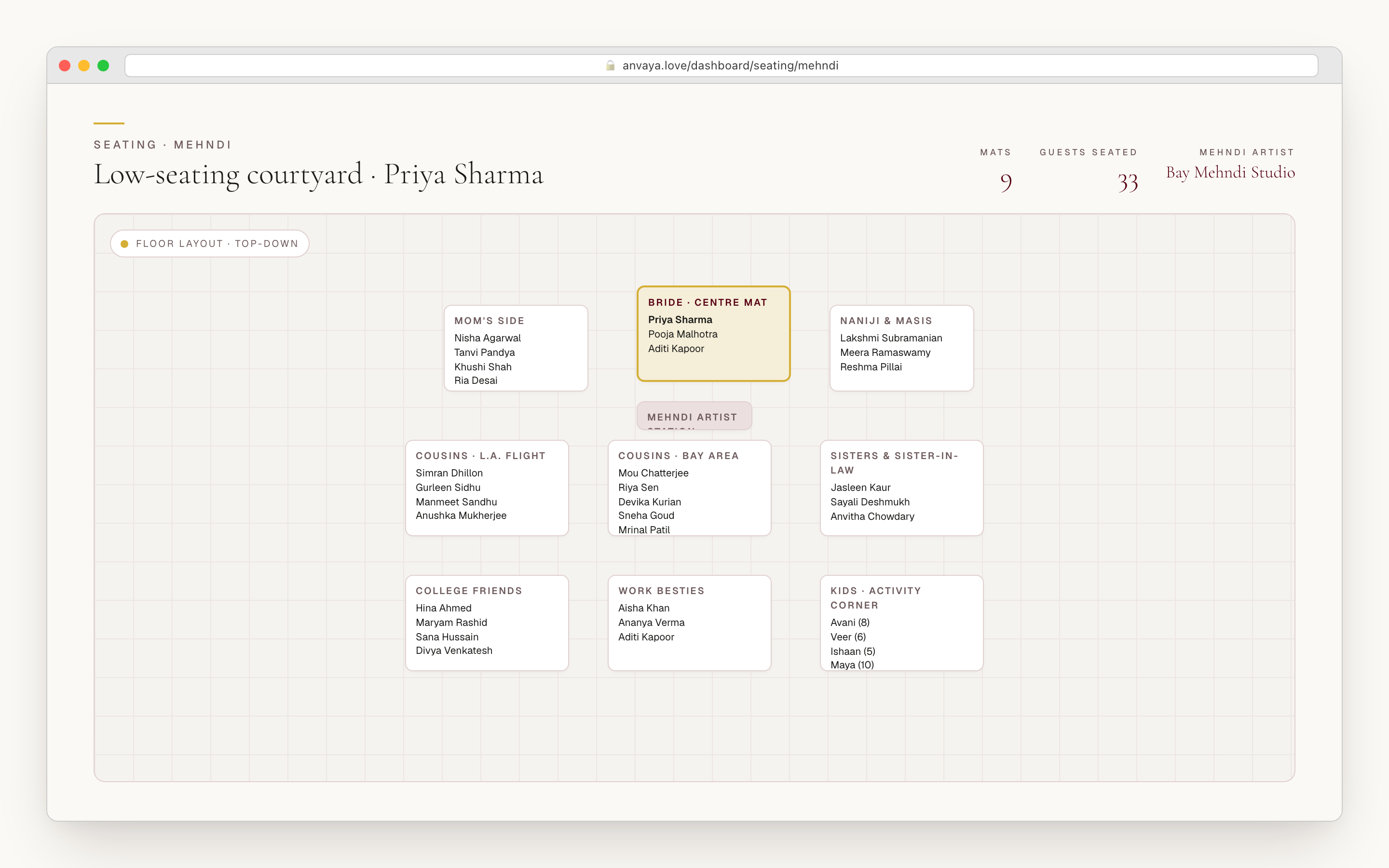
Every seating chart belongs to one ceremony. The reception is round tables for ten with a head table at the centre. The sangeet has a stage, a dance floor, and family up front. The mehndi is its own room again, with low rectangular tables you label by family and a stage for the artists. Each one has its own tables, its own capacities, and its own fixtures.
Because the layouts are separate objects, editing the mehndi the week of the wedding never touches the reception arrangement you finalised a month ago. Reshape one room and the others hold. The guest who moved tables at the reception is untouched at the sangeet — three placements, one workspace, no cross-contamination.
- Per-ceremony canvases — mehndi, sangeet, haldi, wedding, reception each its own room
- Each layout is a separate object — editing one ceremony never touches another
- Its own tables, capacities, and fixtures per event
- Model the mehndi as low rectangular tables you label by family, with a stage for the artists
Every confirmed plus-one gets their own chair.
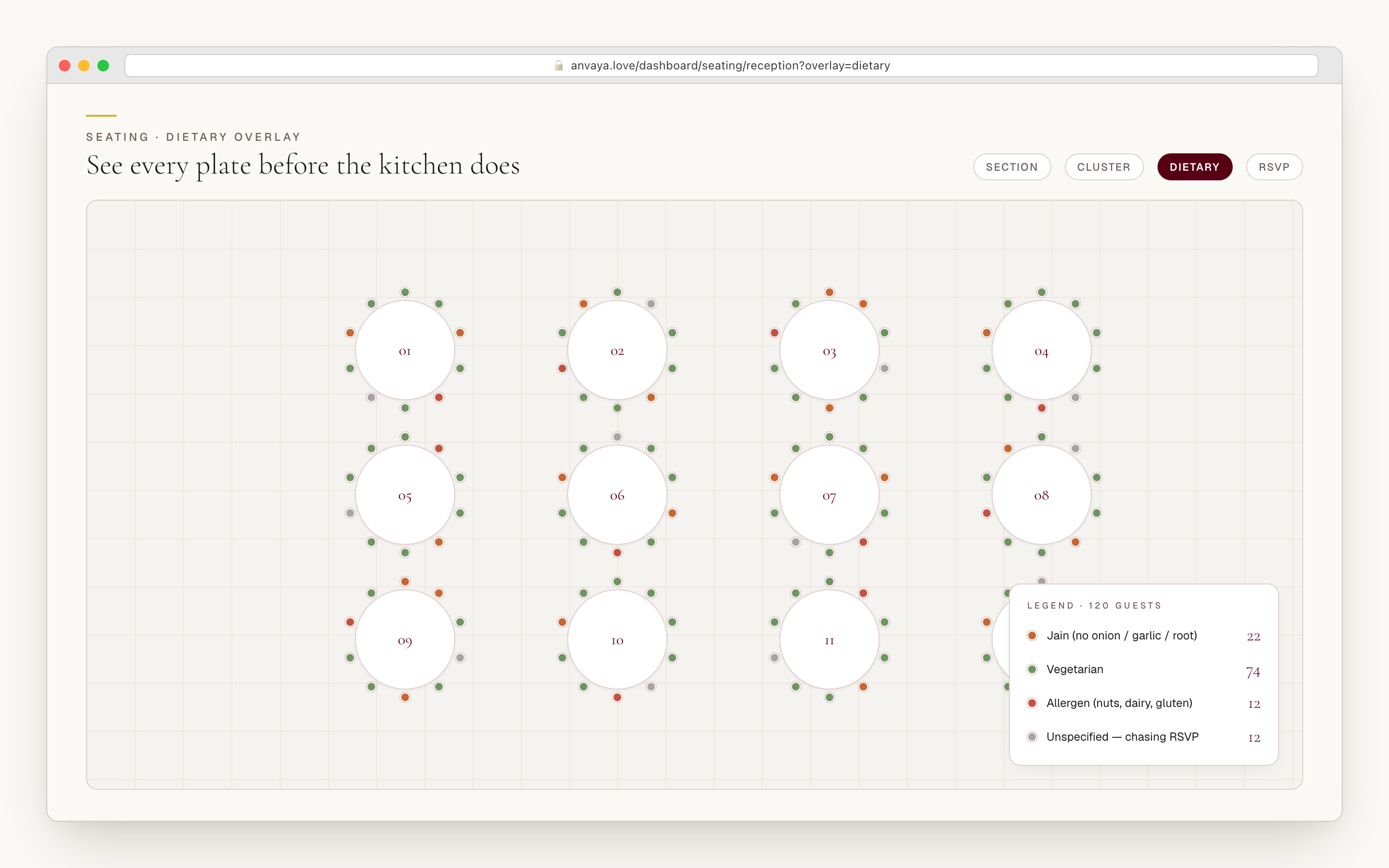
A desi guest list isn't six hundred names — it's six hundred families. Tools that treat a guest as one row leave you guessing how many chairs a household actually needs. Anvaya expands every confirmed plus-one into its own seatable person: a family of six lands six chairs, not one. Each additional attendee carries their own RSVP, and a declined plus-one is dropped automatically — you never seat a chair nobody's using.
On the canvas, each seat shows the guest's RSVP state as a colour — confirmed, pending, or declined — and their initials, so a glance tells you which seats are real and which are still placeholders. Plus-ones read as “with [guest]” so you always know which household a chair belongs to, and that same labelling carries straight through to the export the caterer works from.
- Confirmed plus-ones are seated individually — a family of six gets six chairs
- Each plus-one carries its own RSVP; declined plus-ones drop off automatically
- Seats show RSVP state as a colour (confirmed / pending / declined) plus initials
- Plus-ones read as "with [guest]" on the canvas and in the export
Try two plans, then hand the winner to the caterer.
Seating is rarely settled on the first pass. Every ceremony can hold more than one named plan: fork the one you have to a second copy — same room, same guests, a different arrangement — and compare the two side by side. When one wins, star it as the active plan; a gold star marks it everywhere, including on the printed board and the CSV. The version you didn't pick stays parked, so nobody loses a Saturday redrawing the room from memory.
When a chart is final, export a CSV the caterer and venue can work from: table, seat number, guest name, side of family, and RSVP status, with plus-ones labelled by household. For the night of the wedding, print the “Find Your Seat” board — an alphabetical guest index plus a per-table name listing, set in the same Cormorant typeface as the rest of the stationery — and post it at the venue entrance.
- Name more than one plan per ceremony, then compare two side by side
- Star the plan you want as active — a gold star marks it on the board and the export; the other stays parked
- CSV export: table, seat number, guest name, side, RSVP status (plus-ones labelled by household)
- Printable “Find Your Seat” board — guest index plus per-table listing in the wedding typeface
COMPARED
Anvaya seating vs the tools couples already try.
AllSeated, WeddingMapper, and Prismm are capable single-event seating tools. Anvaya's difference is that a multi-ceremony weekend — mehndi, sangeet, reception, each its own canvas — is the default, not a workaround.
| Feature | Anvaya | AllSeated | WeddingMapper | Prismm |
|---|---|---|---|---|
A separate canvas per ceremony Each event gets its own tables, capacities, and fixtures — drawn from one guest list. | Unknown | |||
Same guest, independent placement per event The guest at five functions is seated five times — each placement its own decision. | Unknown | |||
Drag-and-drop assignment with auto-save Drop guests onto seats, swap seats, move whole tables — saved as you go. | ||||
Undo / redo history Step back up to fifty changes — experiment freely while you arrange. | Unknown | Unknown | Unknown | |
Plus-ones seated individually Every confirmed additional attendee gets their own chair and RSVP — a family of six lands six seats. | Unknown | Unknown | Unknown | |
Fork + side-by-side arrangement compare Copy a ceremony plan, A/B two layouts, promote the winner to active. | Unknown | Unknown | Unknown | |
Linked to your RSVP / guest list The unseated panel reads your live guest list per ceremony, with Confirmed / Pending / Declined filter chips; a seated guest who declines is flagged for review. | Unknown | |||
CSV export for caterer / venue Table, seat number, guest name, side of family, and RSVP status — plus-ones labelled by household. | Unknown | |||
Printable guest-facing seat board A "Find Your Seat" index plus per-table listing for the venue entrance, in the wedding typeface. | Unknown | |||
Free during early access No credit card required during Anvaya early access; AllSeated and Prismm are paid SaaS. | Trial |
A separate canvas per ceremony
Each event gets its own tables, capacities, and fixtures — drawn from one guest list.
Anvaya
AllSeated
WeddingMapper
Prismm
Same guest, independent placement per event
The guest at five functions is seated five times — each placement its own decision.
Anvaya
AllSeated
WeddingMapper
Prismm
Drag-and-drop assignment with auto-save
Drop guests onto seats, swap seats, move whole tables — saved as you go.
Anvaya
AllSeated
WeddingMapper
Prismm
Undo / redo history
Step back up to fifty changes — experiment freely while you arrange.
Anvaya
AllSeated
WeddingMapper
Prismm
Plus-ones seated individually
Every confirmed additional attendee gets their own chair and RSVP — a family of six lands six seats.
Anvaya
AllSeated
WeddingMapper
Prismm
Fork + side-by-side arrangement compare
Copy a ceremony plan, A/B two layouts, promote the winner to active.
Anvaya
AllSeated
WeddingMapper
Prismm
Linked to your RSVP / guest list
The unseated panel reads your live guest list per ceremony, with Confirmed / Pending / Declined filter chips; a seated guest who declines is flagged for review.
Anvaya
AllSeated
WeddingMapper
Prismm
CSV export for caterer / venue
Table, seat number, guest name, side of family, and RSVP status — plus-ones labelled by household.
Anvaya
AllSeated
WeddingMapper
Prismm
Printable guest-facing seat board
A "Find Your Seat" index plus per-table listing for the venue entrance, in the wedding typeface.
Anvaya
AllSeated
WeddingMapper
Prismm
Free during early access
No credit card required during Anvaya early access; AllSeated and Prismm are paid SaaS.
Anvaya
AllSeated
WeddingMapper
Prismm
Competitor capabilities as of June 2026 — they change; verify on each provider’s site. Anvaya rows reflect shipped functionality.
Questions we hear a lot
RSVP & Guests
Free, per-event online RSVP with text and email reminders.
Plan the RSVPMulti-Event
Per-event guest lists, RSVP, seating, and vendors across every ceremony in your wedding.
Plan every eventVendors
For existing accounts: extract quotes from vendor emails and compare vendors side by side.
Track vendorsEarly access
Mehndi tables.
Reception rounds.
One workspace.
Free during early access. No credit card. A separate canvas for every ceremony.