One guest. Every ceremony. A different answer for each.
Anvaya is built for the South Asian wedding weekend — mehndi to reception — where the guest list, the budget, and the answers shift with every event. Guests, vendors, seating, your website, and Anvaya AI all read from one plan.
Free during early access. No credit card.
- Events
- Twelve ceremony templates in one workspace
- Guests
- Per-event RSVPs and private links
- Website
- Your whole site, built from your story
WHAT GENERIC TOOLS MISS
Four things every other planner gets wrong.
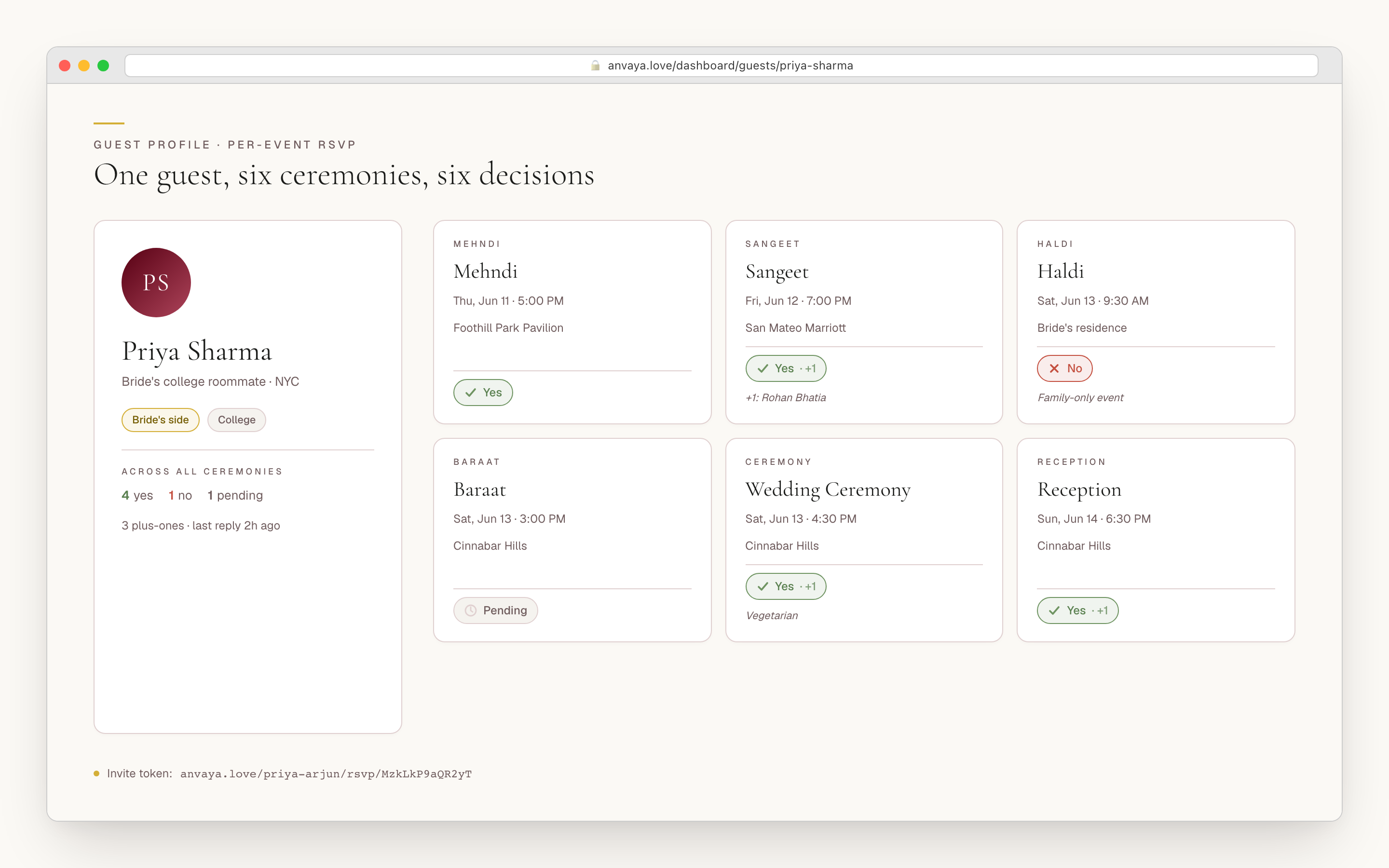
Per-event guest invites
Your phupha comes to the mehndi only. The bride's college friends are everywhere. Anvaya tracks an RSVP per ceremony, with dietary notes, plus-ones, and seating tied to the event. General tools can bolt on extra events; Anvaya makes the multi-event guest matrix the default.
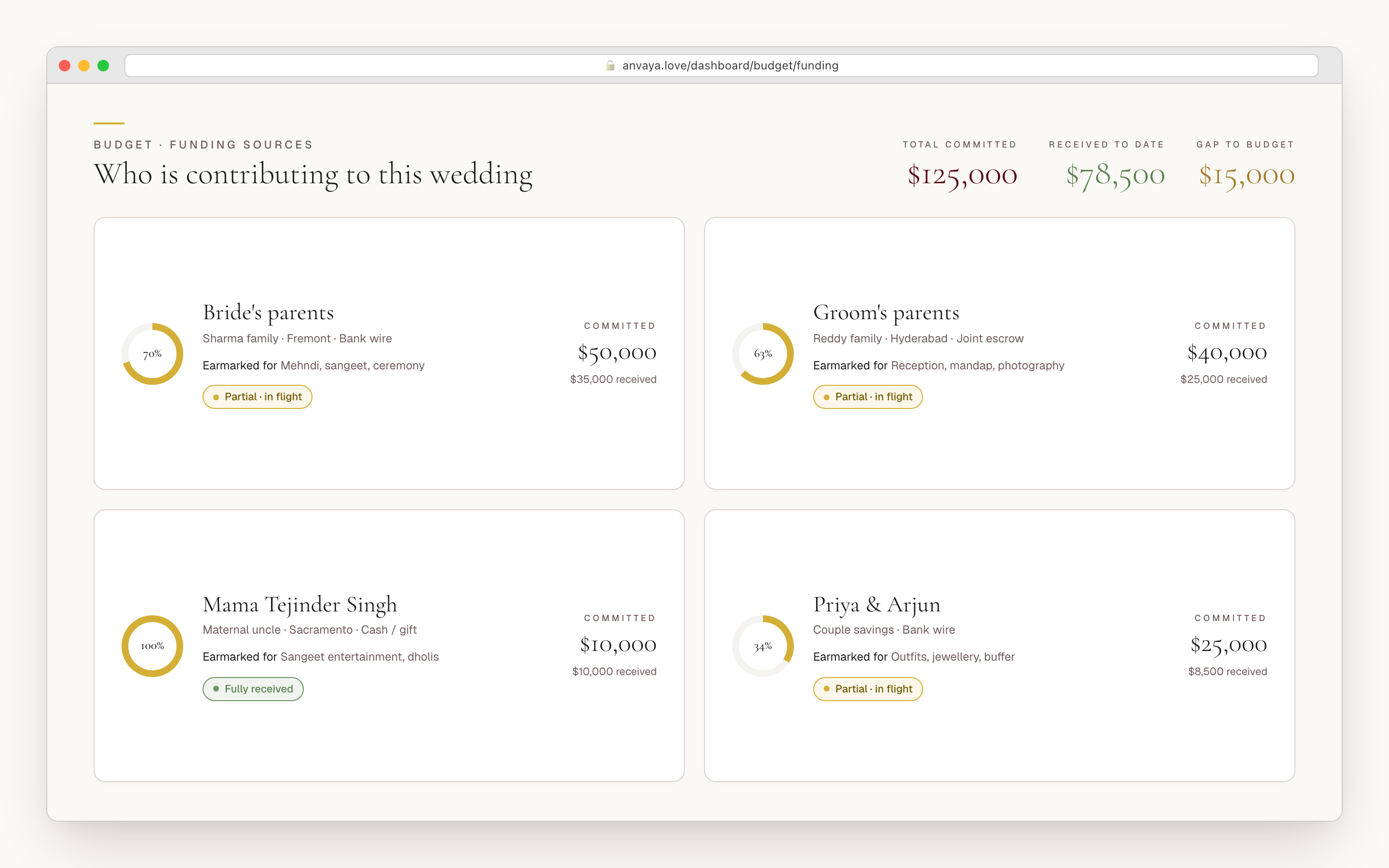
Joint-family contributions
Your parents commit $50K, his $40K, your mama gifts the dholis. Anvaya tags every funding source to a side — bride's family, groom's family, the couple, or other — beside the expenses. Most tools stop at one total; Anvaya models who is paying for what, which is the part of the conversation that actually matters.
Messages that keep the reply
South Asian families coordinate in a dozen group chats, and the answer you needed gets buried. Anvaya texts and emails each guest privately and keeps every reply on that guest's record, so reminders and questions stay in one place instead of scattered across personal phones.
Per-ceremony line items
Mehndi catering, sangeet entertainment, baraat procession, reception bar — each its own budget line under the right ceremony, with the right vendor attached. Single-event tools force three days of catering into one row nobody wants to defend to dad. Sixteen categories come pre-tagged so the math stays clear.
PLAN EVERY EVENT
Every ceremony, on the same calendar.
A South Asian wedding is rarely one day. The mehndi, sangeet, haldi, ceremony, and reception each carry their own logistics: who is invited, who is paying, which vendor is on site, what starts when. Anvaya gives every ceremony its own surface and ties it back to the same budget, vendor list, guest list, and tasks.
Starter task templates give the plan a shape on day one, and families add the work their traditions need. Budget categories work the same way — event-aware, vendor-linked, and clear enough for both sets of parents.
When the number is contested, model two budgets side by side — the dream and the one dad approved — compare them, and mark one as the plan.
One website. One RSVP. Every ceremony.
Your guests get one link. Behind it: a wedding website with your story, the ceremonies, venues, and travel notes, plus an RSVP that asks event by event. Yes to the sangeet, no to the haldi, plus-one for the reception — one submission, all linked to your dashboard.
Your website starts with three questions (how it should feel, your story, your photos), then we build it, with the pages your weekend needs. Save-the-dates go by email or private link; RSVP reminders follow by text or email from the same guest list.
Guests never make an account. They open a private link, see only the events they are invited to, and answer.
RUN THE DAY
When the weekend arrives, nothing is missing.
The week of the wedding is when the spreadsheet breaks — vendor confirmations, seating that respects family politics, guest messages, last-minute swaps. Anvaya is built for what happens between Wednesday and Sunday.
Forward a vendor email to a special address and Anvaya extracts the quote, contract terms, and deposit into a comparable card. Line three photographers up side by side and decide on the contract, not the Instagram grid. Vendor payments track deposits, balances due, and final dates so nothing is paid twice and nothing is forgotten.
Seating is drag-and-drop and per-event — round tables for the reception, long tables for the rehearsal dinner, a sweetheart for the couple — with five table shapes to choose from. Each ceremony gets its own canvas, because the room is different every day. Anvaya even reads sunrise and sunset at the venue, so the haldi lands in morning light.
Texts and email run two-way: a guest replies and the message lands in the same dashboard thread, on their record. Draft a template, send to a slice of the list — everyone coming to the haldi, everyone who hasn't replied — and watch delivery status update as messages land. Texts reach US and Canadian numbers and email reaches everyone, and the activity log shows who changed what — with a one-tap undo on the rows you didn't mean.
Anvaya AI works inside ChatGPT and Claude.
Anvaya AI works from the wedding data already in your workspace. Through the Anvaya MCP server, assistants read structured guests, RSVPs, budget lines, vendors, events, and tasks instead of guessing from a pasted spreadsheet.
Ask for a photographer comparison and the answer uses the real quote fields. Ask for a reminder to everyone pending on the sangeet and the draft starts from the right segment. OAuth scopes, role checks, and the activity log keep the assistant inside the same permission model as the rest of Anvaya — and every change is yours to confirm.
THE MONEY CONVERSATION
Both sides see the same clean numbers.
Every contribution is tagged to a side — bride's family, groom's family, the couple, or other — and the dashboard shows who has committed and spent, in real time. No flat total to argue over. No passive-aggressive group chat.
12
Ceremony templates
32
Pages a site can hold
18
Vendor categories
✓
ChatGPT + Claude
Questions we hear a lot
Plan the wedding
your family is already planning.
Free to start. No credit card. Built for South Asian weddings.