Plan Your Wedding with ChatGPT

Anvaya is a wedding planning workspace for guests, vendors, budget, events, tasks, dress codes, dietary preferences, the works. It's now an app inside ChatGPT. Connect it once and all of that becomes part of every chat. Ask ChatGPT a wedding question and you get two things at once: what's in your workspace, paired with what ChatGPT already knows about hotels, vendors, traditions, and pricing.
This page explains how to add it, what you can do once it's connected, what permissions it has, and how to troubleshoot if something goes sideways.
Add it to ChatGPT#
- Open ChatGPT and find Anvaya. Tap the + in the message box and open Apps (or go to Settings → Apps & Connectors), then search for Anvaya. You can also open the Anvaya app page directly and tap Start chat.
- Connect your account. You'll be sent to anvaya.love to sign in. Use the same account you use for your dashboard. If you're new to Anvaya, you can create your account right from Connect.
- Approve. Anvaya shows its own consent screen. Review the requested permissions and click Authorize. You'll be sent back to ChatGPT automatically.
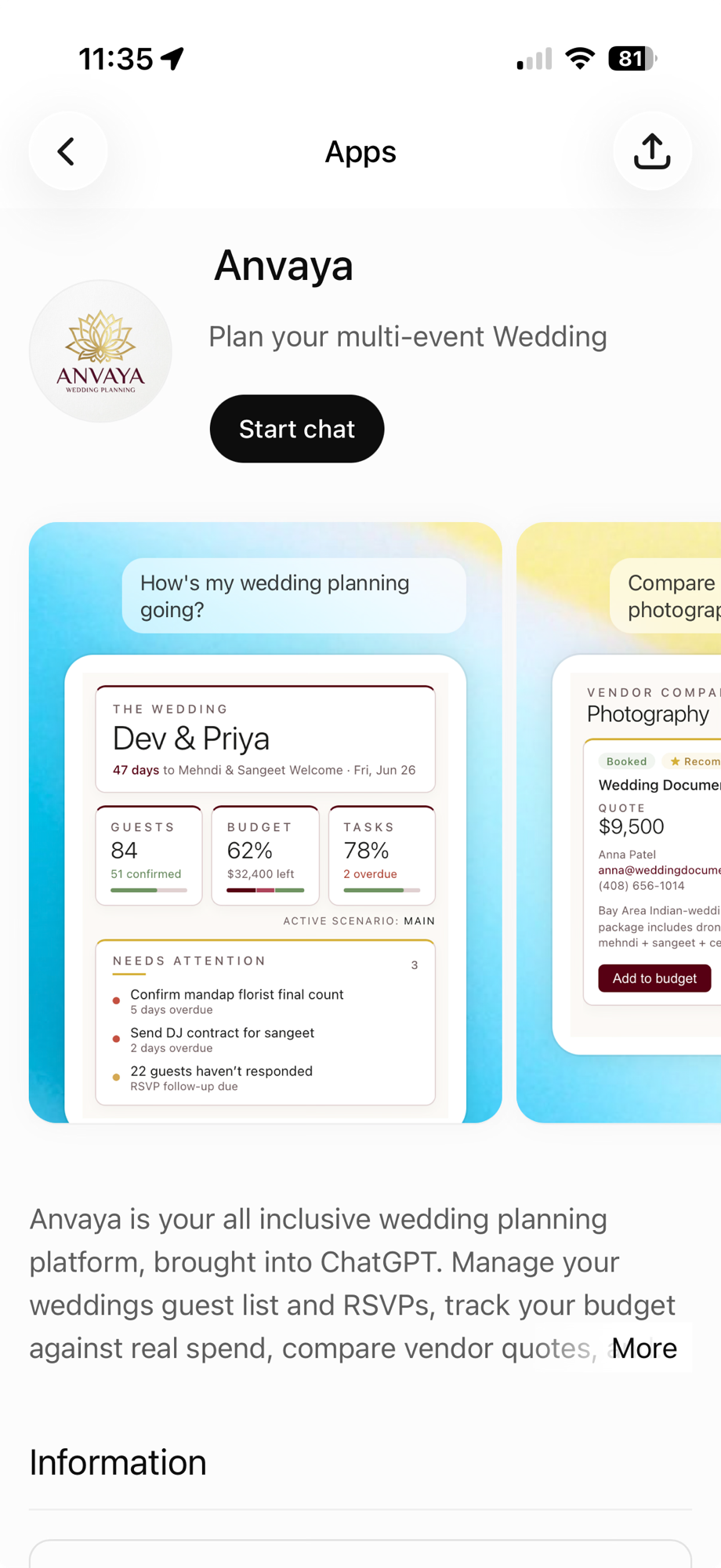
That's it. Once Anvaya is connected, just ask a wedding question — start your message with "Anvaya" or pick it from the + menu and ChatGPT will pull from your real wedding. How often ChatGPT asks before it uses Anvaya depends on the permission level you set for the app, covered below.
Five prompts to try tonight#
"Help me plan my wedding"#
The catch-all opener. ChatGPT calls get_dashboard, reads your full wedding snapshot (days to the next event, guest count and confirmation rate, budget progress, task completion), and tells you what needs attention — as a card, not a wall of text.
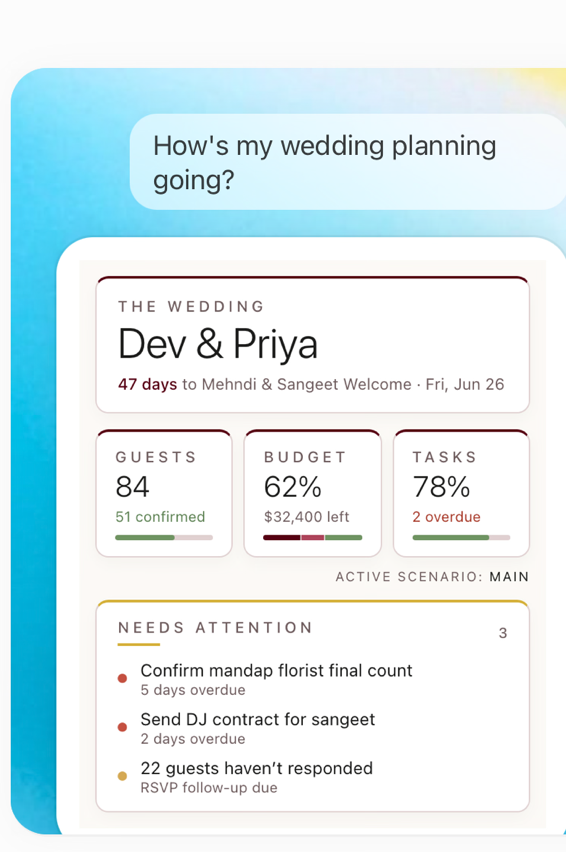
In the example above ChatGPT surfaces 47 days to the next event, 84 guests with 51 confirmed, the budget at 62% with $32,400 left, two overdue tasks, and the three things that need attention first — the mandap florist count five days overdue, the sangeet DJ contract, and 22 guests still silent. All grounded in your real data. No generic checklist.
"Who still hasn't RSVP'd?"#
ChatGPT shows how many guests are attending, maybe, not attending, or haven't responded yet, counting each guest once. Below that is a bar for every event you're tracking.
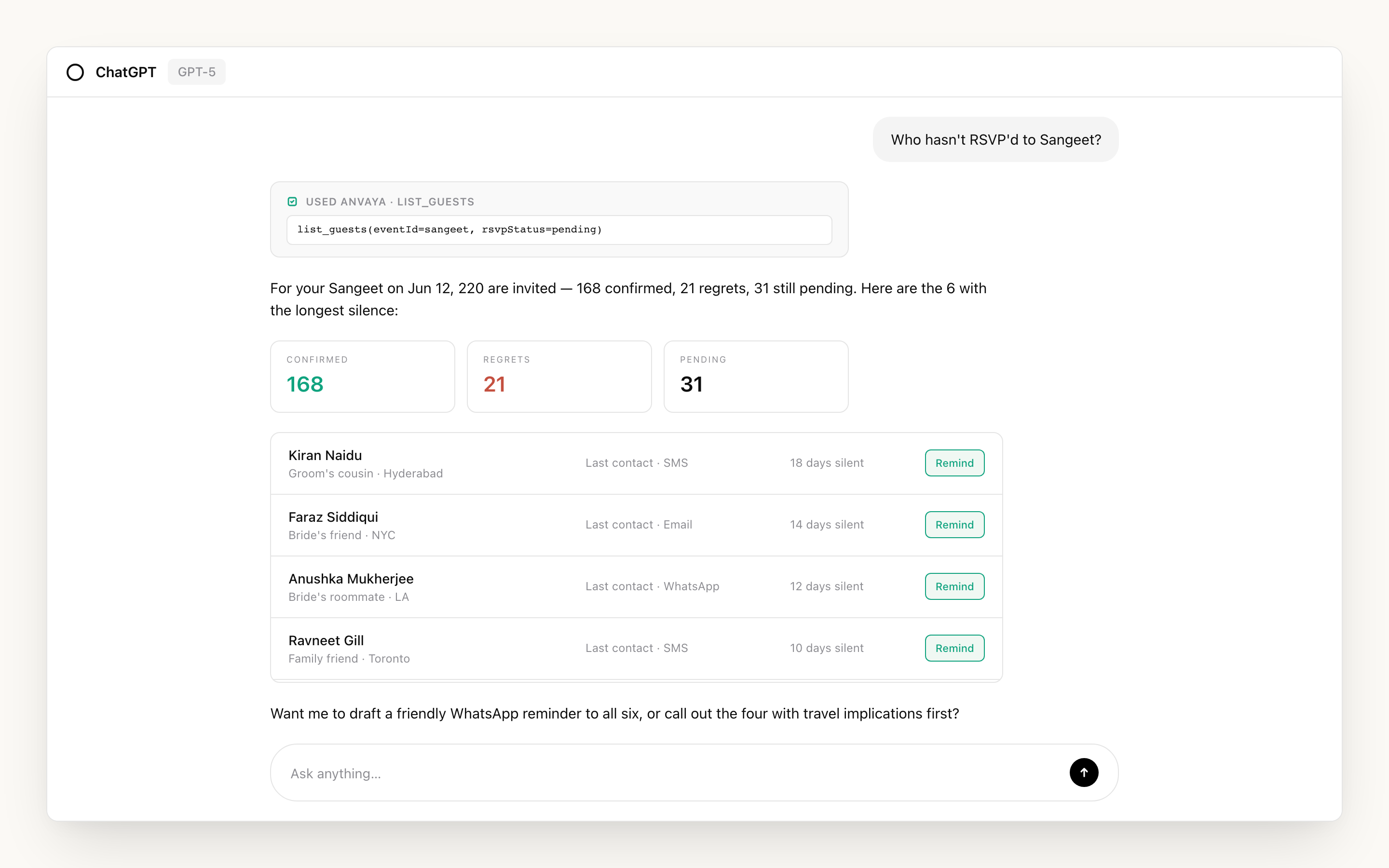
Each event shows how many guests confirmed out of how many were invited, and the days until it. Ask ChatGPT to draft a reminder for the guests who haven't replied. ChatGPT writes it in the chat; you send it yourself from the Messages page in Anvaya.
"How's my budget looking?"#
ChatGPT reads your budget (total, allocated, spent, remaining) and flags categories running over. In the overview above it's 62% allocated with $32,400 left — but the headline number hides the trouble spots.
Photography running 18% over and florals 16% over isn't something you'd notice scrolling a spreadsheet. ChatGPT surfaces it inline as a breakdown with the over-budget lines flagged, and can drill into either category if you ask.
"Compare my photographer options"#
ChatGPT reads every saved photographer quote (package, hours, contact, status) and lays them side-by-side as a comparison card — the same one previewed on the Anvaya app page.
Booked vendors get a green pill. When one vendor clearly has the lowest quote, the card gives it a gold "Recommend" pill; the card picks it from the quotes, not ChatGPT. You can ask ChatGPT to weigh the options beyond price, or to draft a follow-up to the others.
"What tasks need attention this week?"#
ChatGPT reads your task list and groups by urgency: overdue first, then this week.
Each card shows the task, how overdue or how soon, and the category. Ask ChatGPT to check items off as you finish, or mark one done on the card, which asks you to confirm first.
What ChatGPT can and can't do#
It can read: guests, vendors, budget, events, tasks, comments, RSVP status, activity, signals.
It can write: add or edit guests, vendors, budget items, tasks, and events, and add comments. ChatGPT may ask you to approve a change, depending on the permission level you've set for Anvaya in ChatGPT: Always ask, Allow read actions, Allow low-risk actions (the default), or Allow all actions. With the last two, some changes can run without asking.
It cannot: send a message, email, or text. ChatGPT can draft one in the chat; you send it from the Messages page in Anvaya. It also can't access weddings you don't have a role on, or do anything your Anvaya role doesn't allow. A Family Contributor through ChatGPT has Family Contributor permissions, not more.
Changes ChatGPT makes show up on the Activity feed in your Anvaya dashboard, with what changed, when, and an AI tag. You can edit most changes back by hand, but deletes are permanent, so read a delete request carefully before you approve it.
For a full enumeration of every action ChatGPT can take, see the appendix below.
Troubleshooting#
ChatGPT is giving you generic answers without checking Anvaya. ChatGPT decides on its own when to use a connected app. Nudge it: start your message with "Anvaya," pick Anvaya from the + menu, or be slightly more specific, like "look at my actual mehndi event" or "use my real guest list."
ChatGPT says it can't find your wedding. The app might be connected to a different wedding, or your sign-in expired. Reconnect from Settings → Apps & Connectors → Anvaya, or remove and re-add it from the apps directory.
You see a "permission denied" error. Your role on the wedding doesn't allow that action. Member management requires Couple permissions. Deletes require Family Admin or higher, except that a Contributor can delete their own comments.
Something looks wrong on the Activity feed. Open the affected record in the Anvaya dashboard. Every record can be edited or deleted manually.
Removing the app#
In ChatGPT, go to Settings → Apps & Connectors → Anvaya → Disconnect. One click. Your data stays exactly where it was, the connection just goes cold.
Support#
support@anvaya.love. Include your wedding subdomain and the prompt that caused the issue if you can.
The point of connecting ChatGPT to Anvaya isn't to replace planning with AI — it's to stop typing the same facts about your wedding into a chat window over and over. Once ChatGPT can see your real guest list, real budget, and real timeline, the assistant goes from generic helper to second pair of eyes on the plan you're already running. Try the five prompts above on a slow Sunday, see which ones save you the most copy-paste, and keep going from there.
Already live in Claude instead? The same workspace connects there too — see Plan Your Wedding with Claude.
Not yet on Anvaya? Request early access — it's free during early access and built for South Asian weddings from the first ceremony onward.
Appendix: all 55 tools#
Show all Anvaya tools
Every tool the Anvaya app gives ChatGPT: 54 that read or change your wedding, grouped by domain, and one that lets ChatGPT report a missing tool. Read tools only return data. Before a write, ChatGPT may ask you to approve it, depending on the permission level you've set for Anvaya.
Dashboard (2)#
| Tool | What it does |
|---|---|
get_dashboard | Wedding overview: guest count, RSVPs, budget, vendors, upcoming events, near-due tasks. |
get_rsvp_summary | RSVP breakdown per event plus a wedding-wide per-guest summary and dietary aggregates. |
Guests (7)#
| Tool | What it does |
|---|---|
list_guests | List guests with filters: side, tag, RSVP status, event, group, name/email search. |
get_guest | One guest's full record: events, per-event RSVP, dietary preferences, and any plus-ones travelling with them. |
add_guests | Add one or more guests in a single call. |
update_guests | Edit guests, per-row patches or one shared patch across many. |
assign_guests_to_events | Invite guests to events. Produces the cross product (every guest × every event). |
delete_guest | Delete one guest. Cascades to invites, RSVPs, seats, and their plus-one rows. Requires Family Admin. |
delete_guests | Bulk-delete guests. Returns deleted IDs plus IDs that weren't found. |
Budget (9)#
| Tool | What it does |
|---|---|
get_budget_summary | Active scenario overview: total, allocated, spent, remaining, top categories. |
list_budget_items | List line items in a scenario, optionally filtered by category. |
add_budget_items | Add one or more budget line items to a scenario. |
update_budget_item | Edit a line item (name, amounts, payer, notes, category). |
set_total_budget | Set the active scenario's total budget. |
delete_budget_item | Delete a line item. Refuses if there are completed payments. |
create_budget_category | Create a new category in the active scenario. |
delete_budget_category | Delete one or more categories. |
unmark_payment_paid | Reverse a payment marked paid. The line's actual spend drops by that amount. |
Vendors (6)#
| Tool | What it does |
|---|---|
list_vendors | List vendors. Filter by status or category. |
get_vendor | One vendor's full detail: attachments, quote, linked budget item. |
compare_vendors | Side-by-side compare of 2-5 vendors. Returns the comparison and any IDs that didn't resolve. |
add_vendor | Add a vendor (name, category, contact, quote, status, notes). |
update_vendor | Update vendor details. Status changes follow a state machine: Researching → Contacted → Quoted → Booked → Paid. |
delete_vendor | Permanently delete a vendor and its directly-owned data. Requires Family Admin. |
Tasks (6)#
| Tool | What it does |
|---|---|
list_tasks | List tasks. Filter by status, priority, category, event, assignee, due-date window, overdue, search. |
add_tasks | Create one or more tasks. Optionally assigned to a member or linked to an event. |
update_task | Edit one task's fields. |
update_tasks_status | Mark one or more tasks Done / In Progress / To Do at once. |
delete_task | Delete one task. Requires Family Admin. |
delete_tasks | Bulk-delete tasks. |
Events (6)#
| Tool | What it does |
|---|---|
list_events | List events with dates, locations, and guest counts. |
get_event | One event's details, its exact RSVP counts and a short guest list. |
add_events | Create one or more events at a time (multi-day SA weddings often dictate 4-7 events). |
update_event | Edit an event's details (name, date, location, dress code, ceremony type). |
delete_event | Permanently delete an event and its guest assignments. Requires Family Admin. |
unassign_guests_from_events | Remove guests from a single event. |
Comments and activity (4)#
| Tool | What it does |
|---|---|
add_comment | Comment on a vendor, task, budget item, guest, or event. |
edit_comment | Edit a comment you authored (Family Admin and above can edit any). |
delete_comment | Soft-delete a comment you wrote (Family Admin and above can delete any). |
list_activity | Activity stream (comments and status changes). Scoped to one entity or wedding-wide. |
Signals (1)#
| Tool | What it does |
|---|---|
list_signals | Active planning intelligence signals (budget risks, timeline conflicts, vendor gaps, milestone celebrations). |
RSVP (1)#
| Tool | What it does |
|---|---|
update_guests_rsvp | Update one or more guests' RSVP responses across events. |
Guest groups (5)#
| Tool | What it does |
|---|---|
list_guest_groups | List groups (families, friend circles) with member counts. |
create_guest_group | Create a new group. |
add_guests_to_group | Add guests to a group. |
remove_guests_from_group | Ungroup guests (detach from their current group). |
delete_guest_group | Delete a group. Guests are detached, not deleted. Requires Family Admin. |
Budget scenarios (5)#
| Tool | What it does |
|---|---|
list_budget_scenarios | List scenarios with status (Active / Draft / Archived) and totals. |
create_budget_scenario | Create a new blank Draft scenario. |
snapshot_budget | Clone the active scenario (categories, items, vendor alternatives, funding sources). |
set_main_scenario | Activate a scenario (demotes the current Active to Draft). |
delete_budget_scenario | Delete a Draft or Archived scenario. Cannot delete the currently Active one. |
Members (1)#
| Tool | What it does |
|---|---|
list_members | List wedding team members and their roles. |
Wedding metadata (1)#
| Tool | What it does |
|---|---|
update_wedding_metadata | Update the wedding date and/or estimated guest count. |
Feedback (1)#
| Tool | What it does |
|---|---|
get_more_tools | Lets ChatGPT report that it looked for a tool Anvaya doesn't have yet. It reads and changes nothing in your wedding. |
Continue Reading

Plan Your Wedding with Claude
Connect Anvaya to Claude and your guest list, vendors, budget, and events become part of every conversation, paired with everything Claude already knows about wedding planning.

The Ultimate South Asian Wedding Planning Timeline: A Month-by-Month Guide
A realistic 12-18 month planning timeline built for multi-event South Asian weddings — from booking venues to the baraat. Not your typical single-day checklist.

Why Your Wedding Spreadsheet Is Failing You (And What to Use Instead)
You started with one Google Sheet. Now you have 14 tabs, three confused families, and a formatting nightmare. Sound familiar? There's a better way to plan a multi-event wedding.
Ready to simplify your wedding planning?
Anvaya is built for South Asian weddings — manage every event, every guest, and every vendor in one place.
Get Started Free