BUDGET TRACKER · EXISTING ACCOUNTS
A budget that knows whose money is paying for the sangeet.
Track every line by ceremony and by contributor — mehndi, sangeet, haldi, ceremony, reception, and the parents and uncles writing the checks. Not one total. The real conversation.
Existing accounts keep access. Budget is unavailable to new signups.
- 16
- Categories tuned for a desi wedding
- Family
- Each contributor tracked separately
- Scenarios
- Snapshot, clone, compare side by side
WHY GENERIC TOOLS FAIL
A South Asian wedding budget is not one line item.
Several families are paying — not one household
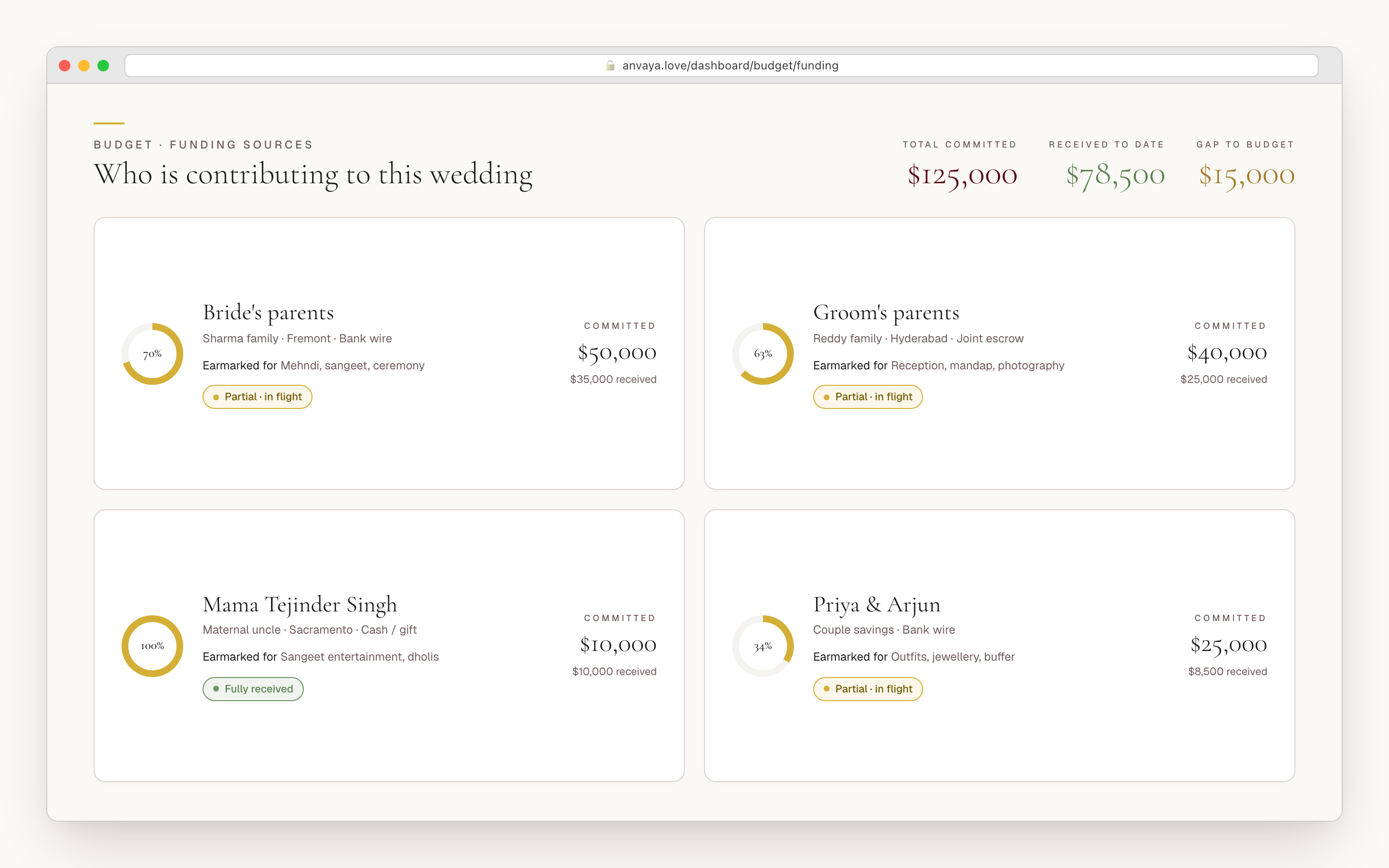
Your parents commit a number. His parents commit another. An uncle wants to fund the sangeet. The Knot, Zola, and Joy assume one household with one total. Anvaya tracks each contributor as its own funding source — pledged amount, type, notes — so the running family-money conversation has a single source of truth instead of three group chats.
Catering, decor, entertainment — per ceremony
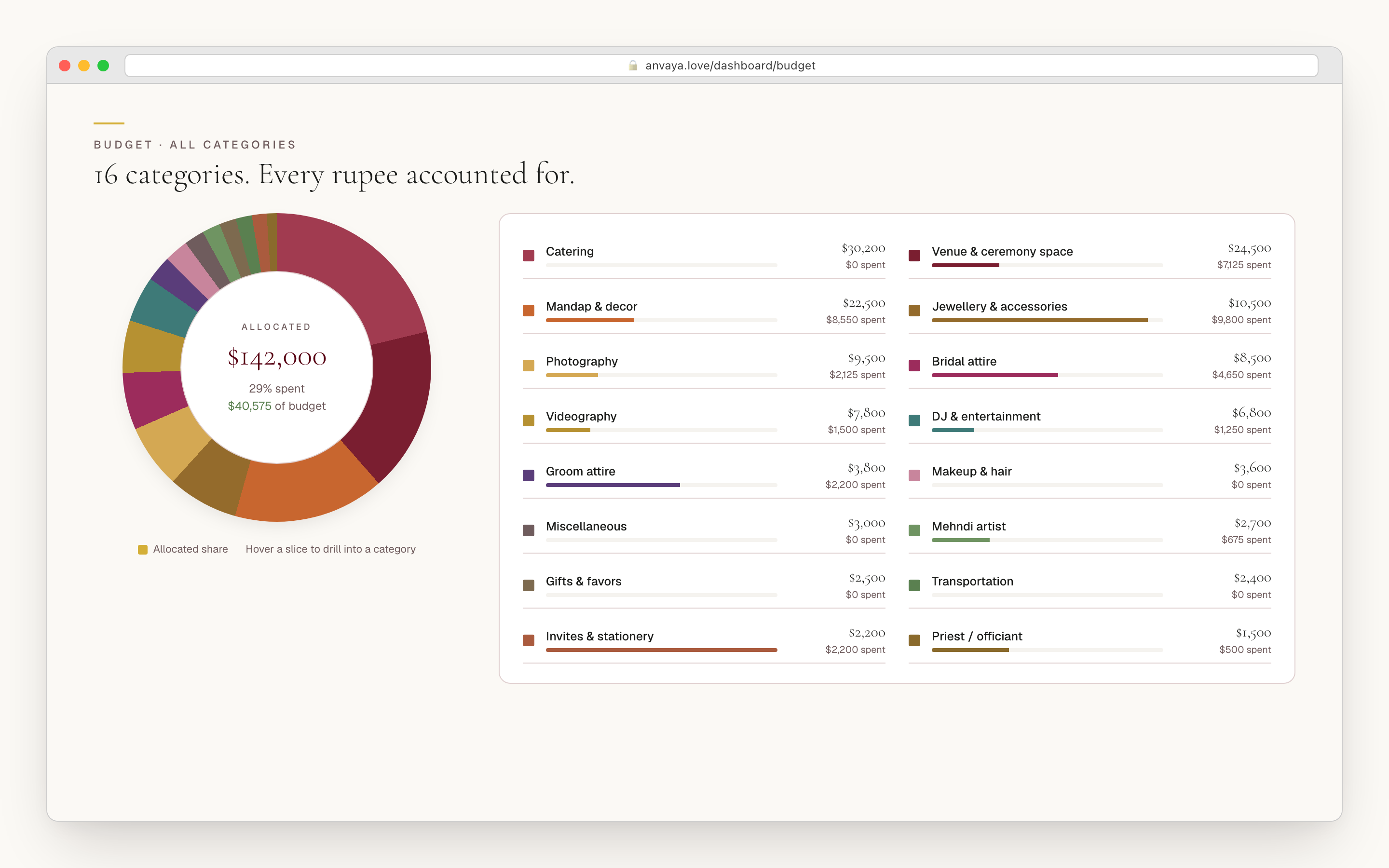
The mehndi caterer is not the reception caterer. The decor for the sangeet stage is not the mandap. The DJ for one event is the dhol player for another. Generic tools collapse all of it into 'catering: $30,000' and lose the per-event detail that drives every vendor conversation. Anvaya tags each line to its ceremony.
South Asian vendor categories do not exist in the Knot
Mehndi artist, panditji, baraat horse, mandap, dhol player — none of these fit a generic 'vendors' bucket. Anvaya gives you a 16-category framework built for a desi wedding, with the ceremony lines US tools have never heard of, so you stop force-fitting your baraat horse into the line marked 'misc.'
The quotes live in your inbox, not a spreadsheet
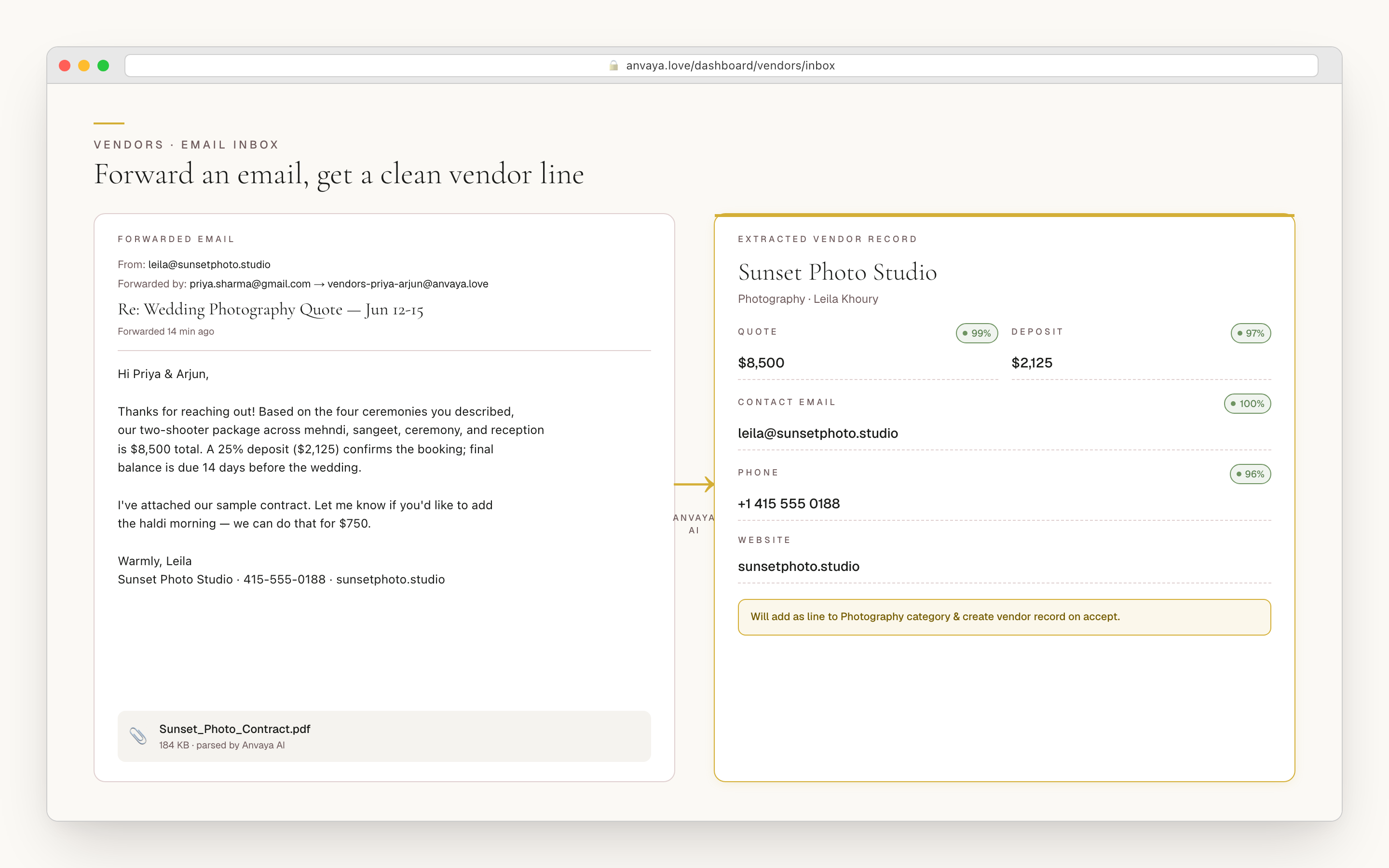
A photographer emails a PDF. A decorator follows up with a revised proposal. By the time you copy it into a sheet, three numbers are stale and two are mistyped. Forward the email to Anvaya and the budget line drafts itself — vendor, contact, quote, category — for your one-click review.
JOINT-FAMILY CONTRIBUTIONS
Your parents' money. His parents' money. Tracked separately.
The conversation that defines a South Asian wedding budget is who is paying for what. Your parents commit a number. His parents commit another. An uncle wires money for the sangeet. The couple covers the rest. None of this fits a single "total budget" bar with a percent-spent meter on top — and that is exactly what every Western wedding-budget tool ships. Anvaya treats funding sources as first-class.
Each contributor is its own funding source: a name, a type (bride's family, groom's family, the couple, or other), a pledged amount, and a notes field for the strings attached. Link any budget line to the source covering it, and the dashboard rolls up the family commitment against what you have allocated — so the gap, if there is one, is a number you can see instead of a feeling at the kitchen table. Adding or editing a pledge takes a contributor role; removing a funding source takes an admin — and every pledge, edit, and removal is written to the activity log: who committed what, and when, settled in the record rather than in memory.
- Each contributor is a first-class funding source — not a note in the margin
- Bride’s-family, groom’s-family, couple, or other — typed, with a pledged amount and notes
- Link any line item to the source covering it, then roll up family commitment vs allocated
- Contributors edit pledges, admins remove sources — the activity log records who pledged what and when
A 16-category framework built for a South Asian wedding.
Anvaya starts you on a sixteen-category framework made for a desi wedding — including the lines no US tool has: Mandap & Ceremony, Baraat & Procession, and Mehndi Artists, alongside Venue, Catering & Food, Photography & Video, Decor & Florals, Music & Entertainment, Bridal Attire & Jewelry, Groom Attire, Hair & Makeup, Accommodation, Transportation, Invitations & Stationery, Gifts & Favors, and a Contingency buffer. You do not start from a blank sheet arguing about whether the dhol player goes under "music" or "entertainment."
When you create your wedding, the categories that apply to every event are set up for you, and the ceremony-specific ones attach as the events do — add a wedding ceremony and Mandap and Baraat appear. The rest of the desi-specific lines are one click to add when you want them. Each category opens into line items you tag by ceremony and link to a vendor and a funding source. Nothing is locked: rename a category or add the line you need, and the totals stay intact. The point is not to constrain you — it is to stop you rebuilding, by hand, the same desi structure every couple has built for a decade.
- A 16-category framework — including Mandap, Baraat, and Mehndi Artists
- Cross-event categories set up for you; ceremony lines attach as you add events
- Tag every line by ceremony, vendor, and funding source
- Rename a category or add the line you need without breaking the totals
AI VENDOR EMAIL EXTRACTION
Forward a quote. The budget line writes itself.
A photographer emails a quote. A caterer responds with a per-head price after the tasting. In a normal flow, that becomes a daily inbox excavation followed by manual entry two weeks later. Anvaya replaces the loop: forward the email to vendors-{your-subdomain}@anvaya.love and Anvaya AI reads the thread and extracts the structured data — vendor name, business name, email, phone, website, category, quote amount, and a short summary of the notes.
You see it as a draft, never a silent write. Accept, edit, or dismiss in one click; accepting creates the vendor record and the budget line, tied back to the email you forwarded so the audit trail is intact. Dismissing leaves nothing behind. The same extractor runs on PDF contracts and image quotes — drop the file into the workspace and it parses the same fields. And when two photographers quote the same slot, stash both as alternatives on the line, then let each scenario pick the one it assumes. Every line that lands in the budget was approved by a human first.
- Forward a vendor email to vendors-{subdomain}@anvaya.love — Anvaya AI reads the thread
- Vendor name, business, email, phone, website, category, and quote parsed automatically
- You approve, edit, or dismiss before anything saves — no silent writes
- Same extractor works on PDF contracts and image quotes — drop the file in
- Stash competing quotes as alternatives on a line; each scenario picks one
Intimate 200, Traditional 300, Lux 400 — side by side.
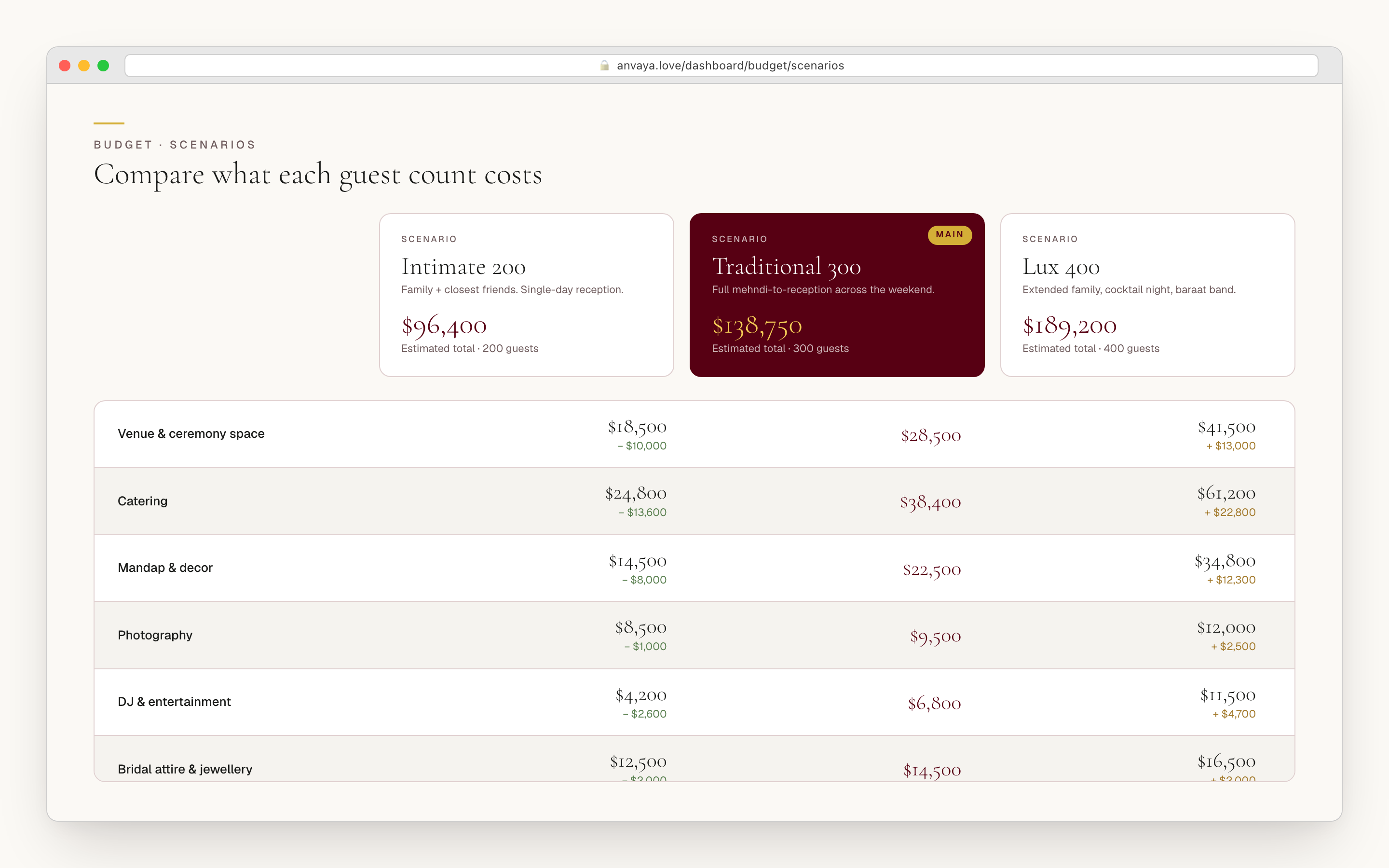
Every couple runs the same exercise: what if we kept it to two hundred? What if we did three? What if we went to four and added the welcome dinner? In a spreadsheet that is three copies of one workbook with quiet drift between them. In Anvaya it is one snapshot. Save the current state as a named scenario, clone it, change the guest count and the per-head catering, save another. For each scenario Anvaya shows the cost per guest and splits out how much of it is variable — catering, favors — versus fixed, so you can see exactly what moves when the guest list does. The photographer, the planner, the attire do not.
Compare any two scenarios side by side with the deltas in view, and promote one to "main" — the version your dashboard reports against — without losing the others; promote a different one later and the first steps back, intact. Scenarios share their funding sources and vendors, so a deposit already paid the photographer carries across all three guest counts; only the marginal costs diverge. The result is a single afternoon where the couple, both sets of parents, and a planner answer "what size wedding can we afford" with real numbers, not a guess and a wince.
- Snapshot the full budget state as a named scenario, then clone and tweak
- See cost per guest, with variable (catering, favors) split from fixed
- Compare any two scenarios side by side, with deltas in view
- Promote any scenario to "main" without losing the others
- Funding sources and vendors shared across scenarios — only marginals diverge
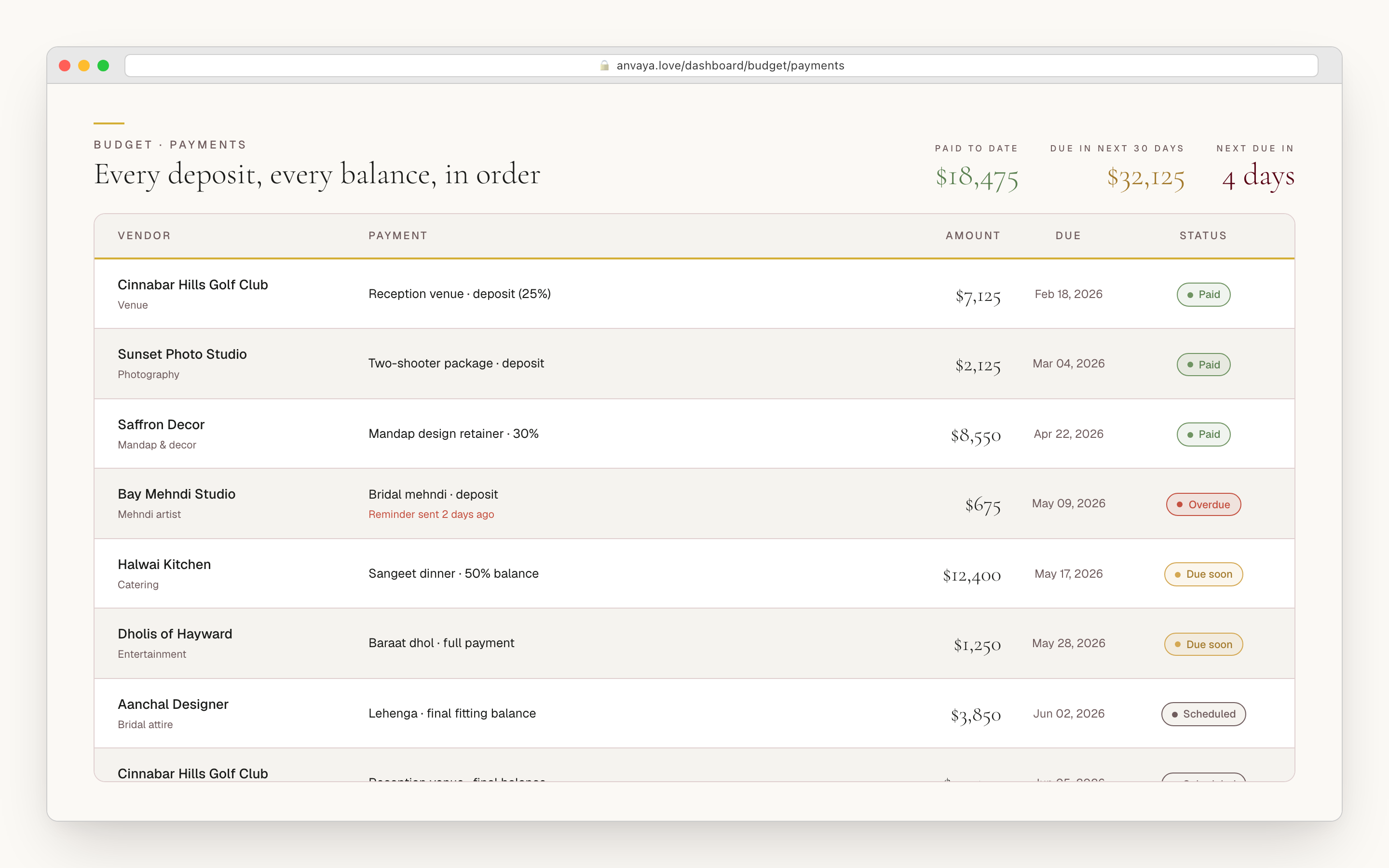
Every payment ties to a vendor, a line, and a ceremony.
A budget that does not match the bank statement is a fiction. In Anvaya every payment ties to a vendor, and you link it to the budget line it pays — with an amount, a due date, a paid date, a type (deposit, installment, final balance, or full payment), and notes. The 30% to hold the photographer's date, the 50% the decorator wants on signing, the balance the week of: each shows with its own status, so a partial payment never quietly looks like full coverage — the line's actual spend is the sum of what you have marked paid, so the budget and the payment schedule can never drift apart. And Anvaya watches the schedule for you — flagging payments that are overdue or due in the next 30 days, a ceremony whose per-guest cost is running hot, and any category that has slipped over what you allocated.
Because every line also carries its ceremony, the dashboard rolls up two ways — by category (total photography across all events) and by event (everything the sangeet costs you, regardless of category). The reception, which eats nearly half of most South Asian budgets, stops hiding inside a single wedding-day number. Allocated, committed, and paid sit side by side per category and per ceremony — and because a line's actual spend is simply the sum of its paid payments, there is no second ledger to reconcile against the first.
- Every payment ties to a vendor; link it to the budget line it pays
- Amount, due date, paid date, and type (deposit, installment, final balance, full payment)
- Anvaya flags overdue and due-soon payments, hot per-guest costs, and over-allocated categories
- Dual rollup: allocated / committed / paid by category and by ceremony
- Per-event view surfaces the reception that flat trackers bury in one total
Anvaya vs the budget tool bundled with a US registry.
Joy, Zola, and The Knot organize their budget tools around one event and one household paying. Anvaya makes per-ceremony spend, joint-family contributions, and vendor quote intake first-class.
| Feature | Anvaya | Joy | Zola | The Knot |
|---|---|---|---|---|
Per-ceremony line items (mehndi, sangeet, reception) Budget lines tagged by ceremony — not a single "wedding day" total. | ||||
Joint-family contributions tracked separately Each contributor is a first-class funding source you link to the lines it covers. | ||||
Side-by-side scenario compare Snapshot the budget, clone it, tweak guest count, compare two scenarios. | ||||
AI vendor email extraction into the budget Forward a vendor quote; Anvaya AI extracts the structured data and proposes a budget line. | ||||
Vendor payment schedule per line item Deposit, installment, final balance — each with a due date, paid date, and status. | Basic | Basic | Basic | |
Allocated vs committed vs paid per category Live rollup across every category with allocated, committed, and paid figures — paid is derived from the payment ledger, so there is no second number to reconcile. | Total only | Total only | ||
Per-event rollup (each ceremony, not one total) See Mehndi, Sangeet, Haldi, Ceremony, and Reception each with their own figures. | ||||
Full data export (CSV) Download your budget, guests, vendors, and more as CSV from settings — your data is yours. | ||||
Display currency (USD, GBP, CAD, EUR, INR, AUD) Set the wedding’s display currency to the market you are paying in. | USD only | USD only | USD only |
Per-ceremony line items (mehndi, sangeet, reception)
Budget lines tagged by ceremony — not a single "wedding day" total.
Anvaya
Joy
Zola
The Knot
Joint-family contributions tracked separately
Each contributor is a first-class funding source you link to the lines it covers.
Anvaya
Joy
Zola
The Knot
Side-by-side scenario compare
Snapshot the budget, clone it, tweak guest count, compare two scenarios.
Anvaya
Joy
Zola
The Knot
AI vendor email extraction into the budget
Forward a vendor quote; Anvaya AI extracts the structured data and proposes a budget line.
Anvaya
Joy
Zola
The Knot
Vendor payment schedule per line item
Deposit, installment, final balance — each with a due date, paid date, and status.
Anvaya
Joy
Zola
The Knot
Allocated vs committed vs paid per category
Live rollup across every category with allocated, committed, and paid figures — paid is derived from the payment ledger, so there is no second number to reconcile.
Anvaya
Joy
Zola
The Knot
Per-event rollup (each ceremony, not one total)
See Mehndi, Sangeet, Haldi, Ceremony, and Reception each with their own figures.
Anvaya
Joy
Zola
The Knot
Full data export (CSV)
Download your budget, guests, vendors, and more as CSV from settings — your data is yours.
Anvaya
Joy
Zola
The Knot
Display currency (USD, GBP, CAD, EUR, INR, AUD)
Set the wedding’s display currency to the market you are paying in.
Anvaya
Joy
Zola
The Knot
Competitor capabilities as of June 2026; they change — verify on each site.
Questions we hear a lot
Vendors
For existing accounts: extract quotes from vendor emails and compare vendors side by side.
Track vendorsMulti-Event
Per-event guest lists, RSVP, seating, and vendors across every ceremony in your wedding.
Plan every eventAnvaya AI
A built-in AI chat that adds guests, snapshots the budget, and drafts messages with you — plus the same assistant inside Claude and ChatGPT.
Plan with Anvaya AIEvery rupee.
Every dollar.
Every contributor.
Existing accounts keep access to Budget. This feature is unavailable to new signups.