A wedding website that starts with your story.
Pick a feeling, add your story and a few photos, and we build your whole site. Every ceremony and RSVP comes from your plan.
- Design
- A look made for your wedding alone
- Pages
- One for every part of the weekend
- RSVP
- Event by event, family by family
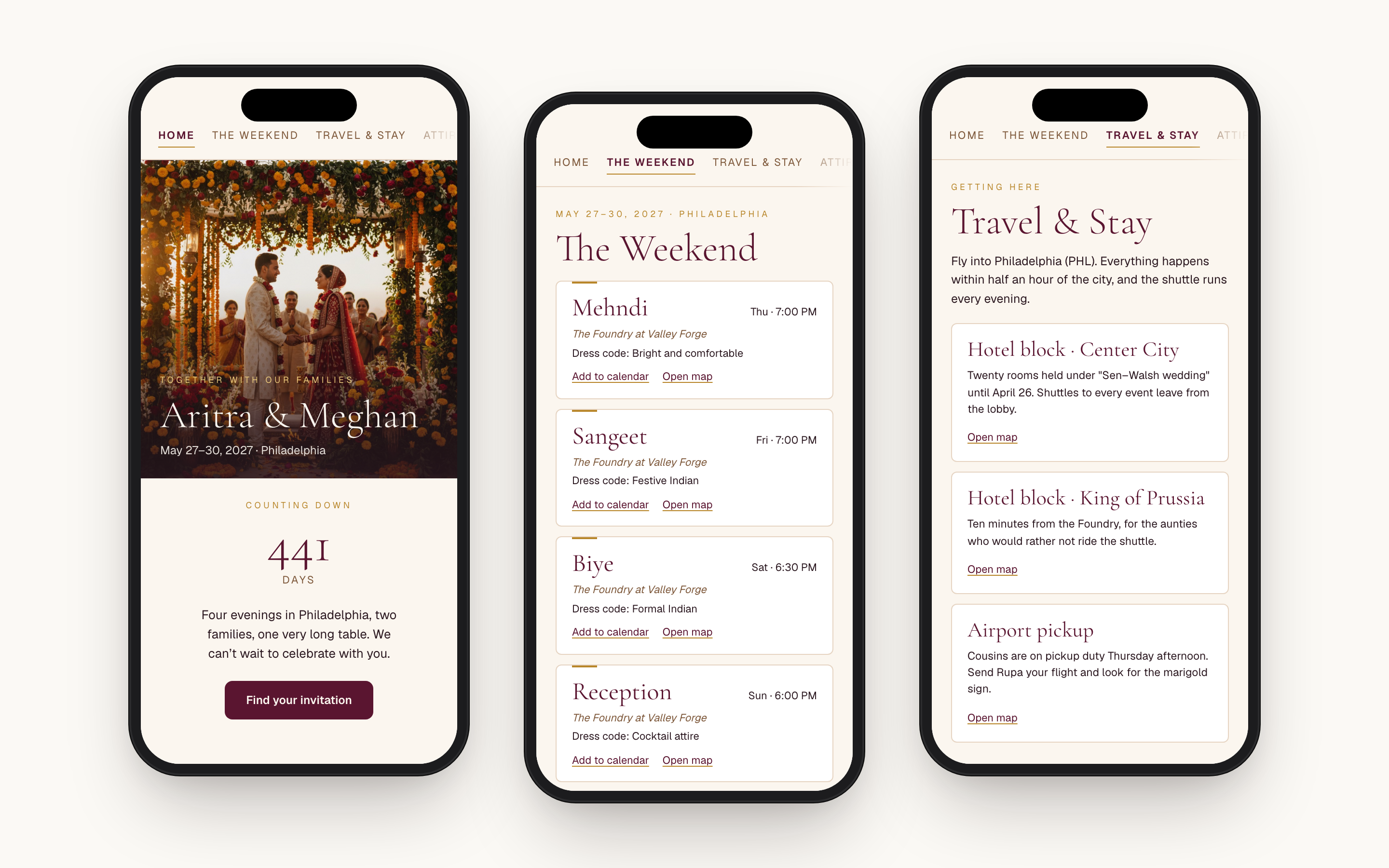
WHAT GENERIC BUILDERS MISS
A South Asian wedding website is not a one-page event.
Generic builders assume one date
The Knot, Zola, and Joy can list extra events, but the wedding day stays the center of gravity: one main hero, one schedule, one RSVP. A South Asian wedding runs five to seven events across three to five days, each with its own venue, dress code, and start time. We build around the whole weekend: a page for the events once you have two or more, a page on what to wear once the dress codes differ, and travel once you've booked a hotel block.
A theme is someone else's wedding
Most builders hand you a gallery of themes, and the popular ones turn up on other couples' sites too. We start from you instead: the feeling you want, your story, your photos, and up to three pictures whose look you love. Your printed invitation, a sari border, the hall where your parents got married. Then we build a site made for your wedding alone.
RSVP is bolted on as a separate product
Most builders keep the website, the RSVP form, and your guest list in three places you match up by hand. On Anvaya they're one. Guests answer event by event on the website itself, and the count on your dashboard moves as they reply. No spreadsheet to reconcile the week of the wedding.
You type the same details twice
With a separate website, you type the mehndi venue in after typing it into your spreadsheet, then fix both when the venue changes. On Anvaya, the names, dates, venues, and hotels on your website come from the plan you already keep here. Move the sangeet to 7:30 and the website moves with it. And we never make up a detail we don't have; we tell you it's missing.
HOW IT STARTS
Three short questions, then we build your site.
It starts with three questions, not a gallery of themes. How should it feel? Joyful, timeless, grand, intimate, playful, earthy, modern: pick any that fit, and if you’ve made your Save the Date, we suggest a few from it. Then your story, in your own words. Keep it short, or ask us to use it word for word.
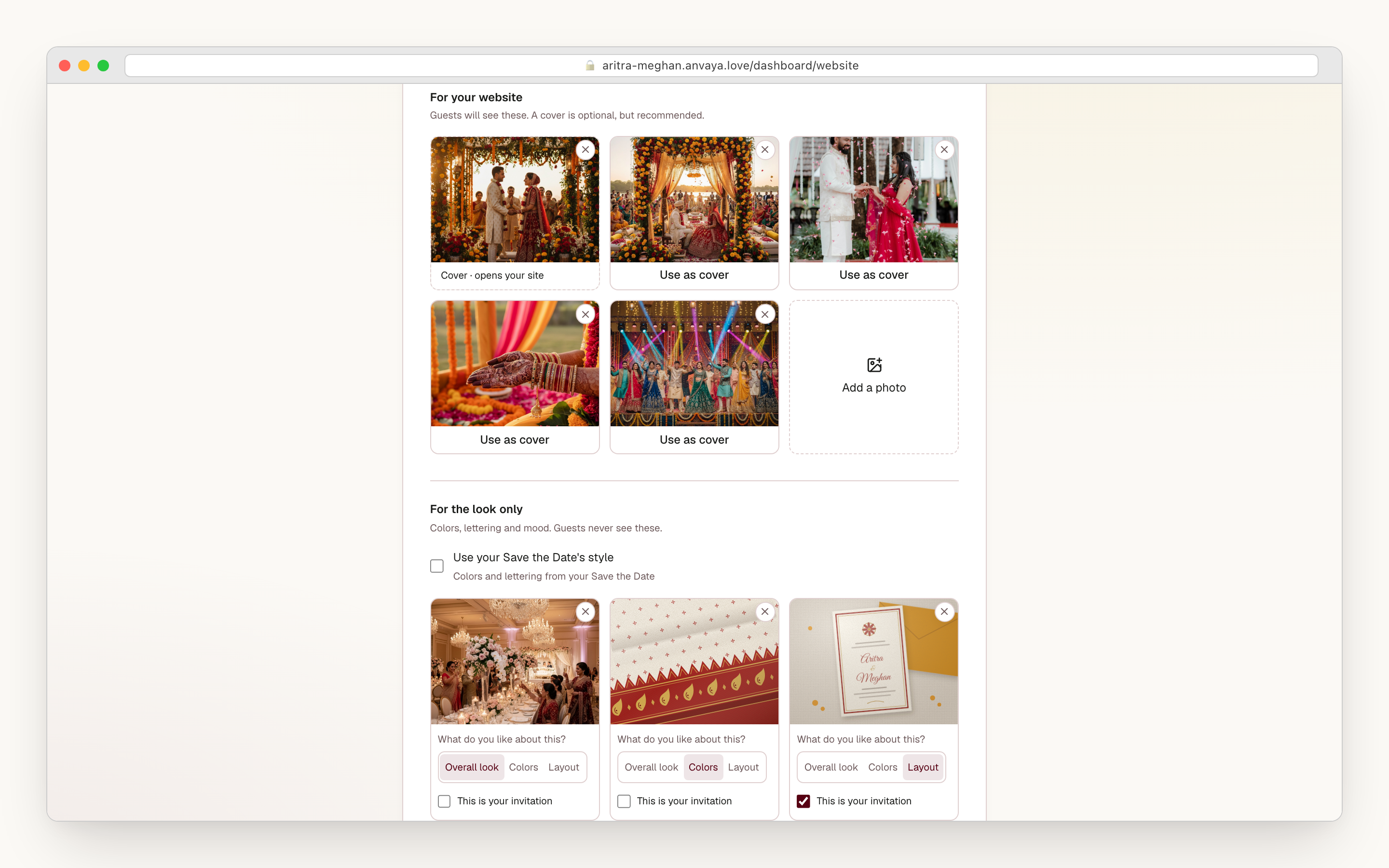
Last, your pictures. The ones guests will see, with one chosen to open the site, and up to three that are only for the look: your printed invitation, a sari border, a reception hall you love. Tell us what you like about each one, its overall feel, its colors, or its layout, and that’s all we borrow. Guests never see them.
- Seven feelings to choose from, with suggestions from your Save the Date
- Your story in your own words, word for word if you ask
- A cover photo to open the site, plus the photos guests will see
- Up to three pictures just for the look, never shown to guests
- Then one tap builds every page, with colors and lettering made for you
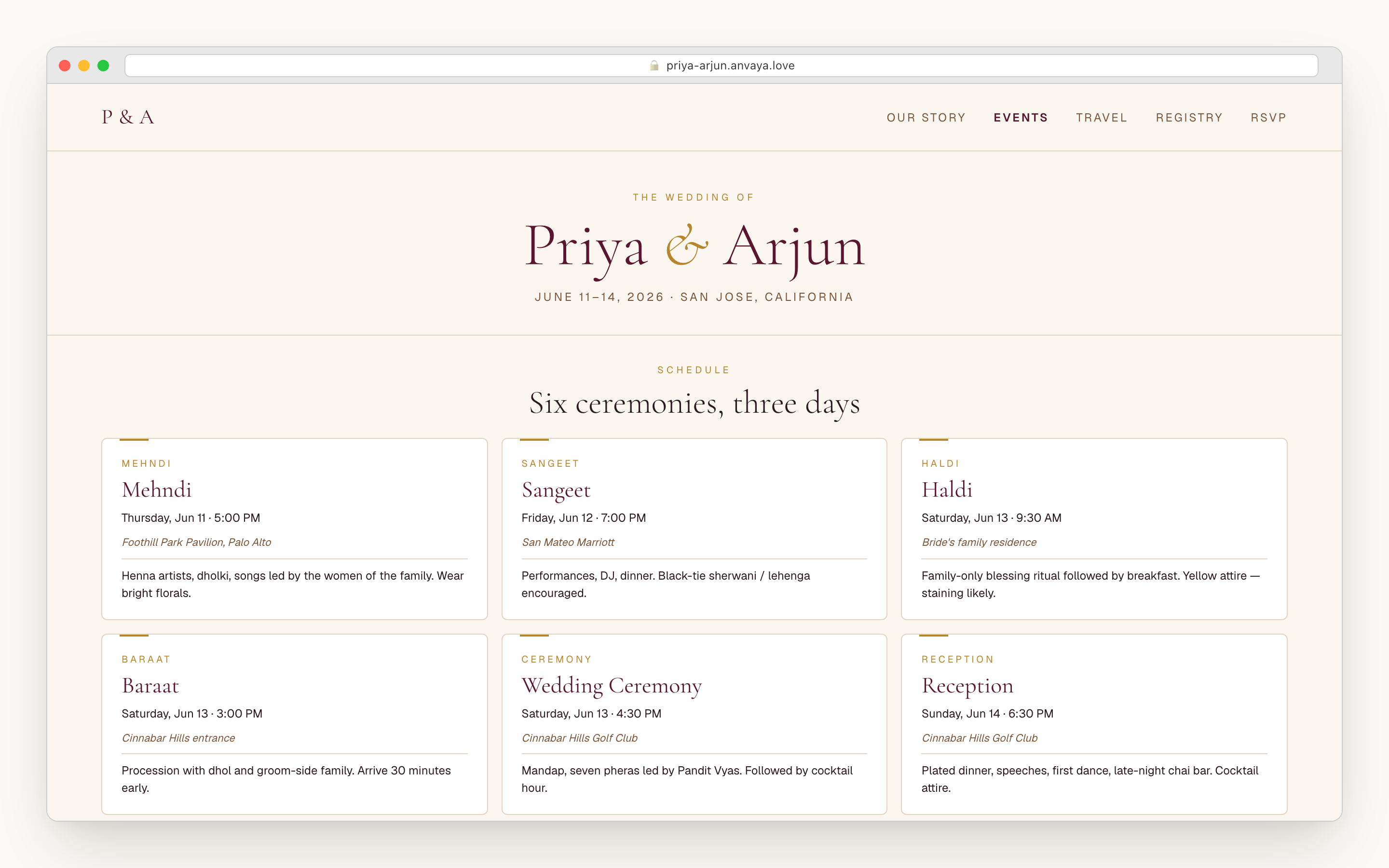
Your homepage and the pages your weekend needs, together.
One tap builds your homepage and every page your plan calls for, in colors and lettering chosen for your wedding. Watch the pages arrive, or leave: it keeps building, and you can edit once it’s ready.
The pages come from what you’ve already planned: a page for the whole weekend once you have two or more events, travel and hotels once you add a block, what to wear when the mehndi and the reception call for different outfits. Your story, your photos, and answers to the questions guests keep asking your mom. Need another page later? Add it whenever you like.
- Your homepage and every page in one build
- Leave while it builds; it keeps going without you
- Pages suggested from your plan: the weekend, travel, attire, your story, photos, FAQ
- Up to 32 pages, each for everyone or for invited guests only
- The same menu on every page, one swipeable row on a phone
Change anything by clicking it, or just ask.
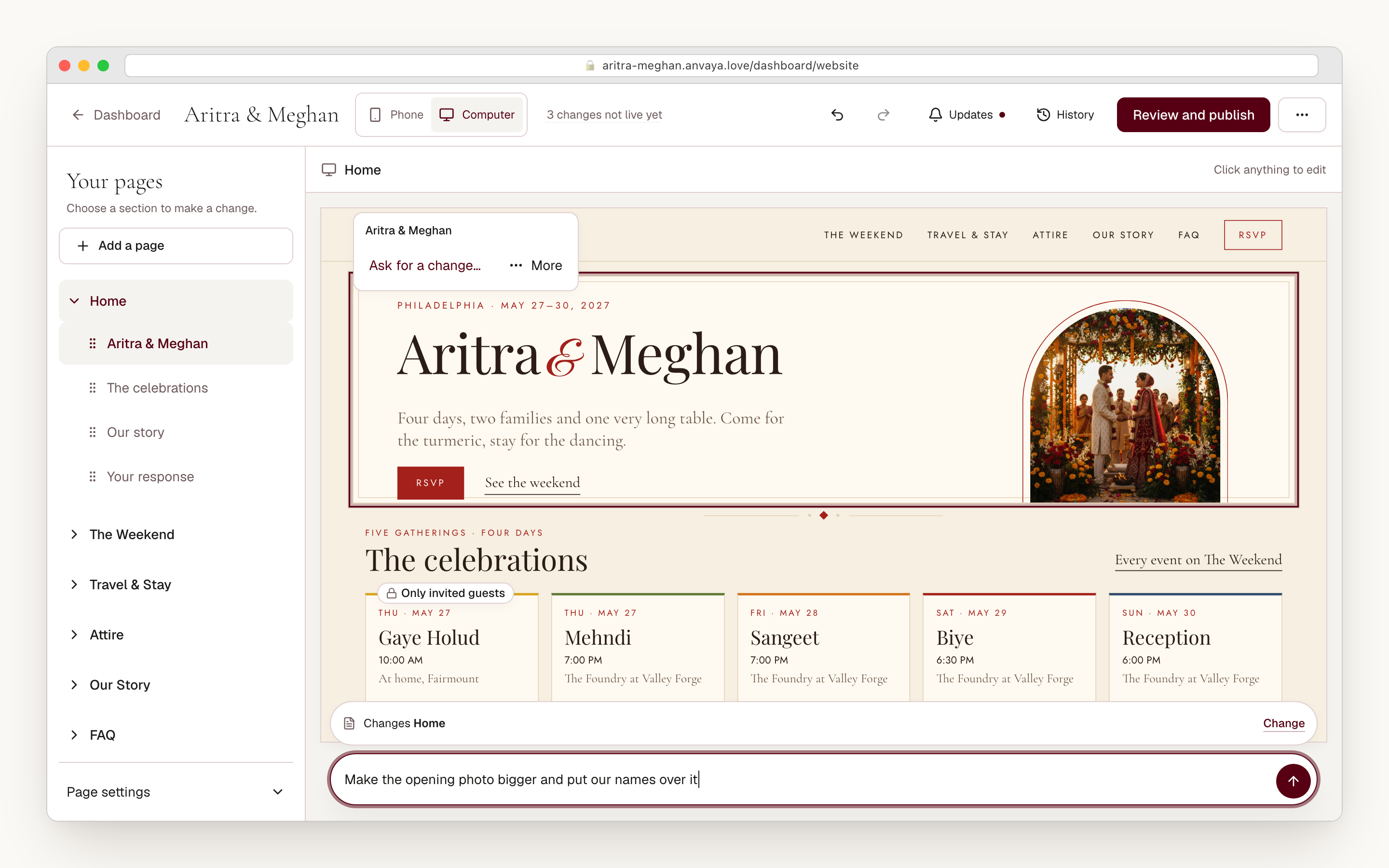
See a word you’d say differently? Click it and type. Stuck on a sentence? Ask for a few rewrites of just that line, or keep your own. For anything bigger, write it the way you’d text your cousin: “make the opening photo bigger and put our names over it.” Before anything changes, we tell you whether it touches one section, one page, or the whole site.
Every change can be undone. Want a different feel overall? Ask for new colors or lettering the same way. And when your partner is editing at the same time, we ask whose change to keep.
- Click any words on the page to change them
- Ask for rewrites of a single line, or keep your own
- Describe bigger changes in your own words
- Ask for new colors or lettering in your own words
- Undo anything, and everything saves as you go
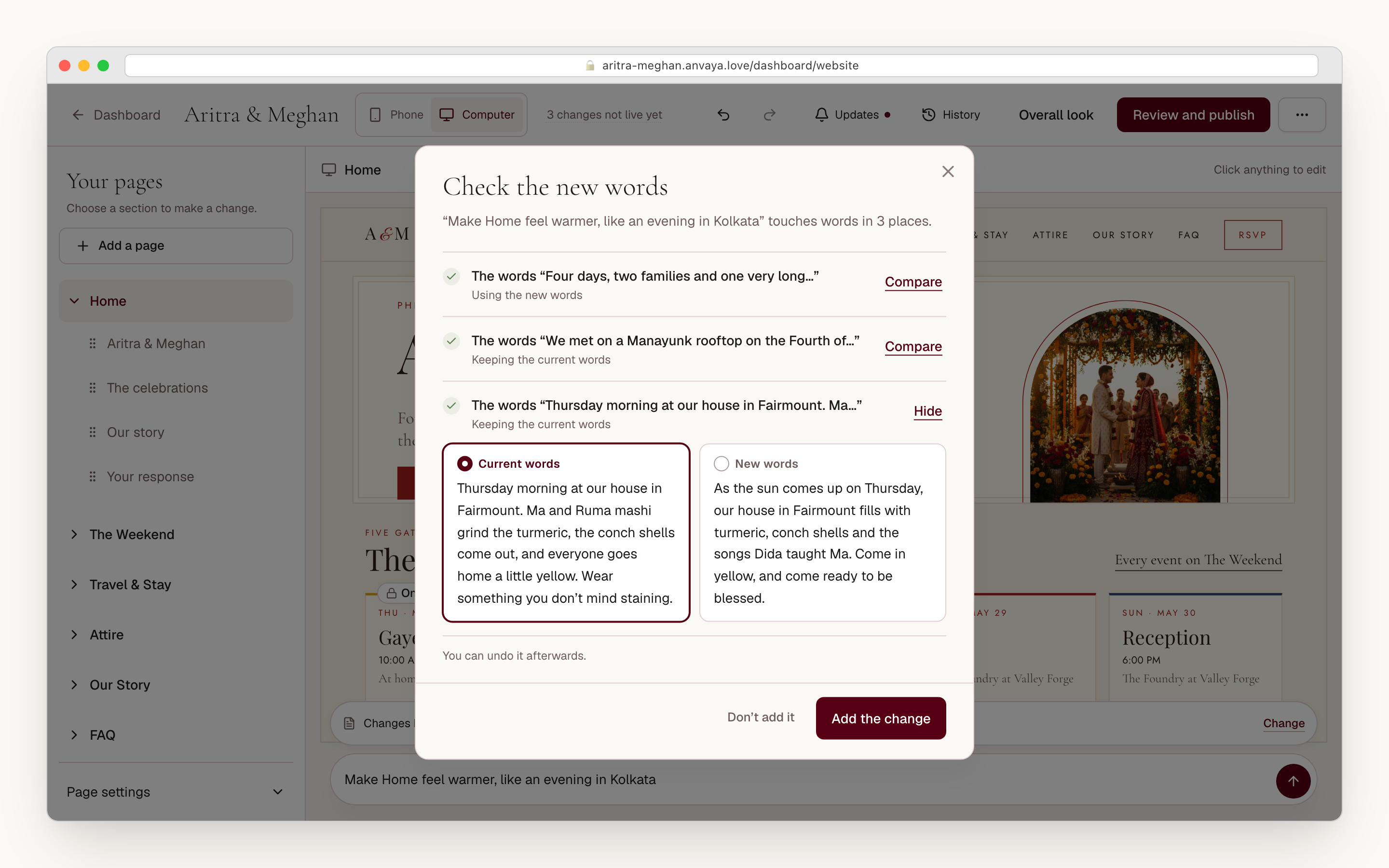
Your words stay yours unless you say otherwise.
A new look shouldn’t quietly rewrite the story you spent an evening on. When a change would replace words already on your site, we show you each passage first, yours beside the new version. Yours stays unless you choose otherwise, and you decide whether the change goes in at all.
Details work the same way. Names, dates, venues, and events come from your plan, never from a guess. If guests need something you haven’t added yet, a start time or a venue, we say it’s missing rather than filling it in. Fix the time from your website and your plan updates too.
- See every passage a change would rewrite before it goes in
- Your words stay unless you pick the new ones
- Keep your story word for word when you ask
- Names, dates, and venues come from your plan
- Missing details are flagged, never made up
Private events stay private, and you can check.
Keep the gaye holud to the people on its list and that’s who sees it, once they open their own link from you or find their invitation with their email. Everyone else never knows it’s there, so a link forwarded to a coworker gives nothing away. A whole page can be just for invited guests, too.
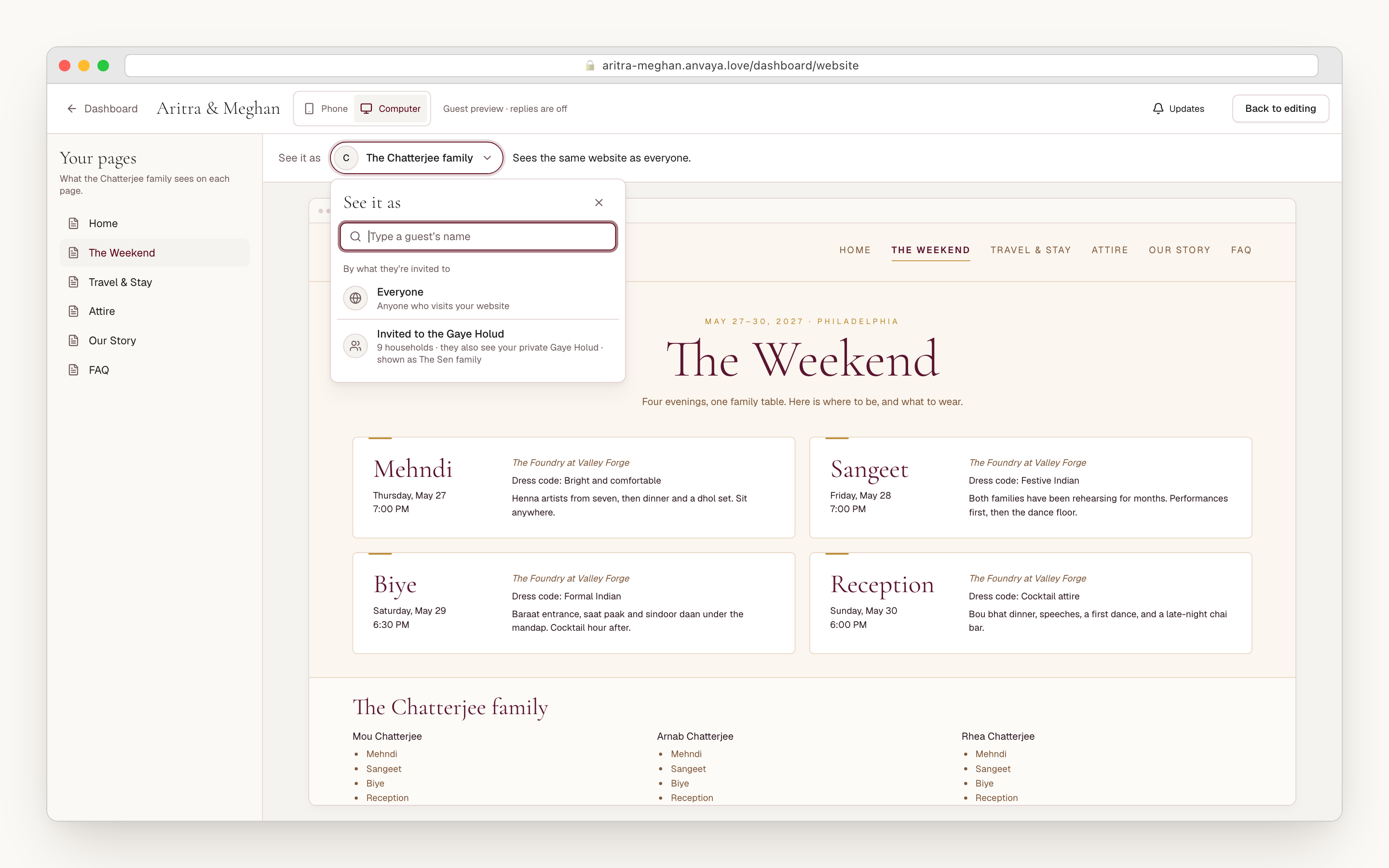
Before you publish, see the site through any guest’s eyes. Type your masi’s name and see exactly what her family will see, with the gaye holud there only if she’s on its list. Or check everyone invited to the gaye holud at once. Want your sister’s opinion first? Send her a private preview.
- Any event can be for invited guests only
- Whole pages can be just for invited guests
- Guests find their events with their own link or their email
- See the site exactly as any family or group will
- Send a private preview before anything goes live
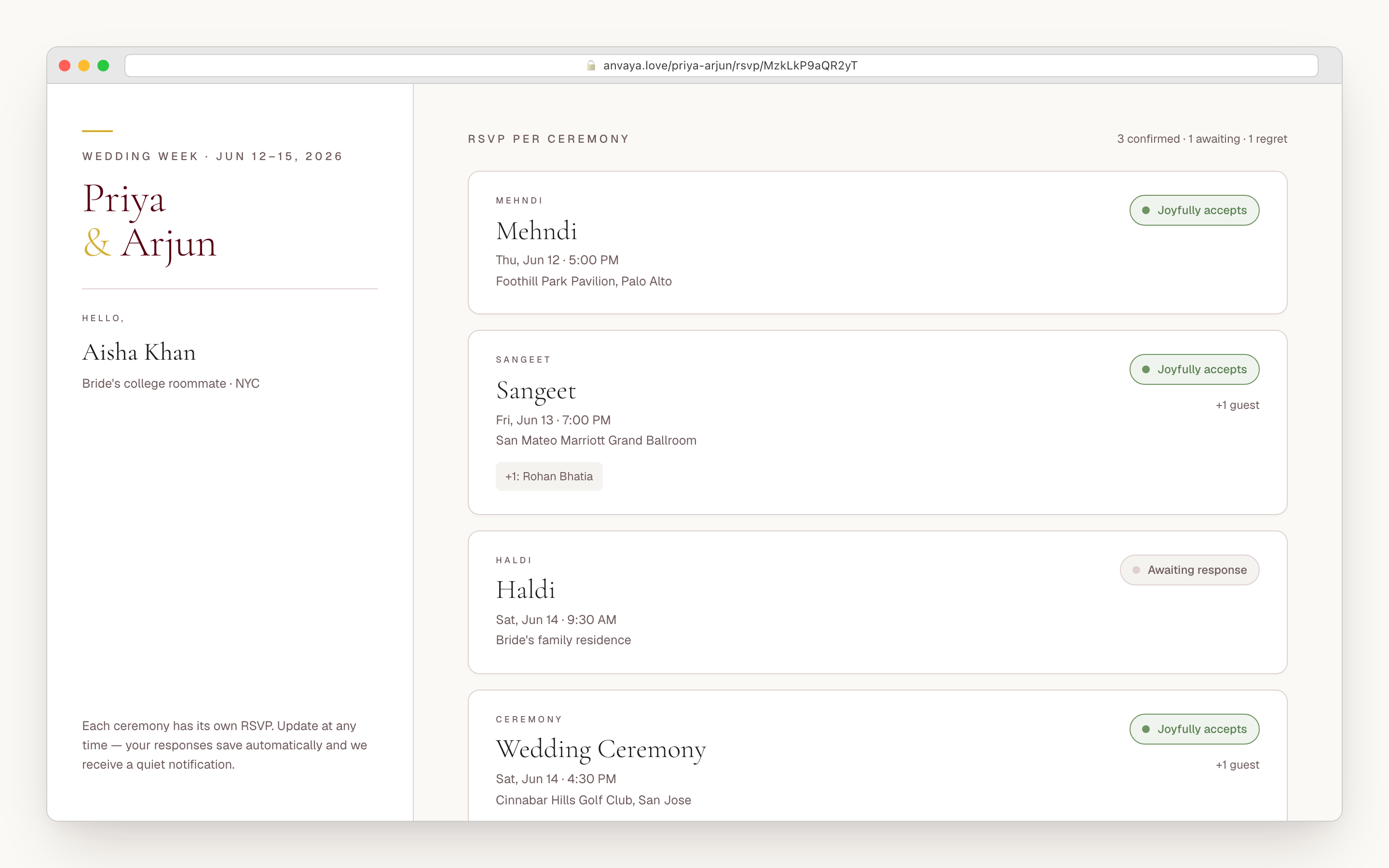
RSVP lives right on your website, event by event.
On most builders, RSVP is a separate form guests reach through another page. On Anvaya it’s the same RSVP for every event that runs the rest of your plan. A guest finds their invitation and sees their family, with the events each person is invited to. Mehndi yes, sangeet yes, reception maybe, and your count moves as they answer.
One reply covers the whole family, and each person answers for their own events, along with anything you ask, like a meal choice. Every event shows what to wear, adds to a guest’s calendar in a tap, and opens the venue on a map. It’s all made for a phone, because that’s where the link gets opened.
- RSVP on the website itself, not a separate form
- One reply per family, each person answering for their own events
- Guests only see the events they're invited to
- What to wear, add to calendar, and directions on every event
- Your guest counts update as replies come in
Three checks before you publish, then your call.
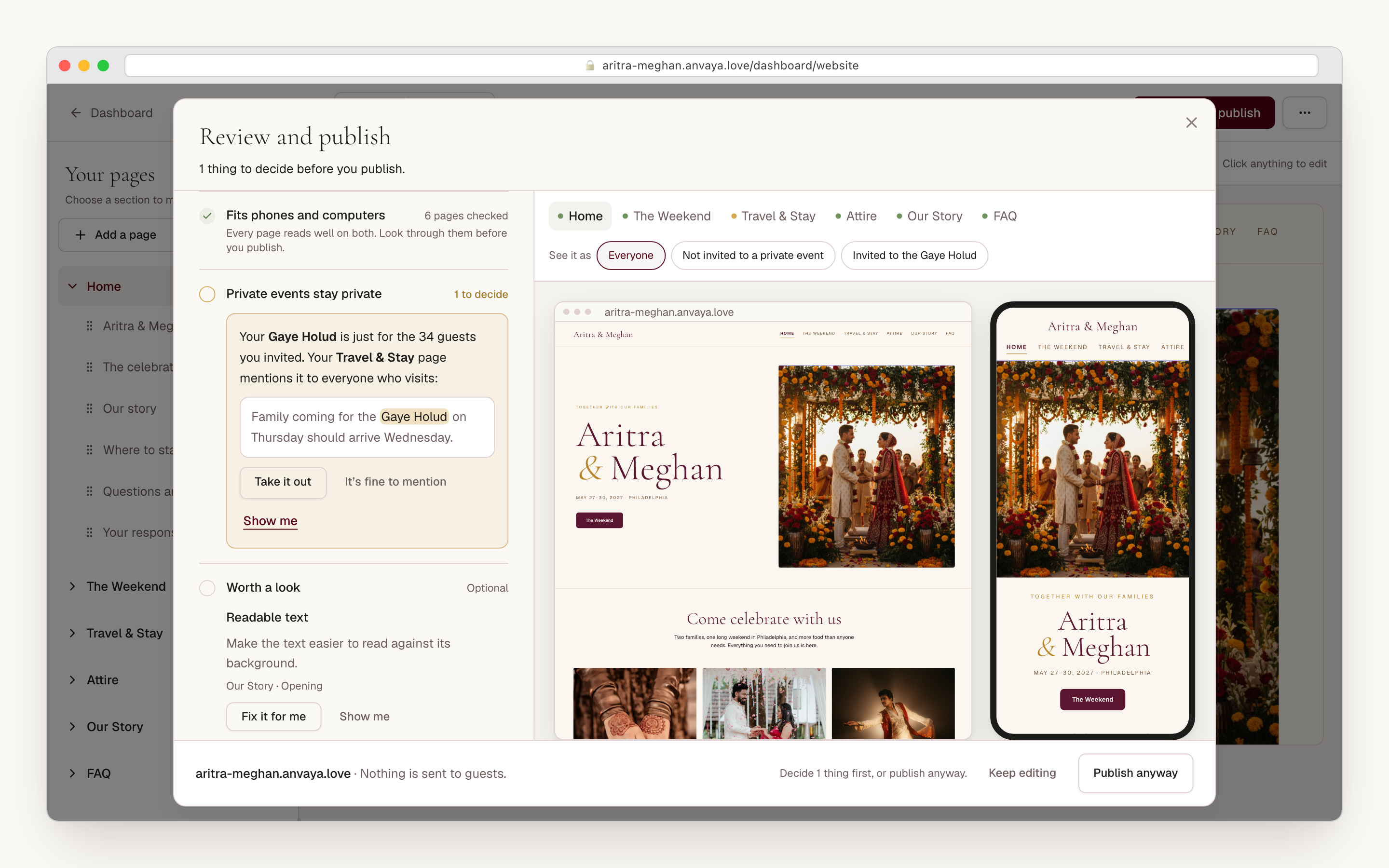
Before your site goes live, we check three things. That it works on phones and computers: the layout, the menu, the photos, and the details guests need, with an offer to fix what we find. That no page mentions a private event to people who weren’t invited. And a few optional notes, like text that’s hard to read.
None of it stands between you and your website: publish anyway whenever you like. The only thing we’ll refuse is a site built to scam or impersonate someone, and publishing never messages your guests. Every earlier version is saved, ready to bring back. Take the site down for a while and put the same one back up, and the RSVP and Save the Date links you’ve sent keep working.
- Checked on phones and computers, with fixes offered
- A heads-up if any page gives away a private event
- Optional notes, never a blocker
- Publish whenever you decide; guests aren't messaged
- Bring back any earlier version, or take the site down for a while
Built for phones, and careful with your photos.
Your guests will open your site from the family WhatsApp group, so every page is designed for a phone first and checked on phones and computers before you publish. The menu stays on one row you can swipe, and each guest’s phone gets photos sized for it, so pages load quickly even on a weak signal.
Your photos stay private to your site: only people allowed to see a page can load the pictures on it. We strip the location from every photo when you upload it, and iPhone photos work as they are. Want the whole site behind a password, or open only to invited guests? That’s one setting.
- Designed for phones first, checked on computers too
- One swipeable menu row on a phone
- Photos sized for each guest's phone
- Photos kept private, with the location removed on upload
- Open to everyone, behind a password, or invited guests only
COMPARED
How Anvaya compares to general wedding website builders.
Most builders can list more than one event. What's different here is the shape: a site designed from your story, pages that come from your plan, and RSVP tied to the same guest list. Comparison reflects publicly documented features as of June 2026; competitors change.
| Feature | Anvaya | Joy | Zola | The Knot | Minted |
|---|---|---|---|---|---|
A page for every part of the weekend The events, travel, what to wear, and more, suggested from your plan, with each ceremony's date, time, and venue. | Events list | Events list | Events list | Single page | |
Designed from your photos and story A site designed from the feeling, story, and pictures you give us. No theme gallery. | Themes | Themes | Themes | Themes | |
Builds the whole site for you One tap builds your homepage and every page your plan calls for. Change anything after. | |||||
RSVP for each event, tied to your guest list Guests answer event by event on the website itself, not on a separate form. | |||||
Undo, redo, and drafts Work on a draft while guests see your live site, and bring back any earlier version. | |||||
Free during early access Your wedding website is free during early access. | Paid | ||||
Your own domain Use yourwedding.com instead of the builder’s address. | Roadmap | Paid add-on | Paid add-on | Paid add-on | Paid add-on |
Family editing the site with you Your partner and family edit and publish the website with you, and you can see who changed what. |
A page for every part of the weekend
The events, travel, what to wear, and more, suggested from your plan, with each ceremony's date, time, and venue.
Anvaya
Joy
Zola
The Knot
Minted
Designed from your photos and story
A site designed from the feeling, story, and pictures you give us. No theme gallery.
Anvaya
Joy
Zola
The Knot
Minted
Builds the whole site for you
One tap builds your homepage and every page your plan calls for. Change anything after.
Anvaya
Joy
Zola
The Knot
Minted
RSVP for each event, tied to your guest list
Guests answer event by event on the website itself, not on a separate form.
Anvaya
Joy
Zola
The Knot
Minted
Undo, redo, and drafts
Work on a draft while guests see your live site, and bring back any earlier version.
Anvaya
Joy
Zola
The Knot
Minted
Free during early access
Your wedding website is free during early access.
Anvaya
Joy
Zola
The Knot
Minted
Your own domain
Use yourwedding.com instead of the builder’s address.
Anvaya
Joy
Zola
The Knot
Minted
Family editing the site with you
Your partner and family edit and publish the website with you, and you can see who changed what.
Anvaya
Joy
Zola
The Knot
Minted
Early access
Seen enough?
Start your wedding website free.
Your homepage in minutes. No credit card during early access.
FAQ
Questions we hear a lot
RSVP & Guests
Free, per-event online RSVP with text and email reminders.
Plan the RSVPSave the Date
Announce the whole wedding weekend in one digital Save the Date with email sending, private links, and soft RSVP.
Send Save-the-DateMulti-Event
Per-event guest lists, RSVP, seating, and vendors across every ceremony in your wedding.
Plan every eventEarly access
Your story.
Your photos.
Your wedding website.
Free during early access, no credit card, and the site you build stays yours. Made for South Asian weddings that last all weekend.