SAVE THE DATE
Block the whole weekend, not one date
Design a digital Save-the-Date in the studio, email it to your guest list, and see what the provider accepted, what failed, and how guests replied — all from the same workspace your RSVP and reminders run on.
Free during early access. No credit card.
- Describe
- Generate from words or a reference
- Send
- Email plus private links
- Track
- Send status and soft responses
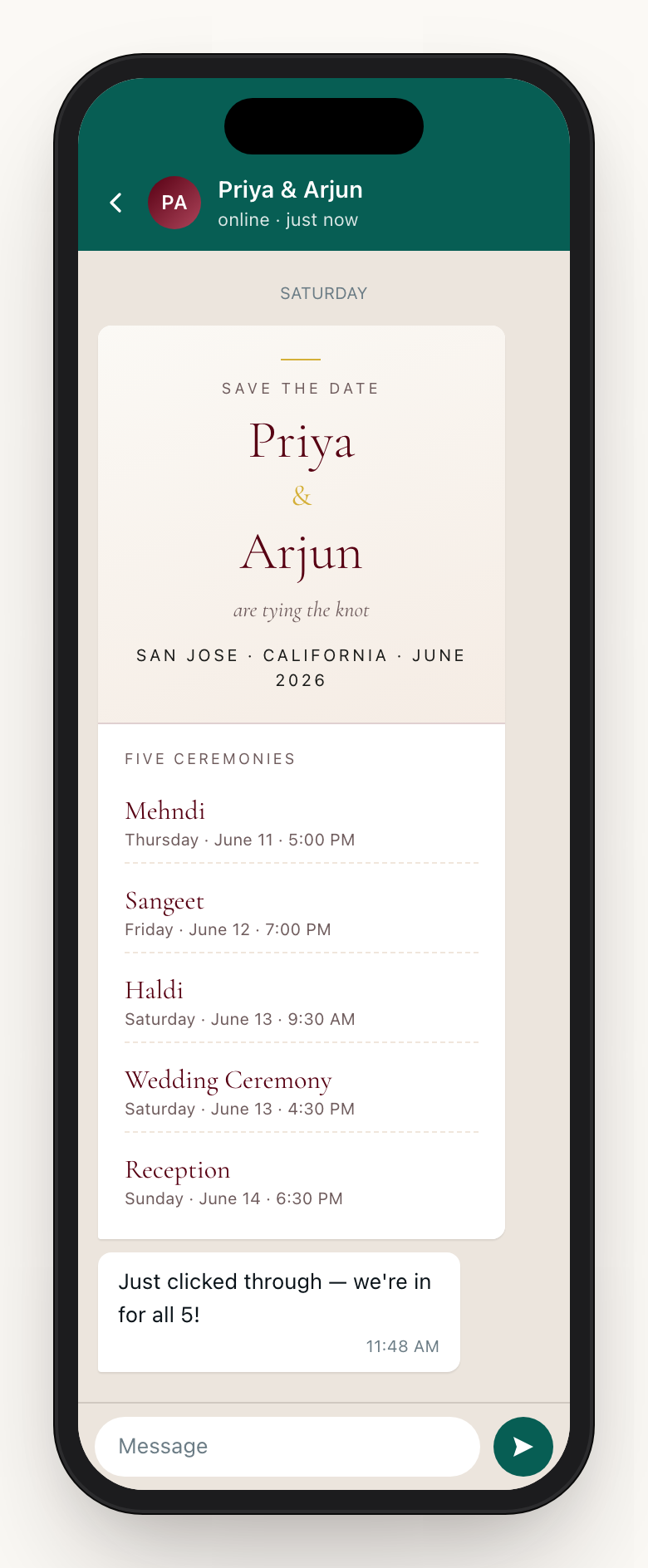
A South Asian wedding is a weekend. The announcement should say so.
One date hides the real ask
A South Asian wedding runs across a long weekend — mehndi, sangeet, haldi, the ceremony, the reception. When a guest sees a single Saturday date, they book one night and one flight, then scramble when they learn the mehndi was Thursday. An Anvaya Save-the-Date announces the wedding weekend as a span, so guests block the right number of days from the first message.
The card should do something, not just look nice
A pretty JPG dropped in a WhatsApp group is a dead end — nobody can reply to it, and four months later nobody remembers where to. An Anvaya Save-the-Date carries a private link to a personal page where each guest can answer a quick soft RSVP and add the weekend to their calendar. The first message becomes the first guest action.
It should run on the list you already keep
A screenshot lives in a chat thread, disconnected from everything else. An Anvaya Save-the-Date is tied to the same guest record you will use for the full RSVP, the reminders, and the seating chart. Who received a send attempt, who answered the soft RSVP, and who still needs follow-up — it all lands on a dashboard, not in your head.
DESCRIBE
Describe the look, then refine the result.
Design happens in the Save-the-Date studio. Type a few words — "marigold and ivory, gold foil, our garden photo" — and generate a finished card you can refine with plain-language changes. Add a couple photo or a style reference when you want the composition or palette to start from something you already love. Already have a finished design? Upload it to use it as-is in the same version history.
Enter the wedding-weekend dates and city once for the AI brief, guest page, and calendar invite. Choose which details appear in the artwork and add personal wording, such as your parents' names. After a date change, refine the card and publish the updated version.
- Describe the card, generate it, and refine it
- Add a reference photo for mood or palette
- Upload a finished design to use it exactly as-is
- Couple photo, parents’ names, city, and tagline
- Shared dates feed the AI brief, guest page, and calendar invite
SEND
Email it to a segment. Share a private link for everyone else.
Pick who gets it — everyone, or a filtered slice like reception-only guests or one side of the family — and preview the exact send before anything goes out: who will be emailed, who will get a link only, and who is a duplicate to skip. Guests with an email address receive the card by email, with an Add-to-Calendar file attached. For guests without one, copy the Save the Date link and share it yourself, in a WhatsApp chat or through a parent, then mark them as sent.
Guests you mark show as sent in your list, so you always know who has it. This first send is deliberately quiet — one polished email. Heavier outreach happens later in guest messaging, where text and email reminders reach the guests still to answer. Same guest list, different job.
- Filter the audience — by side, group, or RSVP status
- Preview the send: who is emailed, link-only, or a skipped duplicate
- Email handoff with an Add-to-Calendar file attached
- Private link fallback for guests with no email on file
- Text and email reminders later, from guest messaging
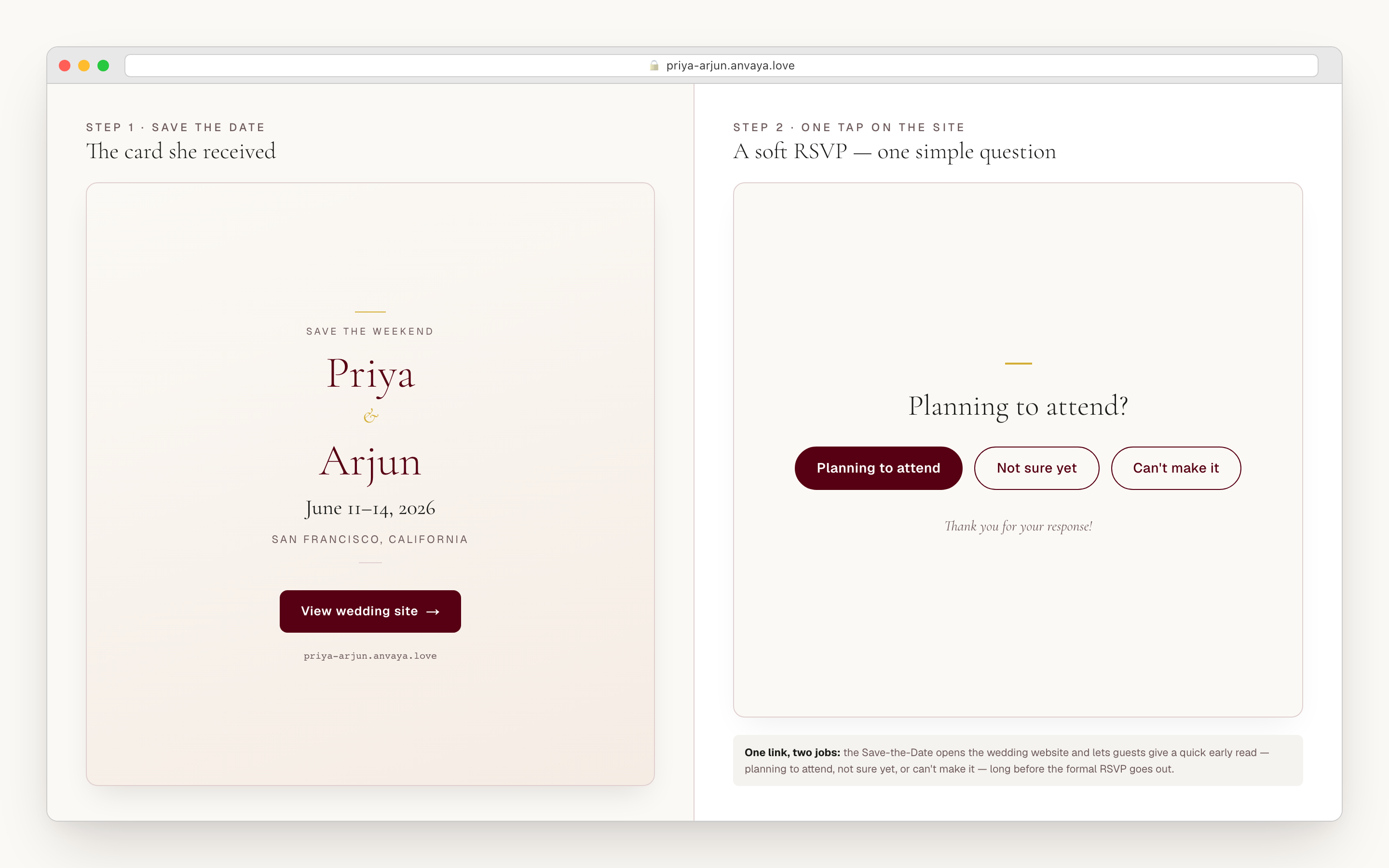
The link opens a page that asks for a reply — not a flat poster.
When a guest taps the link, the card is the hero of a real page, set on the framing you chose in the studio: Classic centers it on a calm field; Editorial sets it beside a typographic column; Immersive floats it over an ambient wash of the card's own colors; Postcard mats and frames it like a keepsake. Below it, a short prompt asks one question a guest can answer in a tap — planning to attend, can't make it, or not sure — long before the formal RSVP window opens.
That soft reply is an early read on your headcount, and it lands on the same guest record the rest of planning uses. The detailed, per-ceremony RSVP — which events, how many seats, dietary notes — lives on your wedding website and its online RSVP. The Save-the-Date gets the first "yes" on the board; the website collects the binding one.
- Four guest-page framings: Classic, Editorial, Immersive, Postcard
- Soft RSVP in a tap: planning to attend, can’t make it, not sure
- A customizable heading above the response form
- Replies attach to the same guest record as the full RSVP
- Per-event RSVP and dietary notes live on the wedding website
TRACK
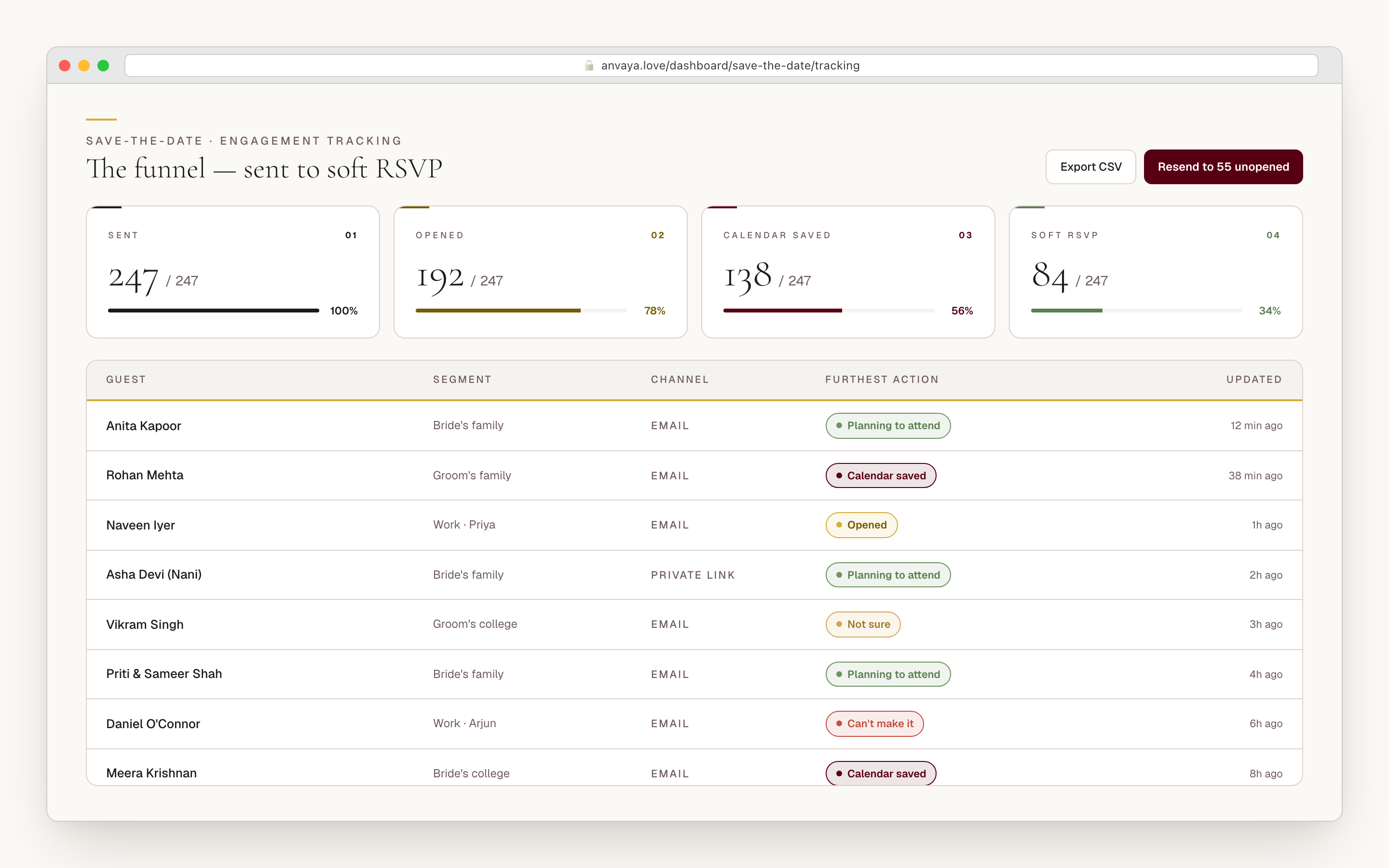
See what was sent, what failed, and how guests responded.
Once the card is out, the Track tab shows the send state for each recipient: sent, accepted by the email provider, or failed. Provider acceptance means the email service took the message; it is not a receipt from the guest's inbox, so Anvaya does not rename it "delivered." The same view shows each deliberate soft response: planning to attend, not sure, or can't make it.
The numbers roll up so you can act on them without pretending an email-open pixel proves engagement. The same guest list then powers your RSVP tracker and reminder messaging, so you can follow up with guests who have not responded without rebuilding the audience in another tool.
- Per-recipient send state: sent, provider accepted, or failed
- Soft responses: planning to attend, not sure, or can’t make it
- No inflated email-open or recipient-delivery claims
- Counts roll up across the whole guest list
- Same record flows into the full RSVP and reminders
The same list runs the Save-the-Date and everything after it.
Send your announcement to the guests already in your Anvaya guest list. Their private links keep early replies attached to the right guest record, ready to compare with the formal RSVP as your plans take shape.
Keep using that guest list for invitations, reminders, and seating. You can update the announcement and refine its artwork as details change, without rebuilding your recipient list for each send.
- Send to the same guests you’ll later RSVP, message, and seat
- Soft replies reconcile against the formal RSVP count
- Private reply links stay attached to each guest record
- Reuse your guest list for later invitations and reminders
Send earlier than the Western default — six to twelve months out.
The standard Western advice is four to six months out for a local, single-day wedding. A multi-event South Asian wedding needs more runway — six to twelve months — because guests are coordinating multi-day travel: international flights, several hotel nights, outfits across siblings, two or more days off, and, for guests flying between countries, visa appointments that can take weeks. For a destination wedding to India, Mexico, or Italy, push to ten to twelve months so nobody misses the cheap fares.
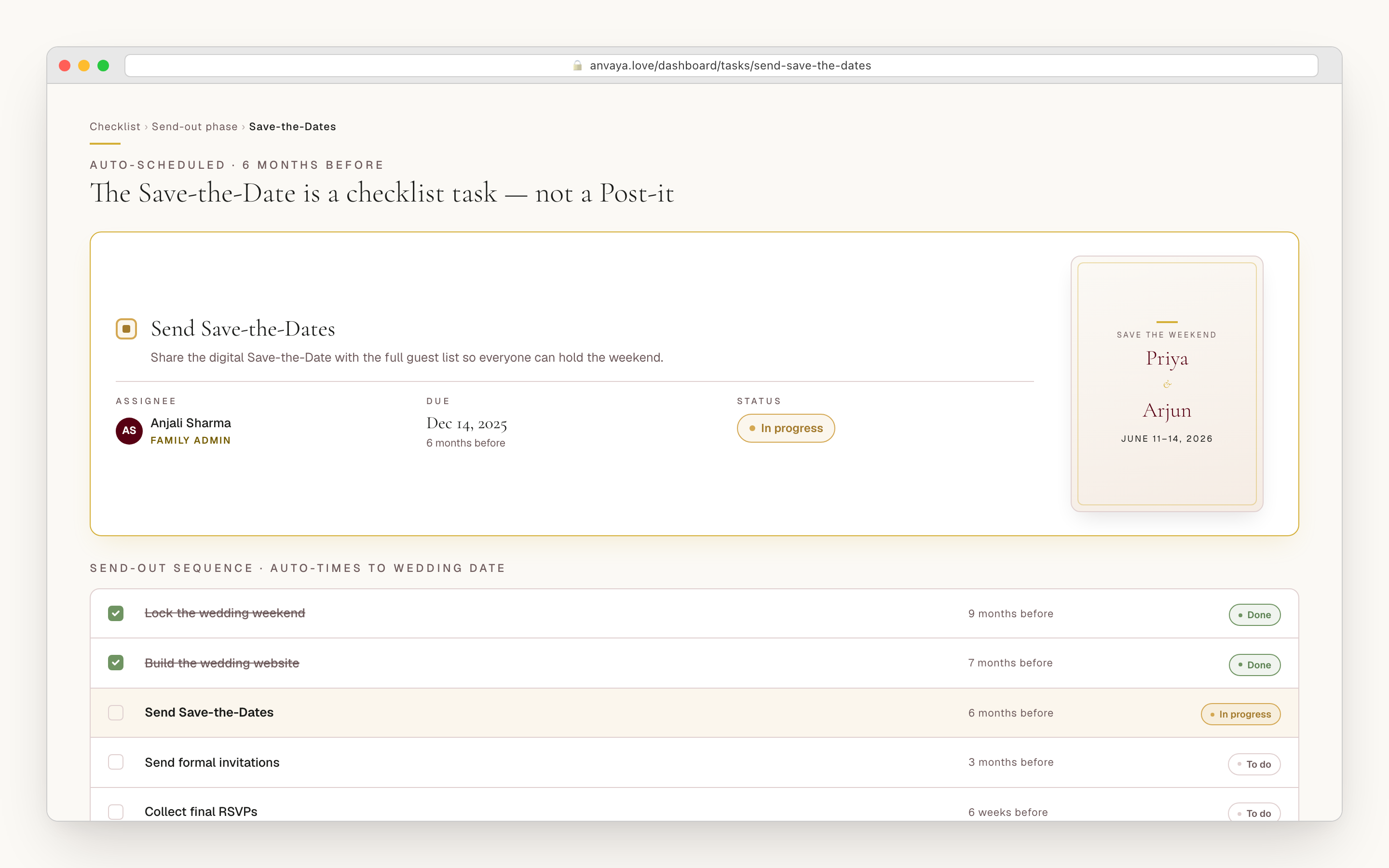
The workspace keeps it on your radar. When you seed your wedding checklist from Anvaya's templates, a "Send save-the-dates" task lands roughly six months before the wedding, marked high-priority, so the card goes out while there is still runway to book. It is a real task on a real list — assign it to whoever in the family owns invitations, and check it off when the send is done.
- Six to twelve months for a local South Asian wedding
- Ten to twelve months for a destination wedding
- A high-priority “Send save-the-dates” checklist task, seeded ~6 months out
- Assignable to whoever owns invitations
- Gives international guests real flight-and-visa runway
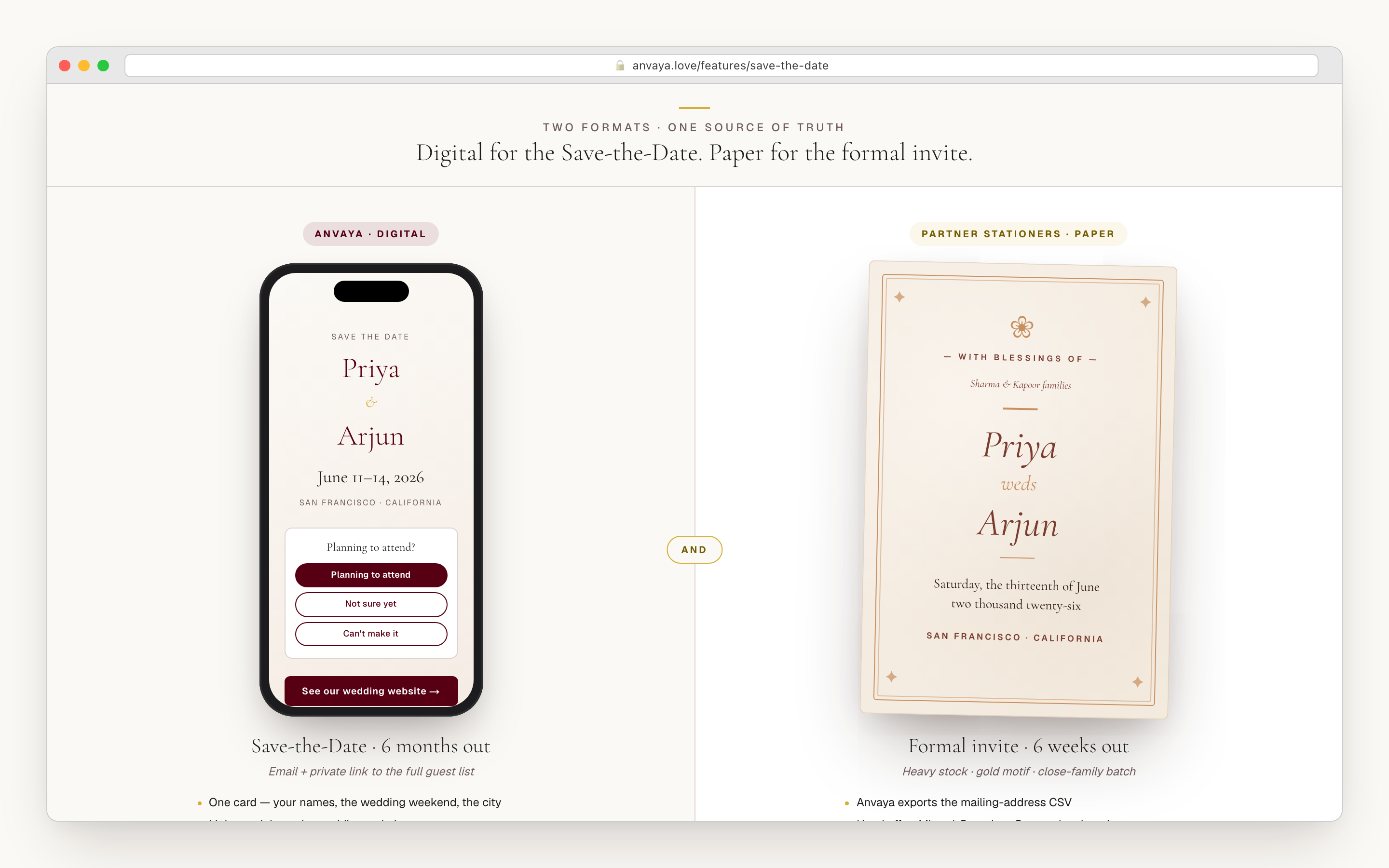
Digital for the Save-the-Date. Paper still has its place for the invite.
South Asian etiquette has not retired the formal paper invite — far from it. The shaadi or nikah invitation, printed on heavy stock and mailed in its own envelope, still arrives four to six weeks before the wedding for ceremony and for the elders. That is its job. The Save-the-Date has a different one: get the weekend onto calendars fast, in front of everyone, on the channel they actually check. For that, digital wins on cost, speed, and reach. Anvaya is digital by design, and most couples pair an Anvaya Save-the-Date with a paper invite from your stationer.
The hand-off stays clean. When it is time for paper, export your guest list with mailing addresses and hand it to your printer — the same addresses you collected over the RSVP flow. No second spreadsheet, no double entry. Two formats, one source of truth.
- Digital by design — for speed, cost, and channel reach
- Pairs with the paper invite from your stationer
- Export the guest list with addresses for the print batch
- No double data entry between digital and paper
- One guest list behind every send
COMPARED
What happens after the card is opened.
Most tools can send a card. The difference is whether it announces a whole weekend, stays tied to a guest record, collects an early reply, and flows into the rest of your planning.
| Feature | Anvaya | Joy | Say I do | RSVPify | Paperless Post |
|---|---|---|---|---|---|
Built for a multi-event weekend Announces the wedding weekend as a span, tied to a multi-event guest list — not one date. | |||||
AI-designed card studio Describe the card, add a reference photo when useful, and generate a finished design you can refine or replace with an uploaded finished design. | |||||
Private link fallback Guests without email still get a private URL you can share through another channel. | Varies | Varies | Varies | Varies | |
Send status and soft responses See provider acceptance, failed sends, and each deliberate soft response without treating opens as engagement. | Varies | Varies | Varies | Varies | |
Soft RSVP before the formal RSVP Guests tap planning to attend, can’t make it, or not sure before the full RSVP window. | |||||
Same list runs RSVP and reminders The recipients flow straight into the full RSVP tracker, messaging, and seating. | |||||
Built for South Asian weddings Palettes, ceremony vocabulary, and a guest model built around mehndi, sangeet, haldi, and more. | |||||
Free during early access A working Save-the-Date send while Anvaya is in early access. |
Built for a multi-event weekend
Announces the wedding weekend as a span, tied to a multi-event guest list — not one date.
Anvaya
Joy
Say I do
RSVPify
Paperless Post
AI-designed card studio
Describe the card, add a reference photo when useful, and generate a finished design you can refine or replace with an uploaded finished design.
Anvaya
Joy
Say I do
RSVPify
Paperless Post
Private link fallback
Guests without email still get a private URL you can share through another channel.
Anvaya
Joy
Say I do
RSVPify
Paperless Post
Send status and soft responses
See provider acceptance, failed sends, and each deliberate soft response without treating opens as engagement.
Anvaya
Joy
Say I do
RSVPify
Paperless Post
Soft RSVP before the formal RSVP
Guests tap planning to attend, can’t make it, or not sure before the full RSVP window.
Anvaya
Joy
Say I do
RSVPify
Paperless Post
Same list runs RSVP and reminders
The recipients flow straight into the full RSVP tracker, messaging, and seating.
Anvaya
Joy
Say I do
RSVPify
Paperless Post
Built for South Asian weddings
Palettes, ceremony vocabulary, and a guest model built around mehndi, sangeet, haldi, and more.
Anvaya
Joy
Say I do
RSVPify
Paperless Post
Free during early access
A working Save-the-Date send while Anvaya is in early access.
Anvaya
Joy
Say I do
RSVPify
Paperless Post
Comparison as of June 2026, based on each tool’s public Save-the-Date offering. Competitor features change — verify on their sites. “Varies” means the capability depends on the plan or template.
FAQ
Questions we hear a lot
Block the weekend.
Then watch the replies land.
Free during early access. Design in the studio, send by email or private link, and track send status and soft responses — all on the guest list that runs the rest of your wedding.