Plan Your Wedding with Claude

Anvaya is a wedding planning workspace for guests, vendors, budget, events, tasks, dress codes, dietary preferences, the works. Connect it to Claude and all of that becomes part of every chat. Ask Claude a wedding question and you get two things at once: what's in your workspace, paired with what Claude already knows about hotels, vendors, traditions, and pricing.
This page explains what you can do once it's connected, what permissions it has, and how to troubleshoot if something goes sideways.
Add it to Claude#
Anvaya isn't listed in Claude's connector directory yet, so you add it as a custom connector. It takes about a minute.
-
Open the add-connector form. Use this link, or go to Customize → Connectors in Claude and choose Add custom connector.
-
Add Anvaya. Name it Anvaya, paste
https://mcp.anvaya.love/mcpas the server URL, and click Add. -
Click Connect. You'll be sent to anvaya.love to sign in. Use the same account you use for your dashboard. If you're new to Anvaya, you can create your account right from Connect.
-
Approve. Review the requested permissions and click Authorize. You'll be sent back to Claude automatically.
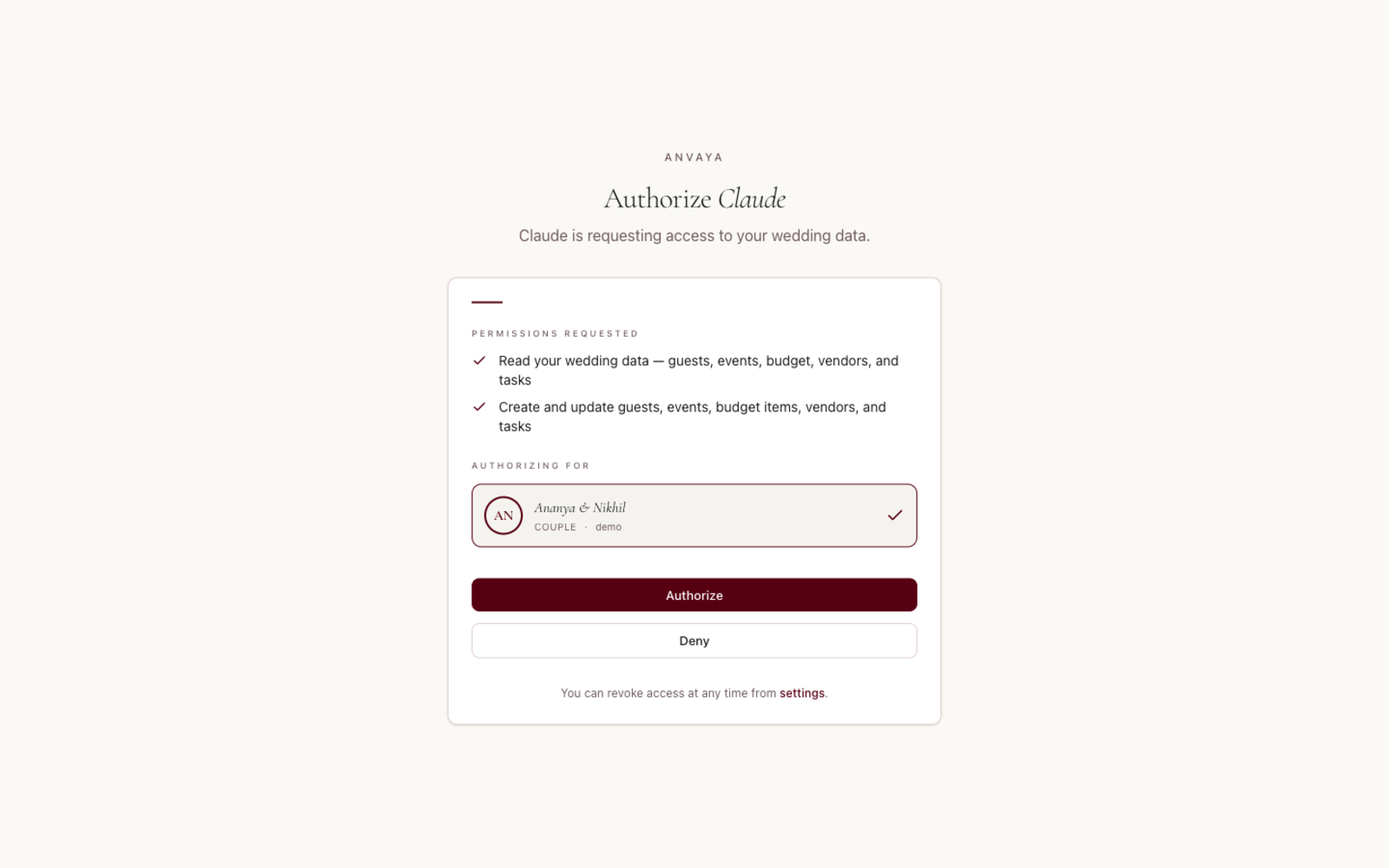
On Claude's free plan you can add one custom connector. On Team and Enterprise plans, an Owner adds custom connectors for everyone.
That's it. Claude detects wedding-planning questions automatically, so you don't need to mention "Anvaya" by name.
Five prompts to try tonight#
"Help me plan my wedding"#
The catch-all opener. Claude calls get_dashboard, reads your full wedding snapshot (days to the next event, guest count and confirmation rate, budget progress, task completion), and tells you what needs attention.
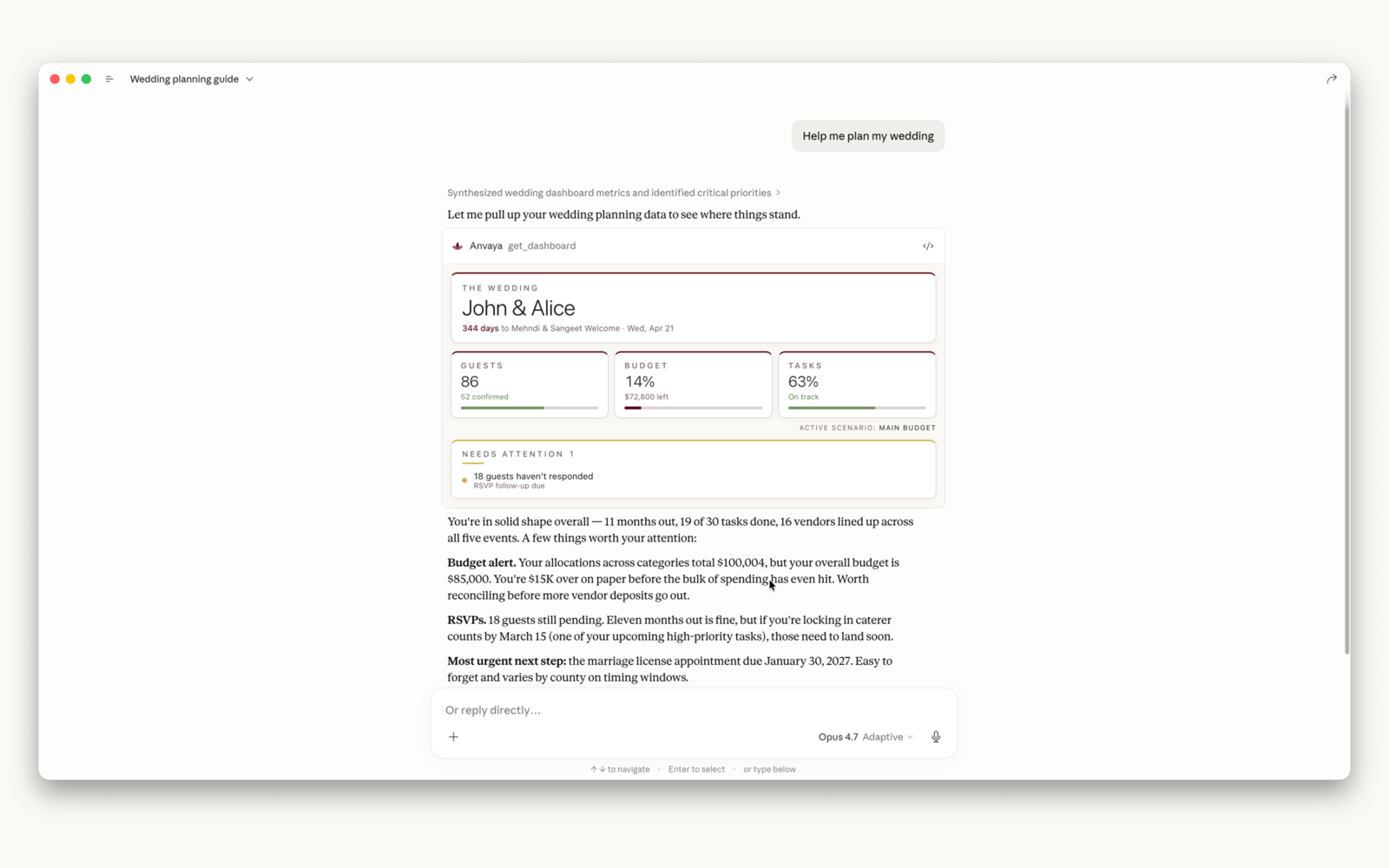
In the example above Claude calls out a $15K budget overage on paper, 18 RSVPs still pending before the caterer headcount lands, and the marriage license appointment as the most urgent next step. All grounded in your real data. No generic checklist.
"Who still hasn't RSVP'd?"#
Claude shows how many guests are attending, maybe, not attending, or haven't responded yet, counting each guest once. Below that is a bar for every event you're tracking.
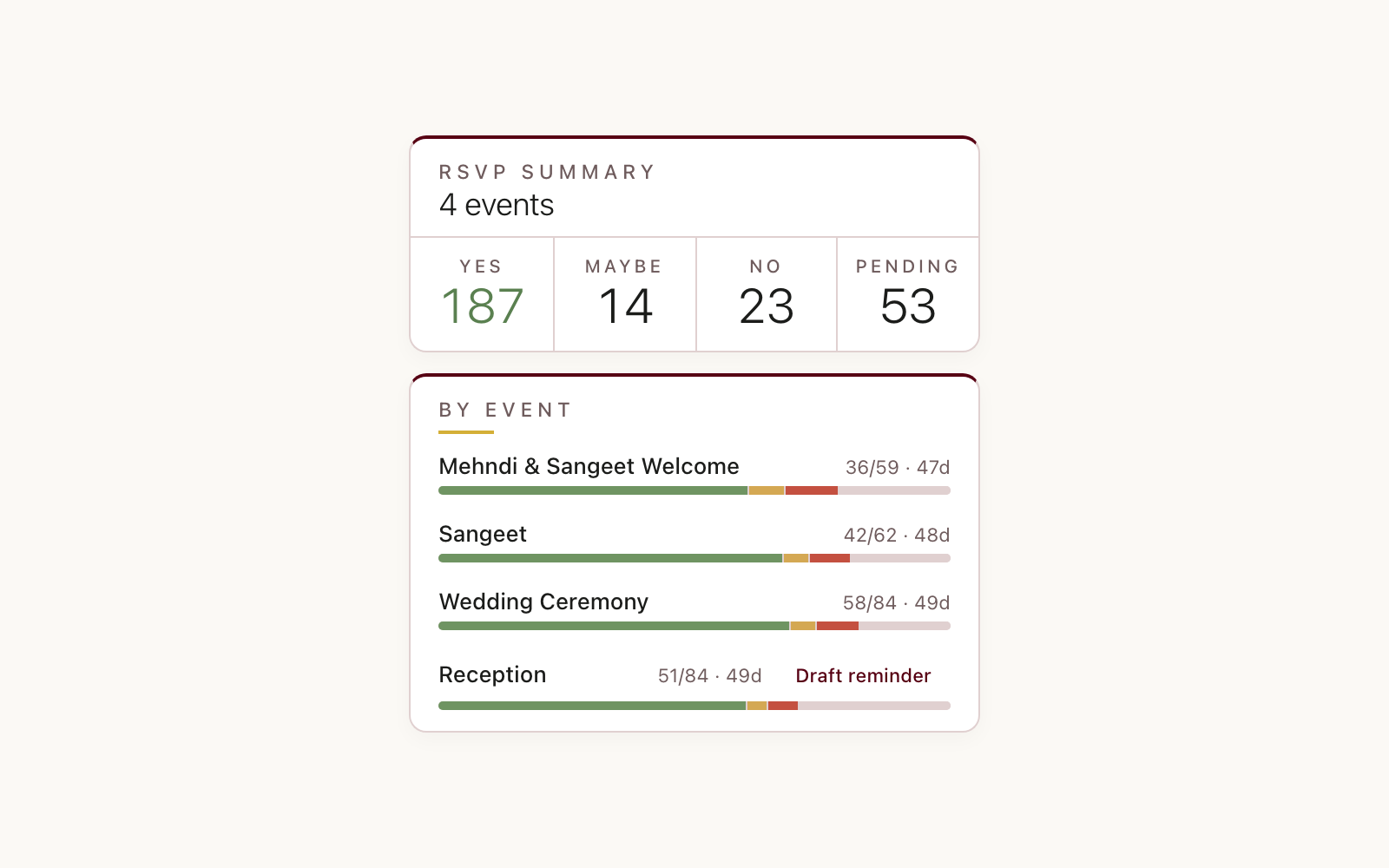
Each event shows how many guests confirmed out of how many were invited, and the days until it. Ask Claude to draft a reminder for the guests who haven't replied. Claude writes it in the chat; you send it yourself from the Messages page in Anvaya.
"How's my budget looking?"#
Claude reads your budget (total, allocated, spent, remaining) and flags categories running over.
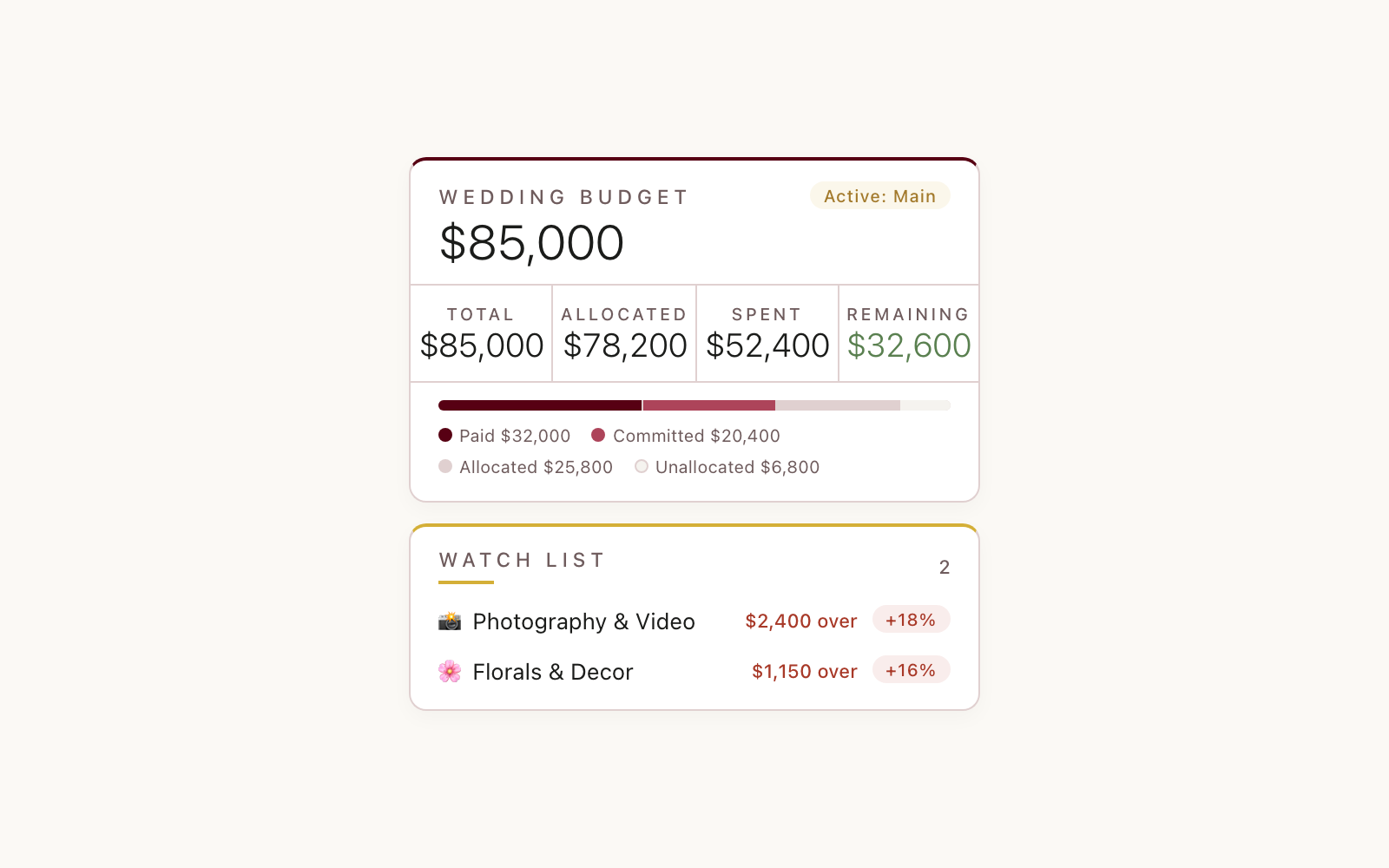
Photography running 18% over and florals 16% over isn't something you'd notice scrolling a spreadsheet. Claude surfaces it inline and can drill into either category if you ask.
"Compare my photographer options"#
Claude reads every saved photographer quote (package, hours, contact, status) and lays them side-by-side.
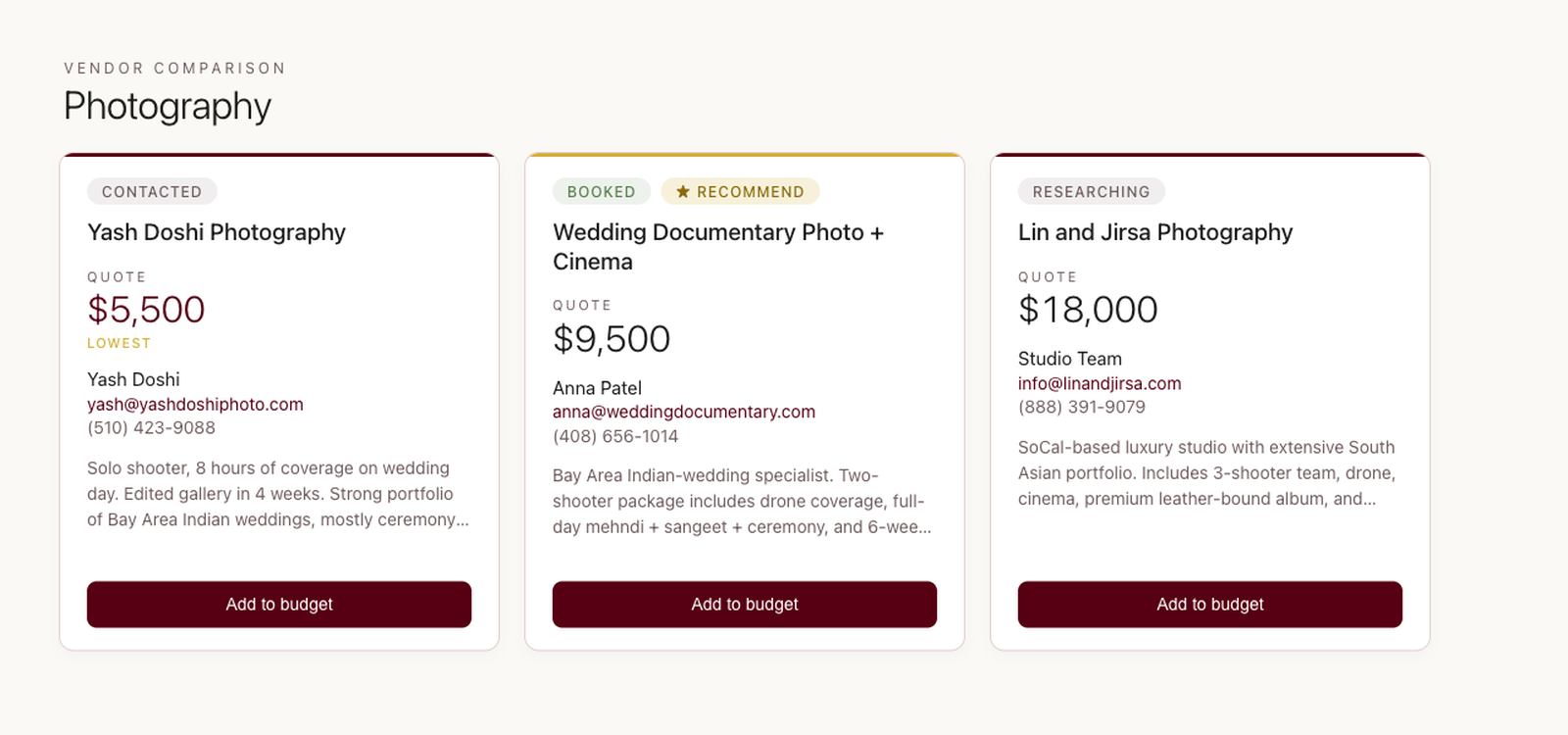
Booked vendors get a green pill. When one vendor clearly has the lowest quote, the card gives it a gold "Recommend" pill; the card picks it from the quotes, not Claude. You can ask Claude to weigh the options beyond price, or to draft a follow-up to the others.
"What tasks need attention this week?"#
Claude reads your task list and groups by urgency: overdue first, then this week.
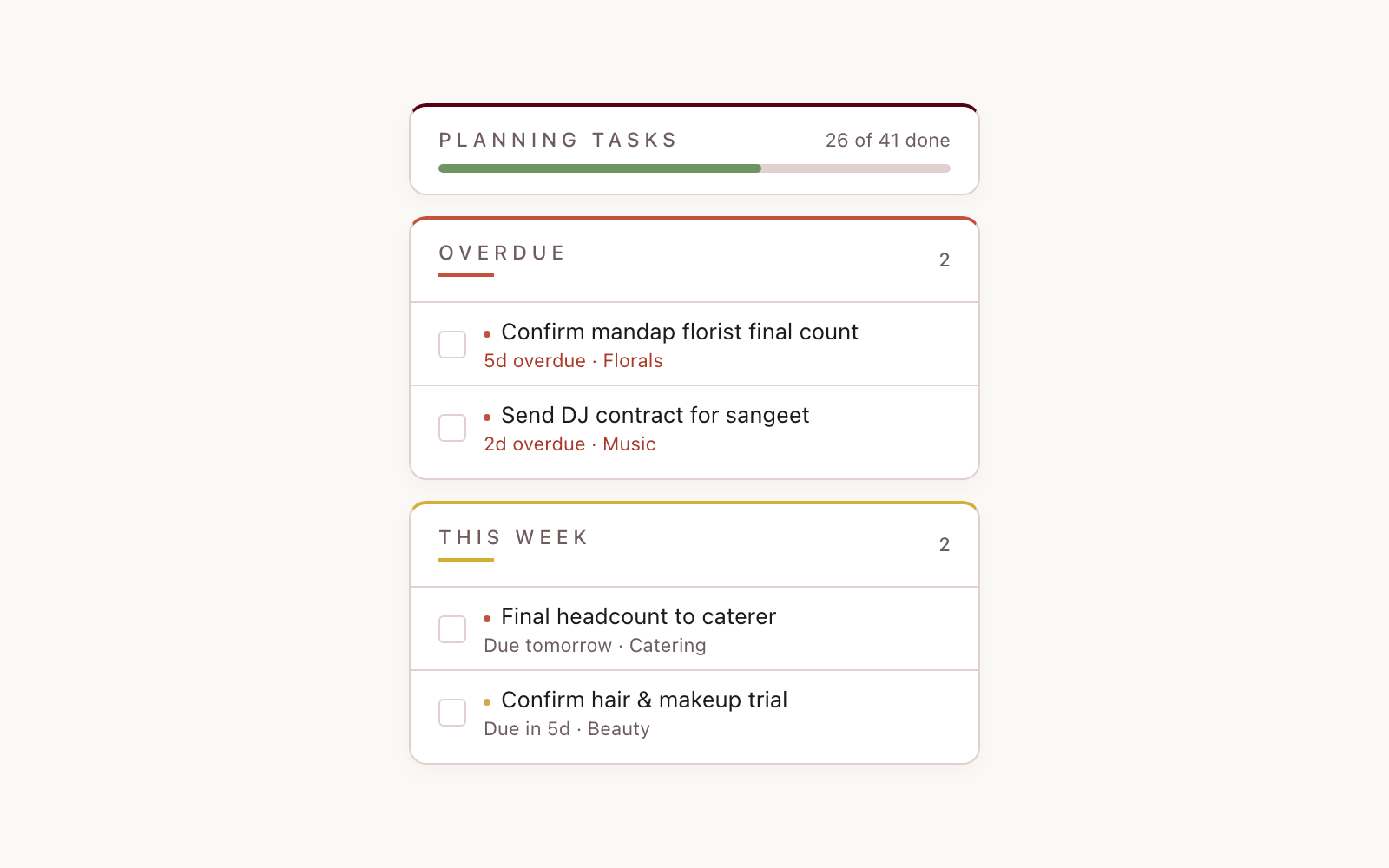
Each card shows the task, how overdue or how soon, and the category. Ask Claude to check items off as you finish, or mark one done on the card, which asks you to confirm first.
What Claude can and can't do#
It can read: guests, vendors, budget, events, tasks, comments, RSVP status, activity, signals.
It can write: add or edit guests, vendors, budget items, tasks, and events, and add comments. Claude asks you to approve each change, unless you've set that tool to always allow in Claude.
It cannot: send a message, email, or text. Claude can draft one in the chat; you send it from the Messages page in Anvaya. It also can't access weddings you don't have a role on, or do anything your Anvaya role doesn't allow. A Family Contributor through Claude has Family Contributor permissions, not more.
Changes Claude makes show up on the Activity feed in your Anvaya dashboard, with what changed, when, and an AI tag. You can edit most changes back by hand, but deletes are permanent, so read a delete request carefully before you approve it.
For a full enumeration of every action Claude can take, see the appendix below.
Troubleshooting#
Claude says it can't find your wedding. Your connector might be authorized for a different wedding, or your primary wedding has been changed. Reconnect it from Customize → Connectors → Anvaya in Claude.
Claude is giving you generic answers without checking Anvaya. Try being slightly more specific, like "look at my actual mehndi event" or "use my real guest list." Some questions Claude can answer without your data; mentioning a specific entity nudges it to check.
You see a "permission denied" error. Your role on the wedding doesn't allow that action. Member management requires Couple permissions. Deletes require Family Admin or higher, except that a Contributor can delete their own comments.
Something looks wrong on the Activity feed. Open the affected record in the Anvaya dashboard. Every record can be edited or deleted manually.
Removing the connector#
In Claude, go to Customize → Connectors → Anvaya → Remove. One click. Your data stays exactly where it was, the connection just goes cold.
Support#
support@anvaya.love. Include your wedding subdomain and the prompt that caused the issue if you can.
The point of connecting Claude to Anvaya isn't to replace planning with AI — it's to stop typing the same facts about your wedding into a chat window over and over. Once Claude can see your real guest list, real budget, and real timeline, the assistant goes from generic helper to second pair of eyes on the plan you're already running. Try the five prompts above on a slow Sunday, see which ones save you the most copy-paste, and keep going from there.
Not yet on Anvaya? Request early access — it's free during early access and built for South Asian weddings from the first ceremony onward.
Appendix: all 55 MCP tools#
Show all MCP tools
Every tool the Anvaya connector gives Claude: 54 that read or change your wedding, grouped by domain, and one that lets Claude report a missing tool. Read tools only return data. Before a write, Claude asks you to approve it, unless you've set that tool to always allow.
Dashboard (2)#
| Tool | What it does |
|---|---|
get_dashboard | Wedding overview: guest count, RSVPs, budget, vendors, upcoming events, near-due tasks. |
get_rsvp_summary | RSVP breakdown per event plus a wedding-wide per-guest summary and dietary aggregates. |
Guests (7)#
| Tool | What it does |
|---|---|
list_guests | List guests with filters: side, tag, RSVP status, event, group, name/email search. |
get_guest | One guest's full record: events, per-event RSVP, dietary preferences, and any plus-ones travelling with them. |
add_guests | Add one or more guests in a single call. |
update_guests | Edit guests, per-row patches or one shared patch across many. |
assign_guests_to_events | Invite guests to events. Produces the cross product (every guest × every event). |
delete_guest | Delete one guest. Cascades to invites, RSVPs, seats, and their plus-one rows. Requires Family Admin. |
delete_guests | Bulk-delete guests. Returns deleted IDs plus IDs that weren't found. |
Budget (9)#
| Tool | What it does |
|---|---|
get_budget_summary | Active scenario overview: total, allocated, spent, remaining, top categories. |
list_budget_items | List line items in a scenario, optionally filtered by category. |
add_budget_items | Add one or more budget line items to a scenario. |
update_budget_item | Edit a line item (name, amounts, payer, notes, category). |
set_total_budget | Set the active scenario's total budget. |
delete_budget_item | Delete a line item. Refuses if there are completed payments. |
create_budget_category | Create a new category in the active scenario. |
delete_budget_category | Delete one or more categories. |
unmark_payment_paid | Reverse a payment marked paid. The line's actual spend drops by that amount. |
Vendors (6)#
| Tool | What it does |
|---|---|
list_vendors | List vendors. Filter by status or category. |
get_vendor | One vendor's full detail: attachments, quote, linked budget item. |
compare_vendors | Side-by-side compare of 2-5 vendors. Returns the comparison and any IDs that didn't resolve. |
add_vendor | Add a vendor (name, category, contact, quote, status, notes). |
update_vendor | Update vendor details. Status changes follow a state machine: Researching → Contacted → Quoted → Booked → Paid. |
delete_vendor | Permanently delete a vendor and its directly-owned data. Requires Family Admin. |
Tasks (6)#
| Tool | What it does |
|---|---|
list_tasks | List tasks. Filter by status, priority, category, event, assignee, due-date window, overdue, search. |
add_tasks | Create one or more tasks. Optionally assigned to a member or linked to an event. |
update_task | Edit one task's fields. |
update_tasks_status | Mark one or more tasks Done / In Progress / To Do at once. |
delete_task | Delete one task. Requires Family Admin. |
delete_tasks | Bulk-delete tasks. |
Events (6)#
| Tool | What it does |
|---|---|
list_events | List events with dates, locations, and guest counts. |
get_event | One event's details, its exact RSVP counts and a short guest list. |
add_events | Create one or more events at a time (multi-day SA weddings often dictate 4-7 events). |
update_event | Edit an event's details (name, date, location, dress code, ceremony type). |
delete_event | Permanently delete an event and its guest assignments. Requires Family Admin. |
unassign_guests_from_events | Remove guests from a single event. |
Comments and activity (4)#
| Tool | What it does |
|---|---|
add_comment | Comment on a vendor, task, budget item, guest, or event. |
edit_comment | Edit a comment you authored (Family Admin and above can edit any). |
delete_comment | Soft-delete a comment you wrote (Family Admin and above can delete any). |
list_activity | Activity stream (comments and status changes). Scoped to one entity or wedding-wide. |
Signals (1)#
| Tool | What it does |
|---|---|
list_signals | Active planning intelligence signals (budget risks, timeline conflicts, vendor gaps, milestone celebrations). |
RSVP (1)#
| Tool | What it does |
|---|---|
update_guests_rsvp | Update one or more guests' RSVP responses across events. |
Guest groups (5)#
| Tool | What it does |
|---|---|
list_guest_groups | List groups (families, friend circles) with member counts. |
create_guest_group | Create a new group. |
add_guests_to_group | Add guests to a group. |
remove_guests_from_group | Ungroup guests (detach from their current group). |
delete_guest_group | Delete a group. Guests are detached, not deleted. Requires Family Admin. |
Budget scenarios (5)#
| Tool | What it does |
|---|---|
list_budget_scenarios | List scenarios with status (Active / Draft / Archived) and totals. |
create_budget_scenario | Create a new blank Draft scenario. |
snapshot_budget | Clone the active scenario (categories, items, vendor alternatives, funding sources). |
set_main_scenario | Activate a scenario (demotes the current Active to Draft). |
delete_budget_scenario | Delete a Draft or Archived scenario. Cannot delete the currently Active one. |
Members (1)#
| Tool | What it does |
|---|---|
list_members | List wedding team members and their roles. |
Wedding metadata (1)#
| Tool | What it does |
|---|---|
update_wedding_metadata | Update the wedding date and/or estimated guest count. |
Feedback (1)#
| Tool | What it does |
|---|---|
get_more_tools | Lets Claude report that it looked for a tool Anvaya doesn't have yet. It reads and changes nothing in your wedding. |
Continue Reading

Plan Your Wedding with ChatGPT
Anvaya is now an app inside ChatGPT. Connect it once and your guest list, vendors, budget, and events become part of every conversation, paired with everything ChatGPT already knows about wedding planning.

The Ultimate South Asian Wedding Planning Timeline: A Month-by-Month Guide
A realistic 12-18 month planning timeline built for multi-event South Asian weddings — from booking venues to the baraat. Not your typical single-day checklist.

Why Your Wedding Spreadsheet Is Failing You (And What to Use Instead)
You started with one Google Sheet. Now you have 14 tabs, three confused families, and a formatting nightmare. Sound familiar? There's a better way to plan a multi-event wedding.
Ready to simplify your wedding planning?
Anvaya is built for South Asian weddings — manage every event, every guest, and every vendor in one place.
Get Started Free